Freedom251 › AI Mind Map Tools

SpawnGraph
What SpawnGraph is
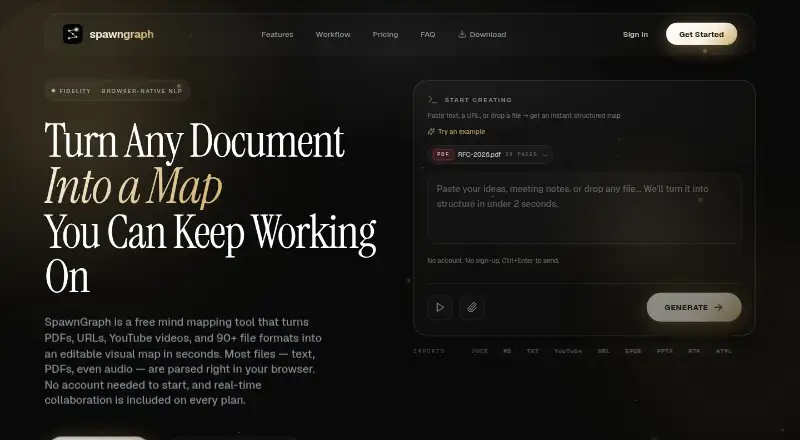
SpawnGraph turns text, URLs, PDFs, YouTube videos, and more than 93 file types into editable hierarchical mind maps. Inputs include Office documents, ebooks, Markdown, images with OCR, audio, video, transcripts, and maps from other mind-mapping formats. Its browser structuring step uses browser-native natural-language processing rather than GPT, language-model APIs, or a server-side model. Text, Office documents, and Markdown are parsed locally; images and some legacy formats are sent to its server for text extraction. Live collaboration with cursors, presence avatars, and edit-locking is available across plans, with Premium supporting up to 20 live editors per board. Free exports include watermarked PNG and several text and data formats; paid plans add options such as PDF, SVG, JSON, and PPTX. A free plan allows two saved maps, 10 MB uploads, and 10 file imports daily. Paid plans start at $5/user/mo (annual). Windows and Linux desktop apps work offline, and the browser app works offline after loading.
Who it suits
It suits students, researchers, consultants, solo creators, startups, agencies, and teams turning varied source material into structured maps. Its collaboration and offline options may fit both individual and group workflows.
What it does well
- Converts more than 93 file types into editable maps.
- Browser processing handles text and Office documents locally.
- Real-time collaboration is available across plans.
- Windows and Linux desktop apps work offline.
- Free plan includes several export formats.
What to know first
- Free plan allows only two saved mind maps.
- Free uploads are limited to 10 MB.
- Free exports include watermarked PNG.
- Some image and legacy-format extraction uses the server.
Limits
The Free plan allows two saved mind maps, 10 MB uploads, 10 file imports per day, 30 image uploads per day, and one active named editor or viewer invite. Its PNG exports are watermarked, and PDF, SVG, JPG, WebP, Markdown, JSON, PPTX, XMind, and knowledge ZIP exports are added on paid plans.
Plans
| Plan | Billed and limits | Price |
|---|---|---|
| Free | Forever free · no card required · 2 saved mindmaps · 10 MB upload · 10 file imports/day · 30 image uploads/day · 8 exports · 1 named editor/viewer invite | Free |
| Premium | $5/seat · 3 seats minimum · billed $180/year · +$5/mo per extra seat · Unlimited mindmaps · up to 20 live editors/board · 100 MB upload · 5 GB image storage · 500 file imports/day · 1000 URL imports/day | $15 a month |
| Enterprise | 3 seats minimum · billed annually · Unlimited image storage · 2000 file imports/day · 30 concurrent sessions · custom MSA · DPA · annual prepay invoicing · dedicated support/SLA | $15 a year |
| Solo Pro | Billed $60/year · save vs $7.99/mo monthly · 20 mindmaps · 25 MB upload · 1 GB image storage · 150 file imports/day · 100 URL imports/day · 3 named invites | $5 a month |
As spawngraph.com lists them, read 2 Oct 2026. The maker's own page has the final word.
Getting started
- Visit spawngraph.com.
- Open the web app or install the Windows or Linux desktop app.
- Create a board or open a supported source such as a PDF, document, URL, video, or existing mind map.
- Use the Free plan or choose a paid plan for its additional formats and quotas.
- Invite collaborators if needed; Free allows one active named editor or viewer invite.
Verdict
SpawnGraph combines broad import support with editable maps, collaboration, and offline desktop use. Check the free-tier limits and which data types are processed on the server before choosing a workflow.
Questions
What does SpawnGraph cost?
The Free plan costs nothing. Solo Pro is $5 a month, billed $60/year. Premium is $15 a month with a three-seat minimum, billed $180/year, plus $5/month per extra seat. Enterprise is listed as $15 a year with a three-seat minimum and annual billing.
Does SpawnGraph have a free plan or trial?
It has a Free plan with no card required. A free trial is not offered.
Which platforms does SpawnGraph support?
SpawnGraph is available on the web and has native Windows and Linux desktop apps. The desktop app and browser app after loading can work offline.
Which formats can the Free plan export?
Free includes watermarked PNG, CSV, OPML, plain text, YAML, HTML, TSV, and FreeMind exports. Paid plans add formats including PDF, SVG, JPG, WebP, Markdown, JSON, PPTX, XMind, and knowledge ZIP.
Does SpawnGraph offer real-time collaboration?
Yes. Live cursors, presence avatars, and edit-locking are available across plans. Premium supports up to 20 live editors per board.
What happens to content and account data?
SpawnGraph says guest boards stay in the browser unless saved by creating an account. Its terms say it keeps daily backups and deletes account data within 30 days after termination.
Facts from SpawnGraph's own pages
- Account and guest storage
- Unauthenticated guest boards remain only in the browser and are not transmitted unless the user saves them by creating an account. · spawngraph.com, 2 Oct 2026
- Audience
- The maker positions SpawnGraph for students, researchers, consultants, serious solo creators, startups, agencies, and teams. · spawngraph.com, 2 Oct 2026
- Browser processing
- Its structuring step uses browser-native natural-language processing rather than GPT, language-model APIs, or a server-side model. · spawngraph.com, 2 Oct 2026
- Collaboration
- Real-time collaboration with live cursors, presence avatars, and edit-locking is available across plans, with Premium supporting up to 20 live editors per board. · spawngraph.com, 2 Oct 2026
- Data retention
- SpawnGraph’s terms say it maintains daily backups and deletes account data within 30 days after termination. · spawngraph.com, 2 Oct 2026
- Desktop app
- Native Windows and Linux desktop apps are available, boards are stored as .spawngraph files locally, and the desktop app works fully offline with optional cloud sync. · spawngraph.com, 2 Oct 2026
- Exports
- Free includes watermarked PNG plus CSV, OPML, plain text, YAML, HTML, TSV, and FreeMind exports; paid plans add PDF, SVG, JPG, WebP, Markdown, JSON, PPTX, XMind, and knowledge ZIP exports. · spawngraph.com, 2 Oct 2026
- Free-tier limits
- The Free plan allows two saved mindmaps, a 10 MB upload limit, 10 file imports per day, 30 image uploads per day, and one active named editor/viewer invite. · spawngraph.com, 2 Oct 2026
- Imports
- Supported inputs include PDF, DOCX, PPTX, XLSX, EPUB, Markdown, images with OCR, audio, video, YouTube transcripts, and existing XMind, FreeMind, OPML, MindManager, and MindMeister maps. · spawngraph.com, 2 Oct 2026
- Integrations
- Paid plans provide iframe embeds for YouTube, Figma, and Vimeo, and the canvas includes a Giphy GIF picker. · spawngraph.com, 2 Oct 2026
- Offline use
- The browser app works offline after it loads, and the desktop app can open, edit, and export without an internet connection. · spawngraph.com, 2 Oct 2026
- Privacy architecture
- Text, Office documents, and Markdown are parsed locally in the browser, while images and some legacy formats are sent to SpawnGraph’s server for text extraction. · spawngraph.com, 2 Oct 2026
- Support
- Free support is community-based, Solo Pro and Premium include email support with a 24-hour reply target, and Enterprise includes dedicated support with an SLA. · spawngraph.com, 2 Oct 2026
- URL and collaboration services
- URL fetching, real-time collaboration sync, and persistent cross-device storage are server-assisted, with the maker stating that content is not logged or retained beyond what is necessary to provide those features. · spawngraph.com, 2 Oct 2026
- What it does
- SpawnGraph turns text, URLs, PDFs, YouTube videos, and more than 93 file types into editable hierarchical mind maps. · spawngraph.com, 2 Oct 2026
Where SpawnGraph stands on Freedom251
- AI Mind Map Tools#23 of 29