uBlock Origin
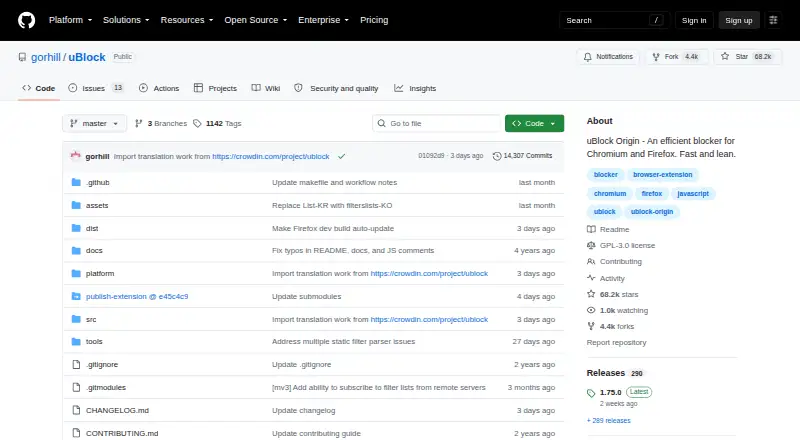
What uBlock Origin is
uBlock Origin is a free, open-source content blocker for Firefox and Chromium-based browsers, including Edge and Opera. It blocks ads, trackers, coin miners, popups, anti-blockers and malware sites by default. Several filter lists are built in, and users can add other lists or hosts files. Custom rules use EasyList syntax, with extra options for filters; users can also turn off preselected lists if the blocking is too broad. Its basic and advanced popup interfaces include a per-site point-and-click firewall. The project’s stated privacy goal is to help neutralize methods that invade privacy in the browser. It is described as CPU- and memory-efficient, fast, and lean. Desktop and Android versions of Firefox are supported, along with Chromium and Thunderbird versions. In Thunderbird, it affects feeds but not email. The software is GPLv3-licensed, and enterprise deployment documentation is available.
Who it suits
It suits people seeking browser content blocking with adjustable filter lists and custom rules. Organizations can also refer to its enterprise deployment documentation.
What it does well
- Blocks ads, trackers, popups and malware sites by default
- Supports custom rules using EasyList syntax
- Includes basic and advanced popup interfaces
- Available for desktop and Android Firefox
What to know first
- The page advises against using it with another content blocker
- Thunderbird blocking applies to feeds, not email
Plans
| Plan | Billed and limits | Price |
|---|---|---|
| Free | — | Free |
As github.com lists them, read 27 Sept 2026. The maker's own page has the final word.
Getting started
- Visit the uBlock Origin project website.
- Choose a supported browser: desktop or Android Firefox, Chromium, or Thunderbird.
- Install the version provided for your browser.
- Use the popup interface to manage blocking and filter lists.
uBlock Origin is a free, open-source content blocker for people who want detailed control over what their browser filters. It is strongest for Firefox users; those who prefer a blocker that works alongside other blockers should look elsewhere.
Overview
By default, uBlock Origin blocks ads, trackers, coin miners, popups, anti-blockers and malware sites. Its focus on neutralizing privacy-invading activity makes it a compelling choice for privacy-conscious browsing, while the option to adjust filter lists gives users a way to respond when blocking is too aggressive.
The project is licensed under GPL-3.0/GPLv3. Its repository lists 14,307 commits, 68.2k stars and 4.4k forks. It is described as fast, lean and CPU- and memory-efficient. uBlock Origin advises against running it with another content blocker, so it is not the right fit for users who want to layer blockers.
Key features
Filter lists and custom rules
Built-in lists provide the starting coverage, and users can add other lists and hosts files or unselect preselected lists if a site is blocked too much. Custom filters use EasyList syntax with uBlock Origin extensions. This range of control suits people who want to tune their filtering; it asks more of users than a fixed, hands-off setup.
Site-level controls
Basic and advanced popup interfaces cater to different levels of involvement. A per-site point-and-click firewall, element picker and cookie-popup blocking give users additional ways to manage what appears on individual sites. These controls are useful for people who want granular decisions, but less relevant to anyone seeking only a minimal toggle.
Pricing
uBlock Origin is free open-source software, priced at $0. There is no paid plan to trade features for a lower price, and no billing schedule or subscription terms. It suits readers who want a no-cost blocker and are comfortable choosing an open-source browser extension. No numeric free-tier cap is stated.
Platforms
uBlock Origin is available for desktop and Android versions of Firefox, as well as Chromium-based browsers including Edge and Opera. It works best on Firefox, making that the clearest choice for users prioritizing its preferred browser support. Chromium versions are also provided. The Thunderbird version affects feeds, not emails, so it is not an email blocker.
Enterprise deployment documentation is provided, and support questions are directed to the uBlockOrigin subreddit.
Who it's for
Choose uBlock Origin if you want extensive default blocking, the option to manage lists and custom rules, and a free, open-source tool—especially if you use Firefox. Look elsewhere if you want to combine content blockers, or if your main need is blocking email in Thunderbird.
Pros and cons
- Pros: Blocks a broad range of unwanted content by default, including trackers and malware sites, giving privacy-conscious users substantial baseline filtering.
- Pros: Custom lists, EasyList-based rules and site-level controls let users tailor blocking rather than accept a fixed setup.
- Pros: Free and open source, with desktop and Android Firefox versions and Chromium versions also provided.
- Cons: Its controls and configurable lists may be more than users wanting a set-and-forget blocker need.
- Cons: The project advises against pairing it with another content blocker, limiting users who prefer layered blocking.
- Cons: Thunderbird support covers feeds but not emails.
Alternatives
Browse the Ad blockers directory for more options.
- Ghostery is another free, open-source option, with versions across Android, browser extensions, iOS, Linux, macOS and Windows.
- AdLock is a freemium alternative for Android, iOS, macOS and Windows, with paid plans for readers considering a subscription.
- Blokada offers a free ad blocker for Android 5 or newer and a freemium option across additional platforms.
- Adblock Plus is a freemium option across Android, extensions, iOS, Linux, macOS and Windows; its web extension is GPLv3-licensed.
- Disconnect is a freemium option with a free trial and versions for Android, browser extensions, iOS, macOS, web and Windows.
- 1Blocker is a freemium choice for extensions, iOS and macOS, with a monthly plan covering multiple blocking categories and background filter updates.
- Privoxy is free software for Linux, macOS, self-hosted use and Windows.
- AdGuard is a freemium option with personal and family plans covering different device counts.
Verdict
uBlock Origin is a strong choice for privacy-minded users, particularly Firefox users, who want extensive default blocking and the freedom to manage lists and rules without paying. Its main trade-off is that this flexibility involves more control than some users need, and it is not intended to run alongside another content blocker.
Verdict
uBlock Origin combines default content blocking with user-controlled lists and custom filters. Its browser support varies, and Thunderbird use is limited to feeds.
Questions
Is uBlock Origin free?
Yes. The listed Free plan costs nothing, and the project describes it as free open-source software.
Which browsers and platforms does it support?
It works best on Firefox and supports Chromium-based browsers, including Edge and Opera. Versions are available for desktop and Android Firefox, Chromium, and Thunderbird.
Is uBlock Origin open source?
Yes. The repository is licensed under GPL-3.0/GPLv3.
Can I add custom filters?
Yes. It supports many additional filter lists and hosts files, and custom rules use EasyList syntax with extensions.
What does it block?
By default, it blocks ads, trackers, coin miners, popups, anti-blockers, and malware sites.
How can I get help?
Support, questions, and help are directed to the uBlockOrigin subreddit.
Facts from uBlock Origin's own pages
- Billing terms
- No billing schedule or paid subscription terms are stated. · github.com, 27 Sept 2026
- Blocker compatibility
- The page advises against using uBO with another content blocker. · github.com, 27 Sept 2026
- Browser support
- multiple-browsers · github.com, 21 Sept 2026
- Content blocking
- Blocks ads, trackers, coin miners, popups, anti-blockers, and malware sites by default. · github.com, 27 Sept 2026
- Cookie popup blocking
- Yes · github.com, 21 Sept 2026
- Custom filter lists
- Yes · github.com, 21 Sept 2026
- Custom filters
- Uses EasyList syntax and extends it for custom rules and filters. · github.com, 27 Sept 2026
- Device coverage
- desktop-and-mobile · github.com, 21 Sept 2026
- Element picker
- Yes · github.com, 21 Sept 2026
- Enterprise deployment
- Enterprise deployment documentation is provided. · github.com, 27 Sept 2026
- Filter lists
- Uses several built-in lists and supports many other lists and hosts files. · github.com, 27 Sept 2026
- Filter selection
- Users can unselect preselected filter lists if uBO blocks too much. · github.com, 27 Sept 2026
- Free plan
- Yes · github.com, 21 Sept 2026
- Free tier limits
- The page does not state a numeric free-tier limit. · github.com, 27 Sept 2026
- Software license
- The repository is licensed under GPL-3.0/GPLv3. · github.com, 27 Sept 2026
- Performance profile
- Described as CPU- and memory-efficient, fast, and lean. · github.com, 27 Sept 2026
- Platform coverage
- Available for desktop and Android versions of Firefox; Chromium and Thunderbird versions are also provided. · github.com, 27 Sept 2026
- Pricing model
- Free and open-source; no paid pricing is stated. · github.com, 27 Sept 2026
- Privacy goal
- Its primary goal is helping users neutralize privacy-invading methods entering the browser. · github.com, 27 Sept 2026
- Repository activity
- The repository lists 14,307 commits, 68.2k stars, and 4.4k forks. · github.com, 27 Sept 2026
- Support channel
- Support, questions, and help are directed to the uBlockOrigin subreddit. · github.com, 27 Sept 2026
- Supported browsers
- It works best on Firefox and supports Chromium-based browsers, including Edge and Opera. · github.com, 27 Sept 2026
- Thunderbird scope
- In Thunderbird, it affects feeds but not emails. · github.com, 27 Sept 2026
- Trial and refund
- No trial or refund policy is stated. · github.com, 27 Sept 2026
Where uBlock Origin stands on Freedom251
- Ad blockers#3 of 48
- Chrome Extensions#2 of 26
- Browser Extensions#3 of 19