
AdLock
by AdLock
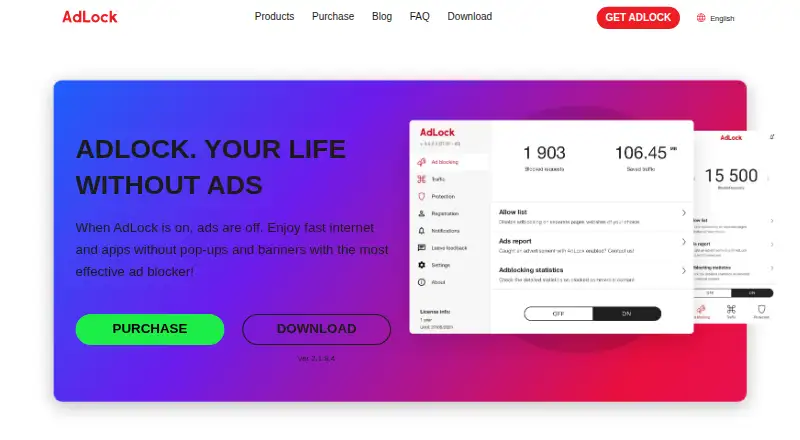
What AdLock is
AdLock is an ad-blocking and privacy app for Windows, macOS, iOS, Android, and Android TV. It blocks ads by default without participating in acceptable ads, while allowing users to permit ads on selected websites or apps. It also blocks tracking scripts, malware, malicious requests, and redirects, and filters HTTP and HTTPS connections. Custom filter lists and cookie-popup blocking are supported. AdLock says it uses few device resources and can save mobile data and extend battery life. Browser support includes Chrome, Safari, and Firefox. Free browser extensions are available, while standalone applications offer free trials. Paid plans cover five devices and include a 30-day money-back guarantee. Listed prices are $9.95 a month, $39.50 a year, or $15.99 a year when billed every five years. AdLock lists technical support around the clock and gives Bratislava, Slovakia as its headquarters.
Who it suits
AdLock may suit desktop and mobile users who want default ad blocking plus controls for allowing ads on selected sites or apps. It also suits people looking for custom filters or coverage for up to five devices.
What it does well
- Blocks ads without participating in acceptable ads.
- Users can allow ads on chosen sites or apps.
- Blocks trackers, malware, malicious requests, and redirects.
- Paid plans cover five devices.
- Free browser extensions are available.
What to know first
- Standalone applications offer free trials rather than a listed free plan.
- The one-month plan costs $9.95 a month.
- Paid plans cover five devices.
Limits
Free browser extensions are available, and standalone app trials last 7 days. Paid plans cover five devices; the listed 5-year option is $15.99 a year, billed every five years.
Plans
AdLock's published prices are being re-checked against the maker's own page.
| Plan | Billed and limits | Price |
|---|---|---|
| 1 month | $119.40/year if billed monthly · 5 devices | Price being re-checked |
| 1 year | billed yearly · 5 devices | Price being re-checked |
| 5 years | billed every 5 years · 5 devices | Price being re-checked |
| Free browser extensions | — | Price being re-checked |
As adlock.com lists them, read 27 Sept 2026. The maker's own page has the final word.
Getting started
- Visit the AdLock website.
- Choose a free browser extension or a standalone app for a supported platform.
- Use the 7-day trial for a standalone app, or select a paid plan.
- Install on up to five devices with a paid plan.
AdLock is a cross-platform ad blocker that also targets trackers and malicious requests. It is best suited to people who want one service for several personal devices, with custom filters and exceptions when strict blocking gets in the way.
Overview
AdLock blocks all types of ads by default and does not participate in acceptable ads. Users can allow ads on particular websites or apps, which makes the default strictness adjustable rather than absolute. Alongside ads, it blocks tracking scripts, malware, malicious requests, and redirects, giving it a wider privacy and security remit than ad removal alone.
Custom filter lists and cookie-popup blocking add useful control for people who want to tune what gets through. AdLock says it does not collect, transfer, or sell user data; it also says its low resource use can save mobile data and battery life. Those are maker claims, not a reason to assume identical results on every device.
Key features
- Ad and privacy controls: Default blocking covers all ad types, while site and app exceptions let users restore ads where needed. Custom filters and cookie-popup blocking make the setup more adaptable than a simple on/off switch.
- Threat blocking: Blocking trackers, malware, malicious requests, and redirects will appeal to users who want protection beyond advertising. The stated no-data-collection policy is another privacy consideration.
- Connection filtering: AdLock filters HTTP and HTTPS connections, with the aim of improving performance and responsiveness. It also says it uses few resources, saves mobile data, and extends battery life.
- Help: Technical support is available 24 hours a day, seven days a week. Paid plans include a 30-day money-back guarantee.
Pricing
AdLock is freemium, with free browser extensions and free trials for standalone applications. The paid plans cover five devices, so the same subscription can serve a mix of desktop and mobile devices, but it will not suit anyone who needs more than five.
- 1 month: $9.95 a month, billed at $119.40/year if billed monthly. This offers the shortest commitment, but costs substantially more over a year than the annual option. It includes five devices and a 30-day money-back guarantee.
- 1 year: $39.50 a year, billed yearly. Marked Most Popular, this is the more practical choice for someone ready to commit for a year; it includes five devices and a 30-day money-back guarantee.
- 5 years: $15.99 a year, billed every 5 years. This has the lowest stated annual rate, but requires the longest billing commitment and is a poor fit for anyone unsure they will keep using AdLock. It includes five devices and a 30-day money-back guarantee.
- Free browser extensions: Available for all popular browsers. They are a way to use AdLock without a paid plan, but the free extension option is distinct from the standalone applications, which offer free trials.
The published trial length is seven days. A five-year commitment trades flexibility for the lowest annual rate, while monthly billing is the expensive option for continued use.
Platforms
AdLock supports Windows, macOS, iOS, Android, and Android TV, and covers Chrome, Safari, and Firefox. This range makes it a plausible fit for mixed-device households, though paid coverage remains capped at five devices.
Who it's for
Choose AdLock if you want broad ad, tracker, and threat blocking across desktop and mobile, plus custom filters, cookie-popup controls, and exceptions for selected sites or apps. It is less suitable if you need a higher device limit, want to avoid a long billing commitment, or only need a free option without a paid standalone-app trial.
Pros and cons
- Pros: Blocks all ad types by default without acceptable ads, and allows exceptions for specific sites or apps.
- Pros: Combines custom filter lists and cookie-popup blocking with protection against trackers, malware, malicious requests, and redirects.
- Pros: Supports five major operating systems, including Android TV, with a five-device paid limit.
- Cons: Five devices may not cover a larger household or a user with many devices.
- Cons: The lowest annual rate requires paying every five years, while the monthly plan amounts to $119.40/year if billed monthly.
Alternatives
Ad blockers and Ad Blocking Software are useful starting points for comparing this category. Consider Ghostery instead if you want a free, open-source option with no subscription required and support across Android, iOS, Linux, macOS, and Windows, as well as extensions. uBlock Origin is another free, open-source option; its stated platform coverage is Android.
Blokada may suit someone looking for a free Android 5-or-newer option, with a separate Blokada Plus plan at €5 a month. Adblock Plus is another freemium alternative, with an open-source web extension licensed under GPLv3; the stated platform range includes Android, iOS, Linux, macOS, and Windows, plus extensions.
Disconnect may be worth considering if you want a single-browser Basic Extension or a Premium plan at $5 a month. AdBlocker Ultimate offers Personal and Family plans with stated limits of three and ten devices respectively, though their prices are not published. wBlock is a free option for macOS, iOS, and iPadOS. 1Blocker is a freemium option for Apple platforms, with a Monthly plan at $2.99 a month.
Verdict
AdLock is a strong fit for people who want strict ad blocking alongside tracker and threat blocking across a handful of desktop and mobile devices. Its customizable filters, exceptions, and cookie-popup blocking make that breadth more practical. Look elsewhere if five devices are not enough or if a five-year billing commitment is too much to accept for the lowest annual rate.
Verdict
AdLock pairs broad ad and threat blocking with custom filters and cookie-popup controls. Compare the listed billing terms and device limit with your needs.
Questions
Is AdLock free?
AdLock offers free browser extensions. Standalone applications have a 7-day trial, and paid plans are also available.
What does AdLock cost?
The listed plans are $9.95 a month, $39.50 a year, or $15.99 a year billed every five years.
Which devices and browsers does AdLock support?
It supports Windows, macOS, iOS, Android, and Android TV. Browser support includes Chrome, Safari, and Firefox, as well as major browsers.
How many devices are covered by a paid plan?
Paid plans cover five devices.
Who makes AdLock, and where is it based?
The maker is AdLock, based in Bratislava, Slovakia.
Facts from AdLock's own pages
- Ad blocking controls
- Users can allow specific websites or apps to show ads · adlock.com, 27 Sept 2026
- Default ad blocking
- Blocks all types of ads by default and does not participate in acceptable ads · adlock.com, 27 Sept 2026
- App coverage
- Lists support or guides for YouTube, Twitch, Discord, Brave, and Android TV · adlock.com, 27 Sept 2026
- Browser support
- major-browsers · adlock.com, 21 Sept 2026
- Copyright period
- The site copyright notice spans 2016 to 2026 · adlock.com, 27 Sept 2026
- Company location
- Lists an address in Bratislava, Slovakia · adlock.com, 27 Sept 2026
- Connection filtering
- Filters HTTP and HTTPS connections to improve performance and responsiveness · adlock.com, 27 Sept 2026
- Cookie popup blocking
- Yes · adlock.com, 21 Sept 2026
- Custom filter lists
- Yes · adlock.com, 21 Sept 2026
- Device coverage
- desktop-and-mobile · adlock.com, 21 Sept 2026
- Free options
- Offers free browser extensions and free trials for standalone applications · adlock.com, 27 Sept 2026
- Free plan
- Yes · adlock.com, 21 Sept 2026
- Headquarters
- Bratislava, Slovakia · adlock.com, 28 Sept 2026
- Money-back guarantee
- Paid plans include a 30-day money-back guarantee · adlock.com, 27 Sept 2026
- Payment methods
- Accepts Visa, Mastercard, Apple Pay, PayPal, iDEAL, and Amex · adlock.com, 27 Sept 2026
- Privacy protection
- Blocks tracking scripts and malware and says it does not collect, transfer, or sell user data · adlock.com, 27 Sept 2026
- Security protection
- Protects against malware, trackers, malicious requests, and redirects · adlock.com, 27 Sept 2026
- Device limit
- 5 · adlock.com, 21 Sept 2026
- Paid from
- 15.99 · adlock.com, 21 Sept 2026
- Support contact
- Provides email addresses and a phone number for contact · adlock.com, 27 Sept 2026
- Supported browsers
- Supports Chrome, Safari, and Firefox · adlock.com, 27 Sept 2026
- Supported platforms
- Supports Windows, macOS, iOS, Android, and Android TV · adlock.com, 27 Sept 2026
- Technical support
- Provides technical support 24 hours a day, 7 days a week · adlock.com, 27 Sept 2026
- Traffic and battery
- Uses few device resources, saves mobile data, and extends battery life · adlock.com, 27 Sept 2026
Where AdLock stands on Freedom251
- Ad blockers#6 of 48
- Ad Blocking Software#8 of 29