Freedom251 › Typing Tutor Software
TypeSprint
What TypeSprint is
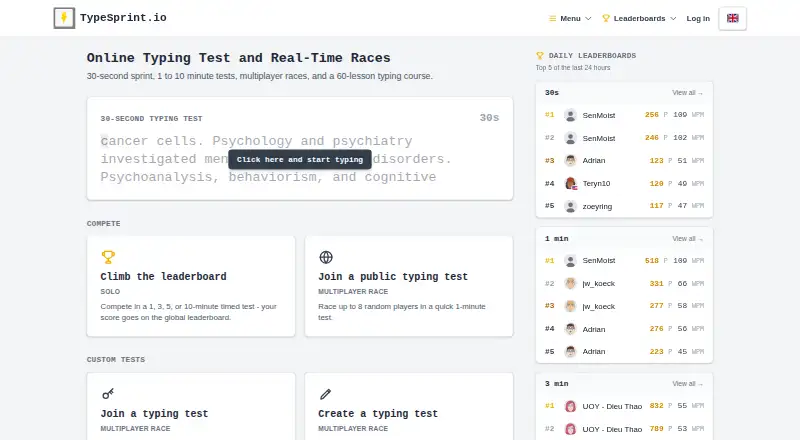
TypeSprint is a free, browser-based typing platform for tests, races, touch-typing practice, and classroom use. Tests include a 30-second option and timed sessions from 1 to 10 minutes, with scores shown on global leaderboards. Public races put up to 8 players in a one-minute test, and users can create custom tests and invite others. Its guided course has 75 lessons per keyboard layout, progressing from home-row practice to full texts and numbers. The platform is available in English, German, Spanish, and Portuguese, with lesson tracks for QWERTY, QWERTZ, Spanish, and Portuguese layouts. Teachers can create classes, give students a 6-character join code, and review lesson results on a dashboard. Tests and races do not require an account, but lessons and classes do. TypeSprint runs without installation in a current browser on a PC, laptop, or tablet with a physical keyboard. Its free plan is listed as free and includes all typing tests, lessons, leaderboards, and classroom features, with no ads or premium tier.
Who it suits
TypeSprint suits people practicing typing in a browser, as well as teachers who want classes and a dashboard for lesson results. Tests and races are accessible without an account; lessons and classes require one.
What it does well
- Offers 30-second and 1–10 minute tests.
- Public races support up to 8 players.
- Includes 75 guided lessons per keyboard layout.
- Teachers can review lesson results on a dashboard.
- Runs without installation on devices with physical keyboards.
What to know first
- Lessons and classes require an account.
- Requires a physical keyboard and current browser.
Limits
The Free plan costs 0.00 USD and includes the listed tests, 75 lessons per keyboard layout, leaderboards and classroom features. Lessons and classes are unavailable until an account is created.
Plans
| Plan | Billed and limits | Price |
|---|---|---|
| Free | All typing tests · 75 lessons per keyboard layout · leaderboards · classroom features · no ads or premium tier | Free |
As typesprint.io lists them, read 10 Oct 2026. The maker's own page has the final word.
Getting started
- Open https://www.typesprint.io/ in a current browser
- Use a PC, laptop or tablet with a physical keyboard
- Start a typing test or public race without an account
- Create an account for guided lessons or classroom features
- Sign in with Google or Microsoft if preferred
- Teachers can create a class and share its six-character join code
Verdict
TypeSprint brings practice, timed tests, races, and classroom features together in a free browser-based platform. Its lessons and classes require an account, and use depends on a physical keyboard.
Questions
How much does TypeSprint cost?
Its Free plan costs nothing. The plan includes all typing tests, 75 lessons per keyboard layout, leaderboards and classroom features.
Which devices support TypeSprint?
It runs in a current browser on a PC, laptop or tablet with a physical keyboard. Installation is not required.
Can I use tests without signing up?
Yes. Typing tests and races can be used without an account, while lessons and classes require one.
Which languages and layouts are available?
The platform is available in English, German, Spanish and Portuguese. Lesson tracks cover QWERTY, QWERTZ, Spanish and Portuguese layouts.
Can teachers manage student practice?
Teachers can create classes, share a six-character join code and view students’ lesson results on a dashboard.
Does TypeSprint offer Google or Microsoft sign-in?
Yes. Accounts can use Google or Microsoft sign-in, and the privacy policy says TypeSprint does not receive or store those providers’ passwords.
Facts from TypeSprint's own pages
- Access requirements
- Typing tests and races can be used without an account, while an account is required for lessons and classes. · typesprint.io, 10 Oct 2026
- Analytics and retention
- The privacy policy says TypeSprint uses Google Analytics and retains test sessions and statistics indefinitely for history and leaderboards. · typesprint.io, 10 Oct 2026
- Browser support
- TypeSprint runs in a browser without installation on a PC, laptop or tablet with a physical keyboard and current browser. · typesprint.io, 10 Oct 2026
- Data and security
- The privacy policy describes HTTPS transmission, bcrypt password hashes, OAuth 2.0 with PKCE, and MongoDB Atlas hosting. · typesprint.io, 10 Oct 2026
- For schools
- Teachers can create classes, share a 6-character join code and view students’ lesson results on a dashboard. · typesprint.io, 10 Oct 2026
- Headquarters
- Vienna, Austria · typesprint.io, 28 Sept 2026
- Languages and layouts
- The platform is available in English, German, Spanish and Portuguese, with QWERTY, QWERTZ, Spanish and Portuguese lesson tracks. · typesprint.io, 10 Oct 2026
- Multiplayer
- Public races let up to 8 players compete in a one-minute test, and users can create custom tests and invite others. · typesprint.io, 10 Oct 2026
- Sign-in integrations
- Accounts can use Google or Microsoft sign-in, and the privacy policy says TypeSprint does not receive or store those providers’ passwords. · typesprint.io, 10 Oct 2026
- Support
- Users can contact TypeSprint or report a bug through links on the site; data-protection requests can be sent to [email protected]. · typesprint.io, 10 Oct 2026
- Touch-typing course
- The course has 75 guided lessons per keyboard layout, progressing from the home row to full texts and numbers. · typesprint.io, 10 Oct 2026
- Typing tests
- Users can take 30-second tests and timed tests from 1 to 10 minutes, with scores on global leaderboards. · typesprint.io, 10 Oct 2026
- What it does
- TypeSprint is a free browser-based typing platform for tests, real-time races, touch-typing lessons and classroom use. · typesprint.io, 10 Oct 2026
Where TypeSprint stands on Freedom251
- Typing Tutor Software#18 of 36