Freedom251 › AI Detection Software
TruthLens
What TruthLens is
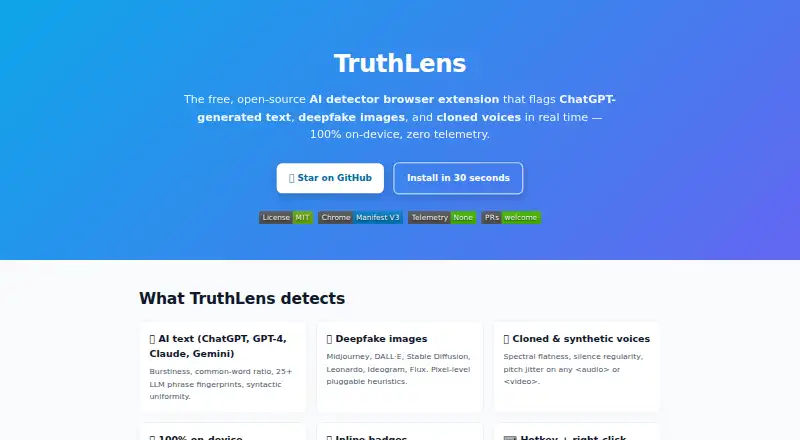
TruthLens is a free, open-source browser extension that flags possible AI-generated text, synthetic images, and cloned voices. Its text checks use patterns such as burstiness, common-word ratios, phrase fingerprints, and syntactic uniformity. Image checks apply pixel-level heuristics and look for known AI image sources, including Midjourney, DALL·E, Stable Diffusion, Leonardo, and Ideogram. Audio and video checks examine spectral flatness, silence regularity, and pitch jitter. Clickable warning badges explain which signals contributed to a flag. You can rescan with Ctrl+Shift+T or right-click an image to triage it. The maker says detection runs on-device, with no uploads, accounts, or tracking. It cautions that TruthLens is a triage aid, not forensic proof, and that its signals can produce false positives and false negatives. The repository lists compatibility with Chromium-based browsers including Chrome, Edge, Brave, Opera, Arc, and Vivaldi. Installation involves downloading or cloning the repository and loading it unpacked in the browser’s extensions page. A signed Chrome Web Store release is planned after the public beta. The maker names journalists, teachers, researchers, parents, voters, and recruiters as intended users. TruthLens is licensed under MIT.
Who it suits
TruthLens is intended for people such as journalists, teachers, researchers, parents, voters, and recruiters who want signals for triaging potentially synthetic content. It requires a listed Chromium-based browser and manual unpacked-extension installation.
What it does well
- Free and open-source under the MIT license
- Checks text, images, audio, and video
- On-device detection with no uploads, accounts, or tracking
- Clickable badges explain signals behind flags
What to know first
- Can produce false positives and false negatives
- Not intended as forensic proof
- Installation requires loading an unpacked extension
- Signed Chrome Web Store release is planned, not listed as available
Limits
TruthLens is a triage tool rather than forensic proof, and its detection signals can produce false positives and false negatives.
Plans
| Plan | Billed and limits | Price |
|---|---|---|
| TruthLens | Free forever; no subscription · No paid tiers stated | Free |
As mrtomdev.github.io lists them, read 4 Oct 2026. The maker's own page has the final word.
Getting started
- Open the TruthLens project website or repository
- Clone or download the repository
- Open your Chromium-based browser’s extensions page
- Load the repository as an unpacked extension
- Browse supported pages and use inline badges, Ctrl+Shift+T, or image right-click triage
Verdict
TruthLens provides multiple kinds of detection signals and explains the signals behind its warnings. Treat results as triage rather than proof, and note the manual installation process and stated error risk.
Questions
How much does TruthLens cost?
The TruthLens plan costs 0.00 USD and is free forever, with no subscription.
Is TruthLens open source?
Yes. TruthLens is open-source under the MIT license.
Which browsers are supported?
The repository lists Chrome, Edge, Brave, Opera, Arc, and Vivaldi, all Chromium-based browsers.
Does TruthLens upload detected content?
The maker says detection runs on-device, with no data uploads, accounts, or tracking.
What can TruthLens detect?
It flags possible AI-generated text, synthetic images, and cloned voices, and checks audio and video elements.
How is it installed?
Clone or download the repository, then load it unpacked through the browser’s extensions page.
Facts from TruthLens's own pages
- Accuracy limitation
- The maker describes TruthLens as a triage tool rather than forensic proof, and says its signals can produce false positives and false negatives. · github.com, 4 Oct 2026
- Audience
- The maker names journalists, teachers, researchers, parents, voters, and recruiters as intended users. · mrtomdev.github.io, 4 Oct 2026
- Audio detection
- Audio and video elements are checked for spectral flatness, silence regularity, and pitch jitter. · mrtomdev.github.io, 4 Oct 2026
- Browser support
- The repository says it works with Chrome, Edge, Brave, Opera, Arc, and Vivaldi, which are Chromium-based browsers. · github.com, 4 Oct 2026
- Image detection
- Image detection uses pixel-level heuristics and checks known AI image sources including Midjourney, DALL·E, Stable Diffusion, Leonardo, and Ideogram. · mrtomdev, 4 Oct 2026
- Inline explanations
- Inline warning badges can be clicked to show the signals behind a flag. · mrtomdev.github.io, 4 Oct 2026
- Installation
- Installation is described through cloning or downloading the repository and loading it unpacked in the browser's extensions page. · github.com, 4 Oct 2026
- License
- TruthLens is open-source under the MIT license. · mrtomdev.github.io, 4 Oct 2026
- Privacy
- The maker says detection runs on-device, data is not uploaded, and there are no accounts or tracking. · mrtomdev.github.io, 4 Oct 2026
- Product
- TruthLens is a free, open-source browser extension that flags AI-generated text, synthetic images, and cloned voices in real time. · mrtomdev.github.io, 4 Oct 2026
- Release status
- A signed Chrome Web Store release is listed as planned after the public beta. · github.com, 4 Oct 2026
- Scanning controls
- Users can rescan with Ctrl+Shift+T and right-click an image to triage it. · mrtomdev.github.io, 4 Oct 2026
- Text detection
- Text checks use signals including burstiness, common-word ratio, phrase fingerprints, and syntactic uniformity. · mrtomdev.github.io, 4 Oct 2026
Where TruthLens stands on Freedom251
- AI Detection Software#27 of 30