Freedom251 › Writing Assistants Software

Smodin AI Detector
What Smodin AI Detector is
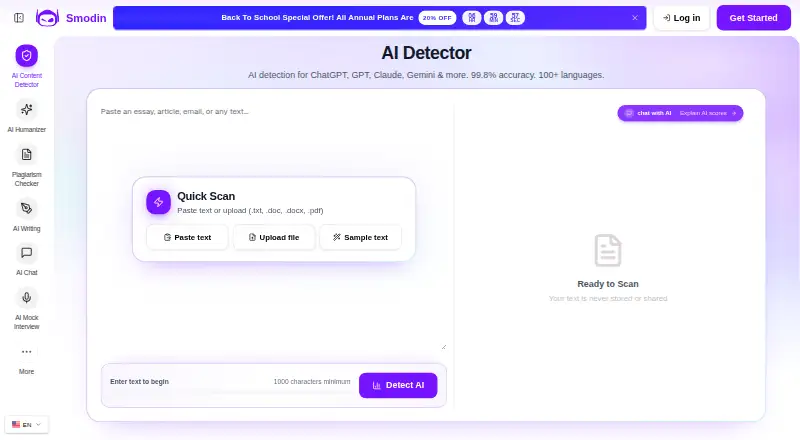
Smodin AI Detector analyzes writing for signs of AI-generated content, giving users indicators to assess its apparent authenticity. Smodin says it detects text from ChatGPT, GPT, Claude, Gemini, Llama, and other AI models, and supports more than 100 languages. Reports include sentence-level breakdowns, probability scores, and confidence indicators. Users can paste text or upload TXT, DOC, DOCX, and PDF files, but a scan requires at least 1,000 characters. A Chrome extension checks AI text on webpages, emails, documents, blogs, and social media, with described use in Gmail, Google Docs, and Notion. Smodin presents the detector for educators, students, researchers, content managers, publishers, editors, and HR professionals. It cautions that human writing may be mislabeled as AI-generated, so results should be weighed alongside broader quality checks. The checker looks for writing patterns; it does not cryptographically verify a provider's hidden watermark key. The detector page says submitted text is encrypted and never stored or shared. A free plan is available, and paid plans start at $10/mo (annual).
Who it suits
The detector may suit educators, students, researchers, content managers, publishers, editors, and HR professionals who want indicators about whether writing may be AI-generated. It is available on the web and as a Chrome extension.
What it does well
- Supports more than 100 languages.
- Reports include sentence-level details and confidence indicators.
- Accepts TXT, DOC, DOCX, and PDF files.
- Chrome extension supports Gmail, Google Docs, and Notion.
What to know first
- Scans require at least 1,000 characters.
- Human writing can be incorrectly labeled as AI-generated.
- Does not cryptographically verify hidden watermark keys.
Limits
A scan needs at least 1,000 characters. The Starter plan has limited writing output and the standard detector, while Premium adds unlimited writing output, the advanced detector, and the Chrome extension.
Plans
| Plan | Billed and limits | Price |
|---|---|---|
| Starter | Billed annually; shown as $10 USD /mo · Writing output: Limited · Standard AI Content Detector · Email support | $10 a month |
| Premium | Billed annually; shown as $16 USD /mo · Unlimited writing output · Advanced AI Content Detector · Chrome Extension · 24/7 priority support | $16 a month |
As smodin.io lists them, read 8 Oct 2026. The maker's own page has the final word.
Getting started
- Open the Smodin AI Detector website
- Choose the web app or Chrome extension
- Use the free plan or select a paid plan
- Paste at least 1,000 characters or upload a supported file
- Install the Chrome extension for browser, Gmail, Google Docs, or Notion checks
- Use the API when integrating detection into an application
Verdict
Smodin AI Detector offers multiple report indicators, broad language coverage, and a browser extension. Its results are not definitive: Smodin warns of false positives and says the checker does not verify hidden watermark keys.
Questions
Does Smodin AI Detector have a free plan?
Yes. Smodin lists a free plan, alongside paid plans from $10/mo (annual).
What files can I scan?
You can paste text or upload TXT, DOC, DOCX, and PDF files. Scans require at least 1,000 characters.
Which platforms does it support?
It is available on the web and as a Chrome extension. Smodin also lists API access.
What does the Chrome extension work with?
The extension checks webpages, emails, documents, blogs, and social media, with described use in Gmail, Google Docs, and Notion.
Can the detector prove a hidden AI watermark?
No. Smodin says it looks for AI-writing patterns and does not cryptographically verify a provider's hidden watermark key.
Facts from Smodin AI Detector's own pages
- Browser extension
- Smodin offers a Chrome extension for detecting AI text on webpages, emails, documents, blogs, and social media. · smodin.io, 8 Oct 2026
- False positives
- Smodin warns that human writing can be incorrectly labeled as AI-generated and advises using results alongside broader quality checks. · smodin.io, 8 Oct 2026
- File formats
- Users can paste text or upload TXT, DOC, DOCX, and PDF files; the page requires at least 1,000 characters to begin a scan. · smodin.io, 8 Oct 2026
- Headquarters
- Dover, Delaware, United States · smodin.io, 28 Sept 2026
- Integrations
- The Chrome extension page describes use with Gmail, Google Docs, and Notion. · smodin.io, 8 Oct 2026
- Languages
- The detector page says it supports more than 100 languages. · smodin.io, 8 Oct 2026
- Models detected
- Smodin says the detector identifies text from ChatGPT, GPT, Claude, Gemini, Llama, and other AI models. · smodin.io, 8 Oct 2026
- Privacy claim
- The detector page says submitted text is never stored or shared and describes detector content as encrypted and never stored. · smodin.io, 8 Oct 2026
- Privacy policy
- Smodin's privacy policy says it uses security measures designed to protect information and retains personal information while it has a legitimate business need. · smodin.io, 8 Oct 2026
- Purpose
- The detector analyzes writing for signs of AI-generated content to help users assess authenticity. · smodin.io, 8 Oct 2026
- Results
- Reports include sentence-level breakdowns, probability scores, and confidence indicators. · smodin.io, 8 Oct 2026
- Support
- The detector page links to Smodin support and its Help Center for questions. · smodin.io, 8 Oct 2026
- Watermark limitation
- Smodin says its checker looks for AI-writing patterns and does not cryptographically verify a provider's hidden watermark key. · smodin.io, 8 Oct 2026
- Who it is for
- The detector is presented for educators, students, researchers, content managers, publishers, editors, and HR professionals. · smodin.io, 8 Oct 2026
Where Smodin AI Detector stands on Freedom251
- Writing Assistants Software#17 of 26
- AI Content Detection Software#34 of 45
- AI Detection Software#24 of 30
- AI Content Detectors#21 of 25