Freedom251 › AI Content Detection Software

ClassGuard
What ClassGuard is
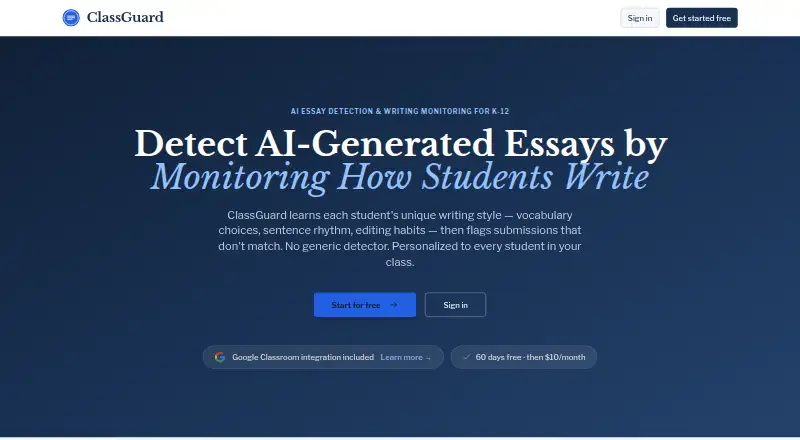
ClassGuard is a web-based service for reviewing whether student writing matches each student’s established style. Its editor records keystrokes, paste events, pauses, and revisions while students complete assignments. Teachers can inspect sentence-level authenticity highlights, pasted-text locations, behavioral summaries, and replays of writing sessions. The service creates an individual writing profile for every student and updates that profile after later submissions. ClassGuard can import Google Classroom classes, rosters, assignments, and earlier Google Doc essays. Teachers and students use a browser, so no installation is required. ClassGuard describes its audience as K-12 teachers, school administrators, and district IT leaders. It says writing data is encrypted, securely stored, and not shared with third parties, and states FERPA and COPPA compliance. Collection is limited to editor behavior, excluding browsing history and screen recordings. The service is in an early pilot. A 60-day full-access trial costs nothing, with unlimited classes and assignments and no credit card.
Who it suits
It suits K-12 teachers, school administrators, and district IT leaders who need writing-authenticity review. Browser access and Google Classroom import support classroom workflows.
What it does well
- Tracks keystrokes, pauses, pastes, and revisions
- Provides sentence-level authenticity highlights
- Replays writing sessions for review
- Imports Google Classroom data
- Includes unlimited classes during trial
What to know first
- No free plan
- Paid service after 60-day trial
- Still in an early pilot
- Collects writing behavior in its editor
Limits
The Free Trial lasts 60 days, although it includes full access plus unlimited classes and assignments. ClassGuard has no free plan beyond that trial; the Pro plan is paid.
Plans
| Plan | Billed and limits | Price |
|---|---|---|
| Free Trial | 60 days · full access · unlimited classes and assignments · no credit card | Free |
| ClassGuard Pro | After your 60-day free trial · Unlimited classes and assignments · continued AI detection and analysis · priority support | $10 a month |
| ClassGuard Pro | After your 60-day free trial · Unlimited classes and assignments · continued AI detection and analysis · priority support | $12,060 a year |
As classguard.ai lists them, read 9 Oct 2026. The maker's own page has the final word.
Getting started
- Open https://www.classguard.ai/ in a web browser
- Select the Free Trial plan
- Use the 60-day full-access trial without entering a credit card
- Import Google Classroom classes, rosters, assignments, and past Google Doc essays
- Have students write assignments in the ClassGuard editor
- Review authenticity highlights, behavioral summaries, and writing-session replays
Verdict
ClassGuard combines student-specific writing profiles with detailed behavior review and classroom imports. Consider the editor-based data collection and paid model when evaluating it.
Questions
Is ClassGuard free?
ClassGuard has no free plan. Its Free Trial costs nothing for 60 days, includes full access and unlimited classes and assignments, and requires no credit card.
Which platforms does ClassGuard support?
ClassGuard is accessed through a web browser by teachers and students. No app installation is required.
Can ClassGuard work with Google Classroom?
Yes. It can import Google Classroom classes, rosters, assignments, and past Google Doc essays.
What does ClassGuard Pro include?
ClassGuard Pro lists AI detection and analysis, behavioral and pattern reports, student portfolio history, and priority support.
What student data does ClassGuard collect?
Its editor collects writing behavior such as keystrokes, paste events, pauses, and revisions. ClassGuard says it does not collect browsing history or screen recordings.
How does ClassGuard handle student data?
ClassGuard says student writing data is encrypted, stored securely, and never shared with third parties. It also states that it is FERPA and COPPA compliant.
Facts from ClassGuard's own pages
- Behavior tracking
- Its editor records keystrokes, paste events, pauses, and revisions during writing assignments. · classguard.ai, 9 Oct 2026
- Compliance
- ClassGuard states that it is FERPA and COPPA compliant. · classguard.ai, 9 Oct 2026
- Data collection limits
- ClassGuard says it collects writing behavior data within its editor and does not collect browsing history or screen recordings. · classguard.ai, 9 Oct 2026
- Integration
- ClassGuard can import Google Classroom classes, rosters, assignments, and past Google Doc essays. · classguard.ai, 9 Oct 2026
- Intended users
- ClassGuard describes itself as built for K-12 teachers, school administrators, and district IT leaders. · classguard.ai, 9 Oct 2026
- Pilot status
- ClassGuard says it is in an early pilot with teachers testing it in classroom writing workflows. · classguard.ai, 9 Oct 2026
- Platform access
- Teachers and students use ClassGuard through a web browser, with no app installation required. · classguard.ai, 9 Oct 2026
- Review tools
- Teachers can view sentence-level authenticity highlights, paste locations, behavioral summaries, and replay writing sessions. · classguard.ai, 9 Oct 2026
- Security and privacy
- ClassGuard says student writing data is encrypted, stored securely, and never shared with third parties. · classguard.ai, 9 Oct 2026
- Support
- The ClassGuard Pro plan lists priority support. · classguard.ai, 9 Oct 2026
- What it does
- ClassGuard monitors how students write and flags submissions that differ from each student's writing style. · classguard.ai, 9 Oct 2026
- Writing profiles
- ClassGuard builds separate writing profiles for students and updates them after new submissions. · classguard.ai, 9 Oct 2026
Where ClassGuard stands on Freedom251
- AI Content Detection Software#38 of 45
- AI Content Detectors#22 of 25
- AI Detection Software#28 of 29