Freedom251 › Receipt Scanner Apps
Tripenzo
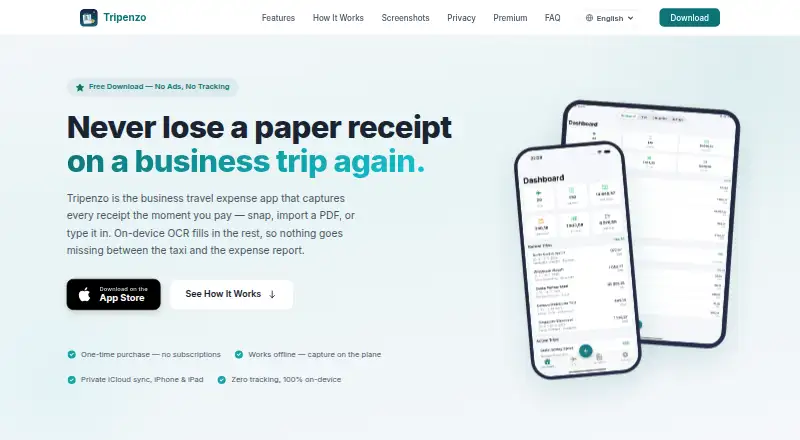
What Tripenzo is
Tripenzo is an iOS app for business travelers who capture receipts and prepare expense reports. Users can add expenses manually, photograph receipts, or import PDFs, and the app works offline, including its OCR. Premium OCR runs on the device and extracts a merchant, date, and total. Currency conversion can move an expense from its payment currency to a company currency and then a personal currency, with default rates and per-expense overrides. The Free plan includes manual expense entry, multi-company support, three-tier currency conversion, and CSV export. Premium is a 7.99 USD one-time purchase with no subscription; it adds OCR auto-fill, XLSX export, backup and restore, App Lock, and iCloud sync. Premium can fill an uploaded company XLSX template and package receipt scans in a ZIP. Sync covers trips, expenses, and receipts between iPhone and iPad through the user's private iCloud CloudKit container. The maker says Tripenzo collects no data and uses no analytics or trackers, with receipt OCR processed on-device. The app supports 25 languages and searches across more than 160 currencies and 195 countries.
Who it suits
Tripenzo suits consultants, contractors, and field engineers who submit expense reports. It is also relevant to business travelers who need offline receipt capture and currency conversion.
What it does well
- Free plan includes manual entry and CSV export.
- Works offline, including OCR.
- Premium OCR processes receipts on-device.
- Premium is a one-time purchase, with no subscriptions.
- Premium syncs between iPhone and iPad through private iCloud.
What to know first
- Available on iOS only.
- OCR auto-fill is a Premium feature.
- XLSX export is a Premium feature.
- Premium costs 7.99 USD once.
Limits
The Free plan provides manual expense entry and CSV export; OCR auto-fill, XLSX export, backup and restore, App Lock, and iCloud sync are Premium features. Premium costs 7.99 USD as a one-time purchase.
Plans
| Plan | Billed and limits | Price |
|---|---|---|
| Free | manual expense entry · multi-company support · three-tier currency conversion · CSV export | Free |
| Premium | one-time purchase; no subscriptions · OCR auto-fill · XLSX export · backup and restore · App Lock · iCloud sync | $7.99, paid once |
As tripenzo.app lists them, read 8 Oct 2026. The maker's own page has the final word.
Getting started
- Visit https://tripenzo.app/.
- Use the iOS app.
- Start with the Free plan or purchase Premium for its additional features.
- Enter expenses manually, photograph receipts, or import PDFs.
- Upload a company XLSX template if you want Premium automatic report filling.
- Use the in-app Help Center or email [email protected] for assistance.
Verdict
Tripenzo offers a free manual-entry option and paid upgrades for OCR, XLSX reports, and sync. Its offline operation and on-device receipt processing are useful distinctions for travelers who submit expenses.
Questions
Is Tripenzo free?
Yes. Its Free plan costs nothing and includes manual expense entry, multi-company support, three-tier currency conversion, and CSV export.
How much does Premium cost?
Premium costs 7.99 USD as a one-time purchase, with no subscriptions.
What platforms does Tripenzo support?
Tripenzo is available on iOS. Premium syncs trips, expenses, and receipts between iPhone and iPad through the user's private iCloud CloudKit container.
What does Tripenzo's OCR read?
Premium on-device OCR reads the merchant, date, and total from receipts. The app works offline, including OCR.
Can Tripenzo export expense reports?
The Free plan includes CSV export. Premium adds XLSX export, can fill an uploaded company XLSX template, and can bundle receipt scans in a ZIP.
What does the maker say about privacy?
The maker says Tripenzo collects no data, uses no analytics or trackers, and processes receipt OCR on-device.
Facts from Tripenzo's own pages
- App security
- Premium App Lock supports Face ID, Touch ID, or a PIN code. · tripenzo.app, 8 Oct 2026
- Currencies and countries
- The site says users can search more than 160 currencies and 195 countries and add custom entries. · tripenzo.app, 8 Oct 2026
- Currency conversion
- Expenses can be converted from payment currency to company currency and then to personal currency, with rate defaults and per-expense overrides. · tripenzo.app, 8 Oct 2026
- iCloud sync
- Premium syncs trips, expenses, and receipts between iPhone and iPad through the user's private iCloud CloudKit container. · tripenzo.app, 8 Oct 2026
- Intended users
- The site describes the app as built for consultants, contractors, and field engineers who submit expense reports. · tripenzo.app, 8 Oct 2026
- Languages
- The site says the app is localized in 25 languages. · tripenzo.app, 8 Oct 2026
- Offline use
- The site says the app works offline, including OCR. · tripenzo.app, 8 Oct 2026
- On-device OCR
- Premium OCR runs on the device and extracts receipt amounts, dates, currencies, and vendor names. · tripenzo.app, 8 Oct 2026
- Privacy
- The maker says Tripenzo collects no data, uses no analytics or trackers, and processes receipt OCR on-device. · tripenzo.app, 8 Oct 2026
- Purpose
- Tripenzo is a business travel expense app for capturing receipts and preparing expense reports. · tripenzo.app, 8 Oct 2026
- Receipt capture
- Users can capture receipts with a photo, import PDFs, or enter expenses manually. · tripenzo.app, 8 Oct 2026
- Report exports
- Premium exports CSV or fills a company's XLSX template and can bundle receipt scans in a ZIP. · tripenzo.app, 8 Oct 2026
- Support
- The maker directs users to an in-app Help Center and lists [email protected] for further help. · tripenzo.app, 8 Oct 2026
- Templates
- Users can upload a company XLSX template for automatic report filling. · tripenzo.app, 8 Oct 2026
Where Tripenzo stands on Freedom251
- Receipt Scanner Apps#22 of 30