Freedom251 › Legal Transcription Software
Transcrify
What Transcrify is
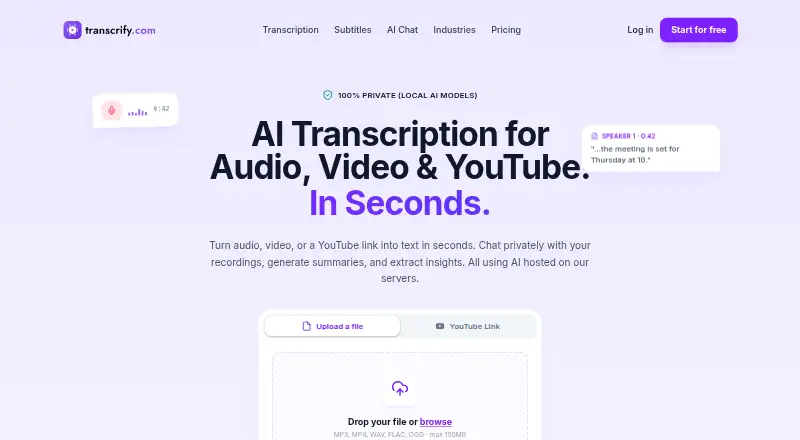
Transcrify is a web service for turning audio, video, and YouTube recordings into transcripts that can be edited and searched in a browser. It accepts MP3, WAV, M4A, FLAC, and OGG audio, MP4, MOV, AVI, MKV, and WebM video, as well as YouTube URLs. The maker says it supports 50+ languages and automatically detects and labels speakers. Users can export subtitles as SRT, VTT, ASS, or TXT, and ask private AI chat about a recording or generate summaries, key points, action items, and decisions. Transcrify says it uses locally hosted models, encrypts data in transit and at rest, does not use customer content for model training, and offers automatic file deletion options. Its AI Chat page describes its infrastructure as GDPR compliant and says it uses European data centers. The first transcription can be tried free, with a 100MB trial upload limit. Paid plans start at $5/mo billed annually; there is no free plan.
Who it suits
Transcrify suits content creators, journalists, researchers, educators, and businesses that need searchable transcripts and tools for reviewing recordings. Its web platform and listed meeting-service uploads may suit teams working with recordings from Zoom, Teams, Google Meet, Webex, or Loom.
What it does well
- Accepts audio, video, and YouTube URLs
- Supports 50+ languages and speaker labels
- Searchable transcripts with multiple subtitle export formats
- AI chat generates summaries and action items
- Encryption and automatic file deletion options
What to know first
- No free plan
- Trial upload limit is 100MB
- Paid plans are billed annually
Limits
The Basic plan costs $5 a month billed yearly and includes 10 hours of transcription, 40 files, and a 50MB maximum single file. The trial upload area shows a 100MB maximum file size.
Plans
| Plan | Billed and limits | Price |
|---|---|---|
| pro | billed yearly; 201.6 USD / year · 1000h transcription · 5000 files · 500mb max single file · transcription chat and summaries · PDF/DOCX export | $16.80 a month |
| basic | billed yearly; 60 USD / year · 10h transcription · 40 files · 50mb max single file · transcription chat and summaries · PDF/DOCX export | $5 a month |
| smart | billed yearly; 117.6 USD / year · 100h transcription · 1000 files · 200mb max single file · transcription chat and summaries · PDF/DOCX export | $9.80 a month |
As transcrify.com lists them, read 3 Oct 2026. The maker's own page has the final word.
Getting started
- Open the Transcrify website
- Start the first transcription free trial
- Upload a supported audio or video file, or provide a YouTube URL
- Edit and search the transcript in the browser
- Use AI chat for questions, summaries, key points, action items, or decisions
- Export subtitles as SRT, VTT, ASS, or TXT
- Choose a paid plan with its listed quotas and file limits
Verdict
Transcrify combines transcription, transcript editing, subtitle exports, and AI tools in a web service. Check the annual plan limits and trial upload cap against the size and volume of recordings you need to process.
Questions
Does Transcrify have a free plan?
There is no free plan, but the first transcription can be tried free. The trial upload area shows a 100MB maximum file size.
How much does Transcrify cost?
The Basic plan is $5 a month billed yearly, or 60 USD per year. Smart costs $9.80 a month billed yearly, and Pro costs $16.80 a month billed yearly.
Which files and links can it transcribe?
It supports MP3, WAV, M4A, FLAC, OGG, MP4, MOV, AVI, MKV, WebM, and YouTube URLs.
Which platforms does Transcrify support?
Transcrify is available on the web.
Does it identify speakers and support timestamps?
Yes. Speaker identification and timestamp controls are listed, and speakers are automatically detected and labeled.
What integrations are available?
Recordings can be uploaded from Zoom, Teams, Google Meet, Webex, and Loom. Webhooks are mentioned for Slack, Notion, Confluence, and project trackers.
Facts from Transcrify's own pages
- AI chat
- Users can ask questions about recordings and generate summaries, key points, action items, and decisions. · transcrify.com, 3 Oct 2026
- Compliance
- The AI Chat page describes its infrastructure as GDPR compliant and says it uses European data centers. · transcrify.com, 3 Oct 2026
- Free use
- The contact page says users can try their first transcription for free, with no stated trial duration. · transcrify.com, 3 Oct 2026
- Integrations
- The business industry page says users can upload recordings from Zoom, Teams, Google Meet, Webex, and Loom, and mentions webhooks to Slack, Notion, Confluence, and project trackers. · transcrify.com, 3 Oct 2026
- Intended users
- The maker describes the service for content creators, journalists, researchers, educators, and businesses. · transcrify.com, 3 Oct 2026
- Languages and speakers
- The maker says the service supports 50+ languages and automatically detects and labels speakers. · transcrify.com, 3 Oct 2026
- Security
- The maker says it uses locally hosted models, encrypts data at rest and in transit, does not use customer content for model training, and offers automatic file deletion options. · transcrify.com, 3 Oct 2026
- Support
- The contact page says support typically responds within 24 hours during business days. · transcrify.com, 3 Oct 2026
- Supported formats
- The contact page lists MP3, WAV, M4A, FLAC, and OGG audio, MP4, MOV, AVI, MKV, and WebM video, plus YouTube URLs. · transcrify.com, 3 Oct 2026
- Transcription tools
- Users can edit and search transcripts in the browser and export subtitles as SRT, VTT, ASS, or TXT. · transcrify.com, 3 Oct 2026
- Upload limit
- The homepage upload area lists a 100MB maximum file size for its trial transcription. · transcrify.com, 3 Oct 2026
- What it does
- Transcrify transcribes audio, video, and YouTube links, and provides private AI chat, summaries, and insights from recordings. · transcrify.com, 3 Oct 2026
Where Transcrify stands on Freedom251
- Legal Transcription Software#17 of 24