Freedom251 › Task Automation Software
TinyTask
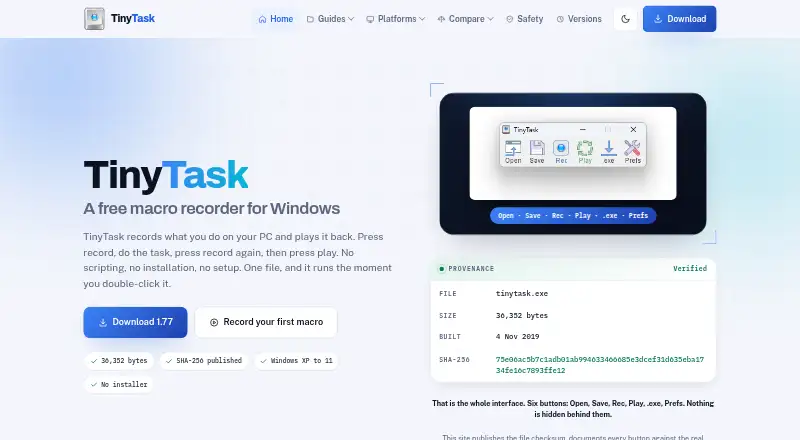
What TinyTask is
TinyTask records mouse movement, clicks, keystrokes, and the timing between actions, then replays the sequence. It is intended for repetitive chores such as data entry, multi-step tasks in slow software, testing, and file or folder work. Playback speed is adjustable, and a recording can run for a set number of repetitions or loop continuously. A recorded macro can also be compiled as a standalone Windows executable. The software is described as a 36 KB portable PC app that needs no scripting or installer; version 1.77 is listed as a 36,352-byte Windows program. The site describes TinyTask as free for personal use, with no paid tier or trial stated. It runs on Windows only, with no macOS, Linux, Chrome OS, or mobile version. It lacks conditions, branching, screen recognition, editing, and built-in scheduling, so it cannot adapt recorded actions to changing screen content. The site says TinyTask has not been rebuilt in years and is no longer being developed. Download pages provide SHA-256 checksums for its EXE and ZIP files.
Who it suits
TinyTask may suit Windows users who want to replay fixed sequences for repetitive tasks without writing scripts. It is less suited to workflows that need branching, screen recognition, editing, or scheduling.
What it does well
- Records and replays mouse and keyboard actions
- Adjustable speed and repeat or continuous playback
- Can compile recordings into standalone executables
- Portable app with no installer
What to know first
- Windows only; no macOS, Linux, Chrome OS, or mobile version
- No branching, screen recognition, editing, or scheduling
- No longer being developed or supported
Limits
The Free plan costs nothing and runs on Windows only. Recordings cannot use conditions, branching, screen recognition, editing, or built-in scheduling, and no paid tier or trial is stated.
Plans
| Plan | Billed and limits | Price |
|---|---|---|
| Free | Windows only · no paid tier or trial stated | Free |
As tiny-task.org lists them, read 8 Oct 2026. The maker's own page has the final word.
Getting started
- Open the TinyTask website
- Download the Windows EXE or ZIP
- Compare the published SHA-256 checksum with your downloaded file
- Run version 1.77 without an installer
- Record your mouse, click, keystroke, and timing sequence
- Set playback speed and choose a fixed count or continuous loop
Verdict
TinyTask offers a simple way to capture and repeat fixed actions on Windows. Its lack of adaptive controls and ongoing development makes those limits important to consider.
Questions
Is TinyTask free?
The site describes TinyTask as free for personal use. Its Free plan costs nothing, with no paid tier or trial stated.
Which platforms does TinyTask support?
TinyTask runs on Windows. There is no macOS, Linux, Chrome OS, or mobile version.
Does TinyTask require installation or scripting?
Version 1.77 is a 36,352-byte portable Windows program with no installer, and it needs no scripting.
Can TinyTask repeat recordings?
Yes. Playback speed is adjustable, and recordings can run a fixed number of times or loop continuously.
Can a recording become a standalone program?
TinyTask can compile a recorded macro into a standalone Windows executable.
Is TinyTask still maintained?
The site says it has not been rebuilt in years and is no longer being developed, with no bug fixes, feature additions, or question support.
Facts from TinyTask's own pages
- Compiled macros
- TinyTask can compile a recorded macro into a standalone Windows executable. · tiny-task.org, 8 Oct 2026
- Development and support
- The site says TinyTask has not been rebuilt in years and that nobody is fixing bugs, adding features, or answering questions. · tiny-task.org, 8 Oct 2026
- Development status
- The site says TinyTask has not been rebuilt in years and is no longer being developed. · tiny-task.org, 8 Oct 2026
- Download and installation
- The site describes version 1.77 as a 36,352-byte Windows program with no installer. · tiny-task.org, 8 Oct 2026
- Download integrity
- The download page publishes file sizes and SHA-256 checksums for the EXE and ZIP downloads. · tiny-task.org, 8 Oct 2026
- File verification
- The download page publishes SHA-256 checksums for the EXE and ZIP files so users can compare their copies. · tiny-task.org, 8 Oct 2026
- Intended users
- The site suggests it for repetitive data entry, multi-step processes in slow software, testing, and file or folder chores. · tiny-task.org, 8 Oct 2026
- Limits
- It has no conditions, branching, screen recognition, editing, or built-in scheduling. · tiny-task.org, 8 Oct 2026
- Maker and affiliation
- The download page says the site is independent and is not operated by or affiliated with TinyTask's developer. · tiny-task.org, 8 Oct 2026
- Platforms
- The site states TinyTask runs on Windows only and has no macOS, Linux, ChromeOS, or mobile version. · tiny-task.org, 8 Oct 2026
- Platform support
- The site says TinyTask runs on Windows and has no macOS, Linux, Chrome OS, or mobile version. · tiny-task.org, 8 Oct 2026
- Playback
- The app supports adjustable playback speed and fixed-count or continuous looping. · tiny-task.org, 8 Oct 2026
- Portable
- TinyTask is described as a 36 KB portable PC app that needs no scripting. · tinytask.net, 8 Oct 2026
- Price
- The TinyTask site describes the software as free for personal use; it does not show a numeric price. · tinytask.net, 8 Oct 2026
- Purpose
- TinyTask records mouse movements, clicks, keystrokes, and their timing, then replays those actions. · tiny-task.org, 8 Oct 2026
- Recording
- It captures movement, clicks, keystrokes, and the timing between actions. · tiny-task.org, 8 Oct 2026
- Security behavior
- The safety page says the program records keystrokes only while recording and does not run at startup or hide itself. · tiny-task.org, 8 Oct 2026
Where TinyTask stands on Freedom251
- Task Automation Software#25 of 35