Freedom251 › Task Automation Software
Remaku
What Remaku is
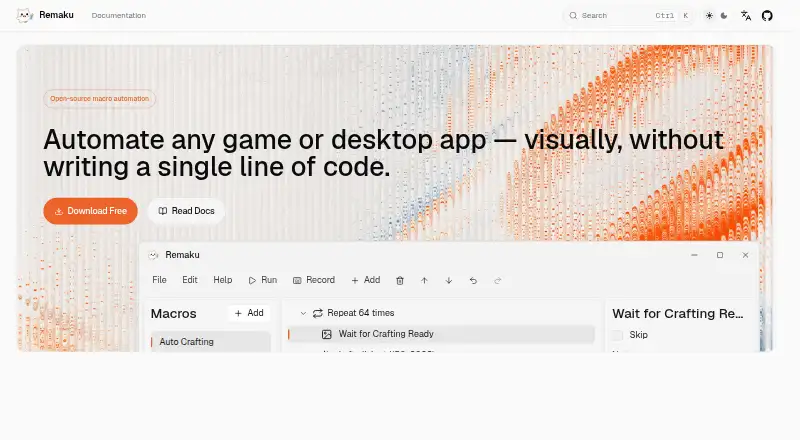
Remaku is a free, open-source visual macro tool for Windows that builds desktop automation workflows without code. Its point-and-click tree editor offers 15 step types, drag-and-drop reordering, notes, and reusable variables. Workflows can combine screenshots, keyboard and mouse actions, waits, loops, and branches; Record mode captures keyboard and mouse activity directly as steps. For screen-based tasks, Remaku can match captured regions, wait for images, branch on matches, and click image centers. It can also read numbers from screen areas and use those values in workflows. The tool can send input to a target window in the background, locate it again if it closes and reopens, and place overlays and selectors across multiple displays. Macros can be exported as ZIP files with their template images. Remaku is licensed under AGPL-3.0 and is in beta, where breaking changes may occur. Its Windows executable is not code-signed, so SmartScreen may show a warning the first time it runs.
Who it suits
Remaku suits Windows users who want to automate repetitive tasks in desktop apps or games through a visual editor. Its beta status is important for anyone considering it for production use.
What it does well
- Builds workflows without code
- Offers 15 visual step types
- Can record keyboard and mouse actions
- Exports macros with template images
What to know first
- Beta project warns of possible breaking changes
- Not recommended for production environments
- Windows executable is not code-signed
- Windows only
Limits
Remaku is in beta, and its project warns that breaking changes may occur. The Windows executable is not code-signed and may produce a SmartScreen warning on first run.
Plans
| Plan | Billed and limits | Price |
|---|---|---|
| Remaku | Open-source desktop macro tool for Windows · beta; breaking changes may occur | Free |
As remaku.com lists them, read 9 Oct 2026. The maker's own page has the final word.
Getting started
- Open the Remaku download page or GitHub Releases
- Download the Windows executable
- Review the SmartScreen warning caused by the unsigned executable
- Create a macro in the visual editor or use Record mode
- Add screenshots, input, waits, loops, and branches
- Export completed macros as ZIP files when sharing
Verdict
Remaku offers visual macro building and screen-aware actions at no cost. Its beta status and first-run SmartScreen warning are worth considering before relying on it.
Questions
How much does Remaku cost?
Remaku is free. Its listed Remaku plan is free.
Which operating systems are supported?
Remaku supports Windows desktop.
Is Remaku open source?
Yes. It is released under the AGPL-3.0 license.
Can it record actions?
Yes. Record mode captures keyboard and mouse actions live and inserts them into a macro.
How are downloads and updates handled?
GitHub Releases are listed as the download source. The app checks for updates at startup, supports stable and beta channels, and can install updates silently.
Is Remaku production-ready?
The project is labeled beta and warns that breaking changes may occur, advising against production use.
Facts from Remaku's own pages
- Beta status
- The project README says Remaku is in active beta development and breaking changes may occur at any time. · github.com, 9 Oct 2026
- Image recognition
- Remaku matches captured screen regions at runtime and supports image waits, conditional branches, image-center clicks, adjustable confidence, and resolution scaling in Gaming Mode. · remaku.com, 9 Oct 2026
- Input automation
- Macros can press keys, type Unicode text, and click, move, or scroll the mouse; each macro can have a global hotkey. · remaku.com, 9 Oct 2026
- Installation limitation
- The Windows executable is not code-signed, so Windows SmartScreen may show a warning on first run. · remaku.com, 9 Oct 2026
- Integrations
- The maker's pages describe GitHub Releases as the source for downloads and updates; they do not list third-party app integrations. · remaku.com, 9 Oct 2026
- Latest listed release
- The download page lists Remaku v0.11.1 for Windows as its latest stable release, published June 27, 2026. · remaku.com, 9 Oct 2026
- License and project status
- The project is open source under the AGPL-3.0 license and its repository labels it beta, warning that breaking changes may occur and not to use it in production environments. · github.com, 9 Oct 2026
- License and source
- The project is open source under the AGPL-3.0 license. · github.com, 9 Oct 2026
- Number recognition
- It can read a number from a captured screen area and use that value for branching, waiting, or repeating steps. · remaku.com, 9 Oct 2026
- Product
- Remaku is an open-source visual desktop macro tool for Windows that builds automation workflows from screenshots, keyboard and mouse input, waits, loops, and branches without code. · remaku.com, 9 Oct 2026
- Recording
- Record mode captures keyboard and mouse actions live and inserts them directly as macro steps. · remaku.com, 9 Oct 2026
- Security and signing
- The maker says the Windows executable is not code-signed, so Windows SmartScreen may show a warning on first run. · remaku.com, 9 Oct 2026
- Sharing
- Macros can be exported as ZIP files with their template images included. · remaku.com, 9 Oct 2026
- Sharing and updates
- Macros can be exported as ZIP files with template images, and the app checks for updates on startup and can install them silently. · remaku.com, 9 Oct 2026
- Support
- The maker lists [email protected] as a contact address and links to a community Discord from the project repository. · remaku.com, 9 Oct 2026
- Updates
- Remaku checks for new versions on startup and can install updates silently; the project also describes stable and beta update channels. · remaku.com, 9 Oct 2026
- Use cases
- The maker describes using Remaku to automate repetitive tasks in games and desktop apps, including farming resources, crafting items, and filling spreadsheets. · remaku.com, 9 Oct 2026
- Visual editor
- The editor composes actions from 15 step types in a point-and-click tree, with drag-and-drop reordering, notes, and reusable macro variables. · remaku.com, 9 Oct 2026
- What it does
- Remaku is an open-source visual desktop macro tool for Windows that builds automation workflows from screenshots, keyboard and mouse actions, waits, loops, and branches without code. · remaku.com, 9 Oct 2026
- Window handling
- Remaku supports background input to a target window, automatic re-finding if that window closes and reopens, and multi-display-aware overlays and selectors. · remaku.com, 9 Oct 2026
- Window management
- Remaku can send input to a target window in the background, automatically find a reopened target window, and place overlays and selectors on the correct monitor. · remaku.com, 9 Oct 2026
Where Remaku stands on Freedom251
- Task Automation Software#24 of 35