
Tiny.cc
by Tiny.cc
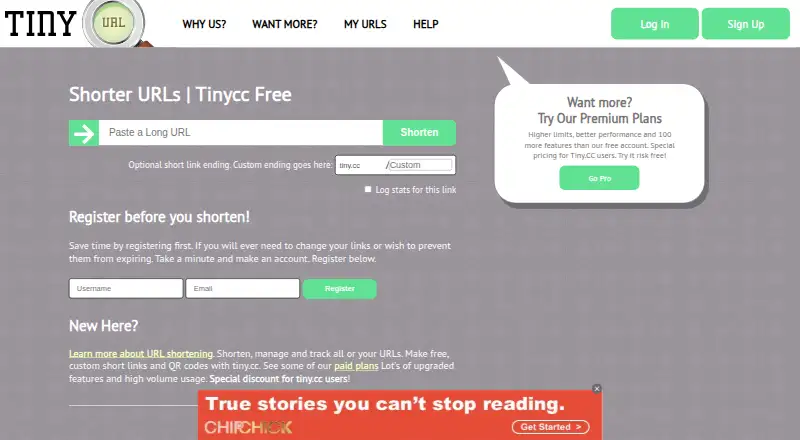
What Tiny.cc is
Tiny.cc is a URL toolkit for shortening links, managing redirects, tracking clicks, and monitoring brands. Registered users can edit or delete URLs, then organize them with filtering, tags, search, and sharing. Click reports include unique and returning visitors, country, browser, and other chart data. Smart links can direct visitors according to language, device, or country, and short links can be turned into QR codes for printed campaigns. Tiny.cc also supports app links, including universal, deep, and digital asset links for iOS and Android. Its REST API and webhooks API can connect with other services, and the feature list mentions merging third-party analytics. The free account includes 500 URLs, the tiny.cc domain, private click statistics, QR codes, and basic tagging. Paid plans start with Starter at $5 a month; higher tiers raise domain, seat, click, and link limits. Tiny.cc has been shortening links since 2006 and lists Android, iOS, web, extension, and API platforms.
Who it suits
Tiny.cc suits marketers, brand managers, promoters, SEO strategists, small businesses, and others who need to create and manage short links. Teams can choose among plans with different user, domain, and link limits.
What it does well
- Free account includes 500 URLs and QR codes.
- Users can edit, filter, tag, search, and share URLs.
- Click reports include visitor country and browser.
- Smart links can route by language, device, or country.
- REST API and webhooks API are available.
What to know first
- Free account uses the tiny.cc domain.
- Free click statistics are private.
- Daily redirect limits can show visitors an interstitial page.
- Starter is $5 a month.
Limits
The Free account includes 500 URLs and uses the tiny.cc domain. Starter, the lowest priced paid plan, includes 2 users, 1 custom domain, 1,000 clicks per link per day, and 500 links. When a link exceeds its daily redirect limit, additional visitors see an interstitial page and need a second click to continue.
Plans
| Plan | Billed and limits | Price |
|---|---|---|
| Starter | $5 Monthly; $55 yearly · 1 custom domain · 2 users · 1,000 clicks/link/day · 500 links | $5 a month |
| Executive | $25 Monthly; $275 yearly · 3 custom domains · 10 users · 5,000 clicks/link/day · 10,000 links | $25 a month |
| Pro | $44 Monthly; $484 yearly · 10 custom domains · 50 users · 15,000 clicks/link/day · 50,000 links | $44 a month |
| Free account | 500 URLs · uses tiny.cc domain · private click stats · QR codes · basic tagging | Free |
| Pro (+) | Ask for quote monthly or yearly · Custom limits · custom features · 1 million links at $139 | On request |
As tiny.cc lists them, read 12 Oct 2026. The maker's own page has the final word.
Getting started
- Open https://tiny.cc/.
- Create a Free account or choose a paid plan.
- Register to manage links, or use the REST API or webhooks API.
- Shorten links and manage them with tags, filters, search, or sharing.
- Use QR codes, smart links, or mobile app links as needed.
Overview
Tiny.cc is a link-shortening and redirect-management service with analytics, QR codes, and app-link support. It suits marketers and small teams managing links across campaigns, channels, or destinations. The free account covers basic URL work; paid tiers add custom domains, team seats, and higher daily click limits.
Key features
Registered users can edit or delete links, then filter, tag, search, and share them. That makes Tiny.cc useful for maintaining a campaign library as it grows, rather than treating each short link as disposable. Bulk creation can also help when a campaign needs many URLs at once.
Click statistics include unique and returning clicks, visitor country, browser, and other chart data. Smart links can route visitors by language, device, or country, while geo targeting and custom domains support more tailored campaigns. QR codes extend links to print, and app links support universal links, deep links, and digital asset links for iOS and Android.
The REST API and webhooks API give teams integration options, and Tiny.cc says it can merge third-party analytics. Android, iOS, web, API, and extension platforms cover common ways to manage or use links. One operational limit matters: when a link exceeds its daily redirect cap, additional visitors see an interstitial and must click again. That extra step may frustrate visitors during a busy campaign.
Tiny.cc says it uses SSL and firewalling where applicable, and payment details are handled by PayPal and Stripe rather than stored by Tiny.cc. Its terms also say it cannot guarantee the security of data passing through its networks. A help center provides tutorials, link-management guidance, API FAQs, and contact support.
Pricing
The free account costs nothing and allows 500 URLs on the tiny.cc domain, with private click stats, QR codes, and basic tagging. It is a sensible way to organize a small collection of links, but the domain restriction and private statistics limit its fit for teams needing branded public campaigns or shared reporting.
Starter costs $5 a month (billed $5 Monthly; $55 yearly). It includes one custom domain, two users, 500 links, and 1,000 clicks per link per day. That is a modest paid step for a small team, though the daily cap can affect high-traffic links.
Executive costs $25 a month (billed $25 Monthly; $275 yearly) and raises capacity to three custom domains, 10 users, 10,000 links, and 5,000 clicks per link per day. It fits teams running several campaigns that need room for more users and links. Pro costs $44 a month (billed $44 Monthly; $484 yearly), with 10 domains, 50 users, 50,000 links, and 15,000 clicks per link per day; its higher capacity is aimed at larger link operations.
Pro (+) has custom limits and custom pricing. Tiny.cc also offers a 7-day trial. Across paid plans, check the per-link daily cap against expected traffic: once exceeded, visitors must take an extra click to continue.
Platforms
Tiny.cc supports Android, iOS, web, API, and browser extension use. The API and webhooks also give developers a way to connect link workflows to other systems.
Who it's for
Tiny.cc is aimed at marketers, brand managers, promoters, SEO strategists, small businesses, and other users who rely on short links. Its organization tools, routing, QR codes, and app-link support are most useful when links need ongoing management across digital and printed campaigns. A single user with a few links may be well served by the free account; teams should weigh the paid seat and link limits against their campaign volume.
Pros and cons
- Pros: Link editing, tagging, filtering, search, and sharing help keep a growing URL library manageable.
- Pros: Smart routing, QR codes, and app links support campaigns across locations, devices, print, and mobile apps.
- Pros: Paid plans publish clear seat, domain, link, and daily-click capacities, with tiers ranging from two to 50 users.
- Cons: The free account uses the tiny.cc domain and keeps click statistics private.
- Cons: Daily redirect caps can add an interstitial and second click for visitors after a link reaches its limit.
- Cons: Pro (+) uses custom pricing, so its cost is not a fixed published monthly amount.
Alternatives
Browse the URL shorteners category to compare other options. Choose Bitly if its free allowance of five links per month, two QR codes per month, and three custom back-halves per month matches your needs. Rebrandly may suit someone who wants a free plan with 10 links, 10 QR codes, and one custom domain. Consider Cuttly for 30 free short links per month, one branded domain, and 30 days of analytics history. Rerout is another freemium option with a free plan. AWSYS.CO offers a free allowance of 25 links per day and 1,000 tracked clicks per month. Short.io is an option with a free plan that includes five custom domains and 50,000 tracked clicks per month. Replug may fit users seeking a free plan with smart QR codes, a campaign, and three custom domains. Go2 offers a free plan with 100 tracked links per month, 5K attributed clicks per month, and one custom domain.
Verdict
Tiny.cc is a strong fit for marketers and small teams that need link organization, audience routing, QR codes, and app links under one service. Its free account is useful for basic URL management, and its paid tiers spell out how much team, domain, and link capacity each price buys. Look elsewhere if the free domain and private stats are too restrictive, or if your campaigns could exceed a daily redirect limit and you want to avoid the added visitor step.
Verdict
Tiny.cc combines link organization, click reporting, smart routing, QR codes, and app-link support. Check the plan limits and daily redirect behavior against your expected link volume before choosing a tier.
Questions
What does Tiny.cc cost?
The Free account costs nothing. Starter is $5 a month, Executive is $25 a month, and Pro is $44 a month. Pro (+) has custom limits, and no price is listed.
What does the Free account include?
It includes 500 URLs, the tiny.cc domain, private click statistics, QR codes, and basic tagging.
Which platforms are listed?
Android, API, extension, iOS, and web.
Does Tiny.cc offer an API?
Yes. Tiny.cc offers a REST API and webhooks API.
How many team seats does Starter include?
Starter includes 2 users, 1 custom domain, 1,000 clicks per link per day, and 500 links.
What happens when a link exceeds its daily redirect limit?
Additional visitors see an interstitial page and need a second click to continue.
Facts from Tiny.cc's own pages
- Analytics
- Click statistics include unique and returning clicks, visitor country, browser, and other chart data. · tiny.cc, 12 Oct 2026
- API access
- Yes · tiny.cc, 21 Sept 2026
- Bulk link creation
- Yes · tiny.cc, 21 Sept 2026
- Company history
- Tinycc says it began shortening links in 2006 and expanded its platform and API for enterprise clients in 2015. · tinycc.com, 12 Oct 2026
- Custom domains
- Yes · tiny.cc, 21 Sept 2026
- Founded
- 2006 · tiny.cc, 28 Sept 2026
- Free plan
- Yes · tiny.cc, 21 Sept 2026
- Geo targeting
- Yes · tiny.cc, 21 Sept 2026
- Integrations
- The platform offers a REST API and webhooks API, and its feature list says it can merge third-party analytics. · tinycc.com, 12 Oct 2026
- Intended users
- Tinycc describes use cases for marketers, brand managers, promoters, SEO strategists, small businesses, and other short-link users. · tinycc.com, 12 Oct 2026
- Link management
- Registered users can edit or delete links and manage, filter, tag, search, and share URLs. · tiny.cc, 12 Oct 2026
- Mobile app links
- Tinycc says its app links support universal links, deep links, and digital asset links for iOS and Android apps. · tinycc.com, 12 Oct 2026
- Plan limits
- When a link exceeds its daily redirect limit, additional visitors see an interstitial page and need a second click to continue. · tinycc.com, 12 Oct 2026
- Product
- Tinycc describes itself as a URL toolkit for shortening URLs, managing redirects, tracking click events, and monitoring brands. · tinycc.com, 12 Oct 2026
- QR codes
- Tinycc says users can generate QR codes for short links, including codes for printed campaigns. · tiny.cc, 12 Oct 2026
- Security
- The privacy policy says Tinycc uses SSL and firewalling where applicable and does not store payment card or bank details, which are handled by PayPal and Stripe. · tinycc.com, 12 Oct 2026
- Security limitation
- Tinycc's terms say it cannot guarantee the security of data passing through its networks. · tinycc.com, 12 Oct 2026
- Smart links
- Smart links can route visitors to different destinations based on characteristics such as language, device, or country. · tinycc.com, 12 Oct 2026
- Support
- Tinycc provides a help center with tutorials, link management guidance, API FAQs, and contact support for account or technical issues. · tinycc.com, 12 Oct 2026
- Team seats
- 2 · tiny.cc, 21 Sept 2026
Where Tiny.cc stands on Freedom251
- URL shorteners#2 of 156
- Custom Url Shortener Software#16 of 27