Freedom251 › On-Call Scheduling Software

TimeLeaf
What TimeLeaf is
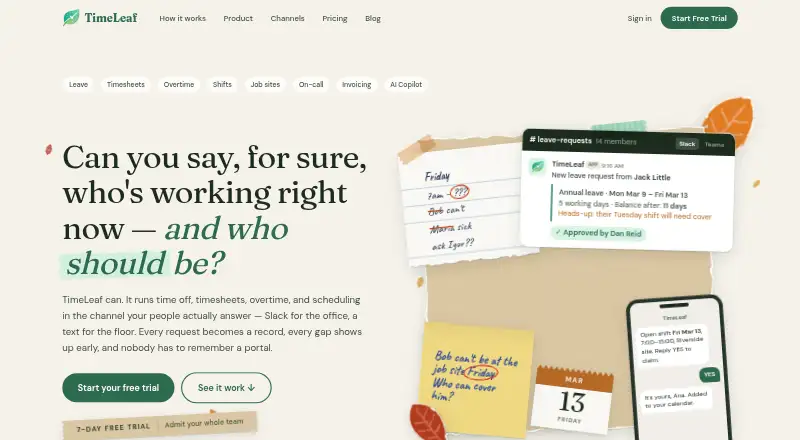
TimeLeaf is web software for teams managing time off, timesheets, overtime and shift scheduling. Leave policies can vary by team, country and employment type, with accruals, rollovers, blackout periods and approval workflows. Professional and higher plans add clock-in through chat or the web app, manager-approved weekly timesheets, overtime detection and a time bank. Scheduling includes role qualifications and coverage warnings; job-site check-ins use GPS and geofence warnings. Integrations include Slack, Microsoft Teams, Google Chat, Google and Outlook calendars, QuickBooks Online and Xero. TimeLeaf exports payroll files but does not run payroll, and direct Xero payroll sync is limited to Australia, New Zealand and the United Kingdom. Pricing starts at $45/mo with a 7-day trial and no free plan. Starter is 45.00 USD monthly billed at $540/year; Professional is 81.00 USD monthly, Business 108.00 USD monthly, and Enterprise uses custom pricing. The company is based in Alberta, Canada.
Who it suits
TimeLeaf suits mixed desk-and-shift teams using chat, web, email or push notifications. It fits organizations needing configurable leave, timekeeping, scheduling, payroll exports and employee self-service.
What it does well
- Configurable leave accruals and rollovers
- Approval workflows included
- GPS and geofence job-site checks
- Integrates with Slack and Teams
- 7-day trial available
What to know first
- No free plan
- Does not run payroll
- No public REST API
- Starts at $45/mo
Limits
Starter includes 10 employees, with an extra-employee charge thereafter. Professional includes time tracking and timesheets, shift scheduling, contracts and e-signature, and QuickBooks and Xero integration. There is no free plan.
Plans
| Plan | Billed and limits | Price |
|---|---|---|
| Business | Billed $1,296/year · 10 employees included · then $10.80/extra employee · named approvers · employment-based accruals · shift automation · AI copilot (MCP) | $108 a month |
| Starter | Billed $540/year · 10 employees included · then $4.50/extra employee · leave requests & approvals · team calendar · email, Slack, Teams & Google Chat · payroll CSV export | $45 a month |
| Professional | Billed $972/year · 10 employees included · then $8.10/extra employee · time tracking & timesheets · shift scheduling · contracts & e-signature · QuickBooks & Xero integration | $81 a month |
| Enterprise | Custom · 10 employees included · custom overage rate · named contact · directory sync write-back · always-on infrastructure · custom integrations | On request |
As timeleaf.io lists them, read 9 Oct 2026. The maker's own page has the final word.
Getting started
- Open the TimeLeaf website.
- Start the available 7-day trial.
- Choose a plan based on employees and required features.
- Configure leave policies, accruals, rollovers, blackout periods and approval workflows.
- Connect supported chat, calendar, accounting or payroll services.
- Use the web app for leave, timekeeping, scheduling and job-site check-ins.
Verdict
TimeLeaf combines leave administration with time tracking, overtime controls and shift scheduling in a browser-based service. Its plans add integrations and automation by tier, while payroll remains export-only and API access is limited.
Questions
How much does TimeLeaf cost?
Starter costs $45 a month, billed $540 per year, for 10 employees. Professional costs $81 a month, Business $108 a month, and Enterprise uses custom pricing.
Does TimeLeaf offer a free plan or trial?
There is no free plan. A 7-day trial is available.
Which platforms does TimeLeaf support?
TimeLeaf is available through the web app. Chat clock-in is included on Professional and higher plans.
Does TimeLeaf run payroll?
No. It exports payroll files, and direct Xero payroll synchronization is limited to organizations in Australia, New Zealand and the United Kingdom.
What integrations are listed?
TimeLeaf lists Slack, Microsoft Teams, Google Chat, Google and Outlook calendars, QuickBooks Online and Xero.
Facts from TimeLeaf's own pages
- AI Copilot
- An MCP-compatible AI client can read workforce information, while proposed write actions require an authorized human approval. · timeleaf.io, 9 Oct 2026
- API limits
- The documentation says there is no public REST API and outbound webhooks require Business plan or higher. · timeleaf.io, 9 Oct 2026
- Data retention
- After account termination, data is retained for up to 30 days for export before deletion; the homepage says backups expire within 14 more days and hosted logs within 30 days. · timeleaf.io, 9 Oct 2026
- Headquarters
- Alberta, Canada · timeleaf.io, 28 Sept 2026
- Integrations
- The maker lists Slack, Microsoft Teams, Google Chat, Google and Outlook calendars, QuickBooks Online and Xero integrations. · timeleaf.io, 9 Oct 2026
- Intended teams
- The maker positions TimeLeaf for mixed desk-and-shift teams, including employees who use chat and floor staff who use web, email or push notifications. · timeleaf.io, 9 Oct 2026
- Leave policies
- Leave policies can vary by team, country and employment type, with accruals, rollovers, blackout periods and approval workflows. · timeleaf.io, 9 Oct 2026
- Payroll limits
- TimeLeaf exports payroll files but does not run payroll; direct Xero payroll sync is limited to AU, NZ and UK organizations. · timeleaf.io, 9 Oct 2026
- Privacy and compliance
- The maker says it does not sell personal data and that processing is primarily governed by Canadian PIPEDA and Alberta PIPA, with applicable jurisdictional rights also honored. · timeleaf.io, 9 Oct 2026
- Product
- TimeLeaf manages time off, timesheets, overtime and scheduling for teams using chat and the web app. · timeleaf.io, 9 Oct 2026
- Security
- The privacy policy describes encryption in transit and at rest, SSO and MFA support, role-based access controls, security monitoring and isolated tenant environments for managed SaaS deployments. · timeleaf.io, 9 Oct 2026
- Shifts and job sites
- Shift scheduling includes role qualifications and coverage warnings, while job-site check-ins use GPS and geofence warnings. · timeleaf.io, 9 Oct 2026
- Support
- Support is by email, with a stated aim to reply within one business day; the company says it does not yet publish a public status page. · timeleaf.io, 9 Oct 2026
- Timekeeping
- Professional and higher plans include chat or web clock-in, weekly manager-approved timesheets, overtime detection and a time bank. · timeleaf.io, 9 Oct 2026
Where TimeLeaf stands on Freedom251
- On-Call Scheduling Software#22 of 25
- Leave Management Software#52 of 55