Freedom251 › Daily Planner Apps
Tempus
What Tempus is
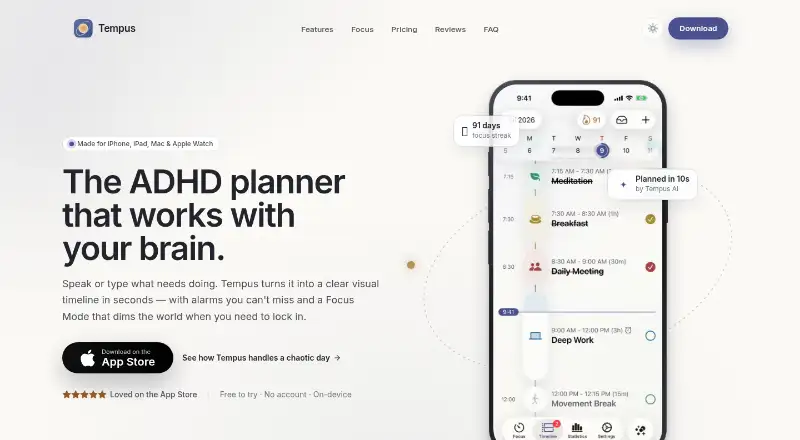
Tempus is an ADHD-focused planner built around time blocking. It brings tasks, routines, and calendar events onto a vertical timeline, where draggable blocks and a live time marker help show how the day is unfolding. Speak or type tasks and Tempus proposes a schedule in about ten seconds; you can accept, edit, or discard it. It can sync Google, iCloud, and Outlook calendars, and recurring tasks are supported. Focus Mode pauses distracting apps during a focus block and provides a countdown, including as a Lock Screen Live Activity. The maker says alarms can ring through Silent Mode, Focus, and Low Power Mode, with countdown alerts ahead of task transitions.
Tempus supports iPhone, iPad, Mac, and Apple Watch, with optional iCloud sync across Apple devices. Its timeline can be viewed and edited offline, and changes sync once the device is back online. No account is required; the maker says tasks and schedules stay on-device, while its privacy policy notes that data may be stored locally or with enabled providers and that service providers may process data for functions such as AI, analytics, sync, and payments. The free plan includes AI planning, three habits, a visual timeline, and reminders. Paid plans add unlimited planning and habits, a full timeline, alarms, countdowns, and Focus Mode.
Who it suits
Tempus suits adults with ADHD or executive function challenges who want tasks and calendar events organized in a time-blocked timeline. It may also fit students, professionals seeking deep work, and people who feel overwhelmed by traditional productivity apps.
What it does well
- Combines tasks, routines, and calendar events on a visual timeline.
- Accept, edit, or discard AI-proposed schedules.
- Syncs Google, iCloud, and Outlook calendars.
- Supports offline timeline viewing and editing.
- No account is required, and iCloud sync is optional.
What to know first
- The free plan is limited to three habits.
- Focus Mode and unlimited habits require a paid plan.
- Tempus Pro requires iOS 26.2 or later.
Limits
The free plan includes three habits and does not include the listed paid features: unlimited AI planning and habits, a full visual timeline, all alarms and countdowns, and Focus Mode. Tempus Pro requires iOS 26.2 or later; Apple Intelligence planning needs a supported device with Apple Intelligence enabled.
Plans
| Plan | Billed and limits | Price |
|---|---|---|
| Free | AI planning · 3 habits · visual timeline · reminders | Free |
| Monthly | $4.99/month · Unlimited AI planning · unlimited habits · full visual timeline · all alarms and countdowns · Focus Mode | $4.99 a month |
| Yearly | $19.99/year · Save 67% · Unlimited AI planning · unlimited habits · full visual timeline · all alarms and countdowns · Focus Mode | $19.99 a year |
| Lifetime | $39.99 one-time · Unlimited AI planning · unlimited habits · full visual timeline · all alarms and countdowns · Focus Mode · pay once, use forever | $39.99, paid once |
As gettempus.app lists them, read 7 Oct 2026. The maker's own page has the final word.
Getting started
- Visit https://www.gettempus.app/.
- Use Tempus on iPhone, iPad, Mac, or Apple Watch.
- Start with the free plan, which includes AI planning, three habits, a visual timeline, and reminders.
- Optionally connect Google, iCloud, or Outlook calendars.
- Choose Monthly at $4.99 a month, Yearly at $19.99 a year, or Lifetime at $39.99 a month for paid features.
Verdict
Choose Tempus if time blocking, calendar sync, and ADHD-focused planning tools match how you organize your day. Look elsewhere if you need more than three habits without paying, or if you do not use its Apple-device platforms.
Questions
Is Tempus free?
Yes. Its free plan is listed as free and includes AI planning, three habits, a visual timeline, and reminders.
What do the paid plans cost?
Monthly is $4.99 a month, Yearly is $19.99 a year, and Lifetime is listed at $39.99 a month.
Which calendars can Tempus sync?
The maker says it can sync Google, iCloud, and Outlook calendars onto the timeline.
Which devices does Tempus support?
The maker lists iPhone, iPad, Mac, and Apple Watch. The App Store listing says Tempus Pro requires iOS 26.2 or later.
Does Tempus require an account?
No account is required. The maker says tasks and schedules stay on-device and iCloud sync is optional.
Facts from Tempus's own pages
- AI planning
- Users can speak or type tasks and Tempus proposes a schedule in about ten seconds for them to accept, edit, or discard. · gettempus.app, 7 Oct 2026
- Alarms
- The maker says alarms ring through Silent Mode, Focus, and Low Power Mode, with countdown alerts before task transitions. · gettempus.app, 7 Oct 2026
- Apple devices
- The maker lists iPhone, iPad, Mac, and Apple Watch, with iCloud sync across Apple devices. · gettempus.app, 7 Oct 2026
- Calendar sync
- Yes · gettempus.app, 20 Sept 2026
- Focus Mode
- Focus Mode pauses distracting apps during a focus block and shows a countdown timer, including as a Lock Screen Live Activity. · gettempus.app, 7 Oct 2026
- Focus sessions
- Yes · gettempus.app, 20 Sept 2026
- Free plan
- Yes · gettempus.app, 20 Sept 2026
- Integrations
- The maker says Tempus can sync Google, iCloud, and Outlook calendars onto the timeline. · gettempus.app, 7 Oct 2026
- Intended users
- The App Store listing describes Tempus as suited to adults with ADHD or executive function challenges, students, professionals seeking deep work, and people overwhelmed by traditional productivity apps. · apps.apple.com, 7 Oct 2026
- Mobile platforms
- ios · gettempus.app, 20 Sept 2026
- Offline use
- Tempus supports viewing and editing the timeline offline; changes sync when the device is back online. · gettempus.app, 7 Oct 2026
- Planning method
- time blocking · gettempus.app, 20 Sept 2026
- Privacy
- The maker says no account is required, tasks and schedules stay on-device, and iCloud sync is optional. · gettempus.app, 7 Oct 2026
- Privacy policy
- The privacy policy says data may be stored locally or with enabled providers, and service providers may process data for functions such as AI, analytics, sync, and payments. · gettempus.app, 7 Oct 2026
- Purpose
- Tempus is an ADHD-focused planner designed to help with time blindness, task paralysis, forgetfulness, and overwhelm. · gettempus.app, 7 Oct 2026
- Recurring tasks
- Yes · gettempus.app, 20 Sept 2026
- Requirements
- The App Store listing says Tempus Pro requires iOS 26.2 or later; Apple Intelligence planning needs a supported device with Apple Intelligence enabled. · apps.apple.com, 7 Oct 2026
- Support
- The maker lists [email protected] for questions and support. · gettempus.app, 7 Oct 2026
- Timeline
- Tasks, routines, and calendar events appear together on a visual vertical timeline with draggable blocks and a live time marker. · gettempus.app, 7 Oct 2026
Where Tempus stands on Freedom251
- Daily Planner Apps#20 of 137