Freedom251 › Ebook Reader Software
Talebook
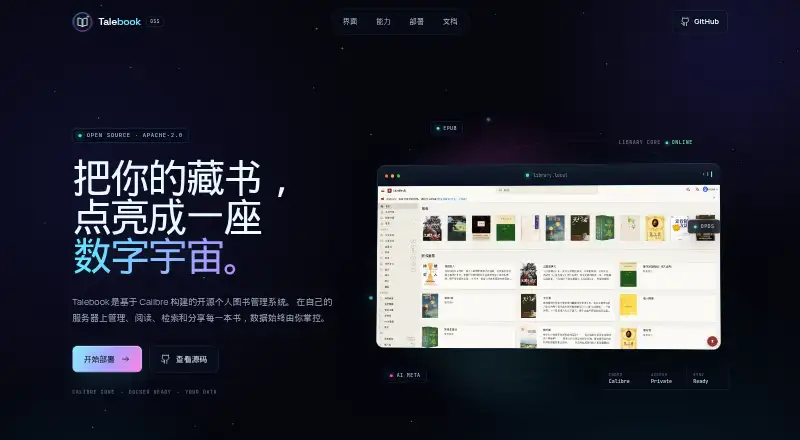
What Talebook is
Talebook is a free, open-source personal book management system built on Calibre. Its web library includes a built-in candle-reader for EPUB, PDF, MOBI, AZW3, and other formats, with automatic conversion for non-EPUB files. Users can search multiple book metadata sources in parallel and use AI-powered recognition to find book information. It supports social login through services including QQ, Weibo, and GitHub, with granular permissions for multi-user access.
Talebook supports OPDS apps such as KyBooks and can browse and import from external OPDS libraries. Users can manage multiple Kindle devices and send books with automatic format conversion. Legado-style book sources can be imported to search and read web novels, then save them to the library. The project is licensed under MIT. Talebook provides Docker images and recommends Docker Compose for deployment; after startup, setup proceeds through a web initialization wizard. A separate Moke desktop app is listed for Windows, macOS, and Linux. The FAQ says Tornado's default upload limit is 100 MB and can be raised in admin settings; unresolved issues can be reported through a GitHub issue.
Who it suits
Talebook suits readers who want a self-hosted or web book library with online reading, metadata tools, and multi-user access. Kindle users and readers using OPDS apps may also find its device and integration support useful.
What it does well
- Built-in reader supports several common book formats.
- Searches multiple metadata sources in parallel.
- Supports OPDS apps and external OPDS libraries.
- Can send books to multiple Kindle devices.
- Free and licensed under MIT.
What to know first
- Recommended deployment uses Docker Compose.
- Default upload limit is 100 MB.
- Initial setup requires a web initialization wizard.
Limits
The FAQ gives Tornado a default upload limit of 100 MB; an administrator can increase it in admin settings.
Getting started
- Open the Talebook website
- Deploy the provided Docker image, with Docker Compose recommended
- Start Talebook and open its web initialization wizard
- Complete the initial setup in the wizard
- Use the web library or the listed Moke desktop app on Windows, macOS or Linux
Verdict
Talebook pairs a Calibre-based library with reading, metadata search, OPDS, and Kindle delivery features. It is free and open source, though deployment involves Docker and the default upload limit is 100 MB unless increased in admin settings.
Questions
Is Talebook free?
Yes. Talebook is free and open source under the MIT License.
Which platforms does Talebook support?
Talebook supports web and self-hosted use. The Moke desktop app is listed for Windows, macOS and Linux.
Which formats can its reader open?
The candle-reader supports EPUB, PDF, MOBI, AZW3, TXT and other formats, with automatic conversion for non-EPUB files.
Does Talebook work with OPDS apps?
Yes. It supports OPDS, including compatibility with KyBooks and browsing or importing from external OPDS libraries.
Can it send books to Kindles?
Yes. Users can manage multiple Kindle devices and send books with automatic format conversion.
Facts from Talebook's own pages
- Book metadata
- It searches multiple sources for book information and offers AI-powered automatic recognition. · talebook.org, 9 Oct 2026
- Book sources
- Users can import Legado-style book sources to search and read web novels, then save them to their library. · talebook.org, 4 Oct 2026
- Deployment
- Talebook provides Docker images and recommends Docker Compose for deployment. · talebook.org, 9 Oct 2026
- Desktop platforms
- The Moke desktop app is available for Windows, macOS and Linux. · talebook.org, 9 Oct 2026
- Integrations
- Talebook supports OPDS apps such as KyBooks and can browse and import from external OPDS libraries. · talebook.org, 9 Oct 2026
- Kindle delivery
- It can manage multiple Kindle devices and push books with automatic batch format conversion. · talebook.org, 9 Oct 2026
- License
- The About page says Talebook is open-sourced under the MIT License. · talebook.org, 4 Oct 2026
- Metadata
- Talebook offers parallel searches across book metadata sources and AI-powered book information recognition. · talebook.org, 4 Oct 2026
- Multi-user access
- It supports social login through services including QQ, Weibo and GitHub, with granular permissions and bcrypt encryption. · talebook.org, 9 Oct 2026
- Online book sources
- Users can import Legado-style sources to search and read web novels and save them to the local library. · talebook.org, 9 Oct 2026
- Online reading
- Its built-in candle-reader supports EPUB, PDF, MOBI, AZW3 and other formats, with automatic conversion for non-EPUB files. · talebook.org, 9 Oct 2026
- OPDS
- Talebook supports OPDS and is compatible with KyBooks and other reading apps. · talebook.org, 4 Oct 2026
- Purpose
- Talebook is a personal book management system built on Calibre. · talebook.org, 9 Oct 2026
- Reading
- Its built-in candle-reader supports EPUB, PDF, MOBI, and AZW3, among other formats. · talebook.org, 4 Oct 2026
- Security
- The project describes bcrypt password storage, image CAPTCHA and GeeTest verification for login, registration and password reset. · github.com, 9 Oct 2026
- Setup
- After startup, users complete setup through a web initialization wizard. · talebook.org, 4 Oct 2026
- Support
- The FAQ directs users whose issue is unresolved to file a GitHub issue. · talebook.org, 9 Oct 2026
- Upload limit
- The FAQ says Tornado's default upload limit is 100 MB and can be increased in admin settings; Nginx may impose a separate limit. · talebook.org, 9 Oct 2026
Where Talebook stands on Freedom251
- Ebook Reader Software#23 of 27