Freedom251 › Ebook Reader Software
Bookworm
What Bookworm is
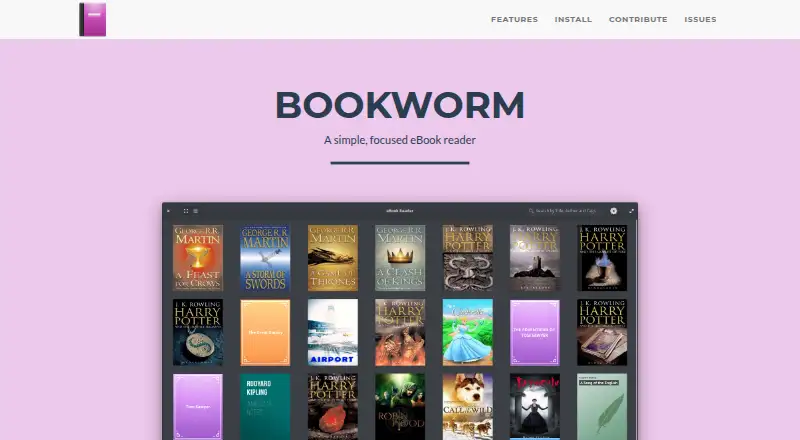
Bookworm is a free, open-source eBook reader for Linux. Version 1.1.2 opens EPUB, PDF, MOBI, FB2, CBR, and CBZ files. Its library supports grid or list views, metadata editing, list sorting, and search filtering. Reading controls include text zoom, margins, line width, light, sepia, and dark profiles, plus bookmarks and full-screen mode. An information panel collects the table of contents, bookmarks, search results, and annotations. Preferences cover fonts, reading profiles, caching, opening the library at startup, and loading books automatically from multiple folders. The maker lists installation through elementary OS AppCenter, an Ubuntu PPA, openSUSE, Flatpak, and source builds for Ubuntu, Debian, and Fedora. Development currently focuses on elementary OS, while broader distro-agnostic support is a roadmap goal. The project uses the GPL-3.0 license, welcomes pull requests and issue-based feature requests, and accepts browser-based translation contributions through Weblate.
Who it suits
Bookworm suits Linux users who want a focused reader with library organization, display controls, bookmarks, and annotations. It is also relevant to people using the listed Linux installation methods.
What it does well
- Supports six listed eBook and comic formats
- Grid and list library views
- Adjustable zoom, margins, and line width
- Bookmarks and annotations included
- Free and GPL-3.0 licensed
What to know first
- Linux availability only
- Development currently focuses on elementary OS
- Distro-agnostic support remains a roadmap goal
Limits
Bookworm is available for Linux, with current development focused on elementary OS. Distro-agnostic support is described as a roadmap goal.
Getting started
- Install through the elementary OS AppCenter, Ubuntu PPA, openSUSE, or Flatpak
- Build from source on Ubuntu, Debian, or Fedora if preferred
- Open Bookworm and load books from one or more folders
- Choose grid or list view and organize metadata
- Adjust fonts, reading profiles, zoom, margins, or line width
- Use bookmarks, annotations, search, and the table of contents while reading
Verdict
Bookworm combines broad file-format support with practical library, reading, and annotation controls. Linux users should check the available installation route and the project’s elementary OS focus.
Questions
Which formats does Bookworm support?
Version 1.1.2 supports EPUB, PDF, MOBI, FB2, CBR, and CBZ files.
What library tools are included?
The library offers grid and list views, metadata editing, sorting in list view, and search filtering.
Can I annotate and bookmark books?
Yes. The information panel includes bookmarks, annotations, search results, and a table of contents.
Which reading settings can I change?
You can adjust text zoom, margins, line width, fonts, and reading profiles, and choose light, sepia, or dark modes.
How can I install it?
Options include elementary OS AppCenter, an Ubuntu PPA, openSUSE, Flatpak, and source builds for Ubuntu, Debian, and Fedora.
Is Bookworm open source?
Yes. The project is licensed under GPL-3.0 and accepts pull requests and feature requests.
Facts from Bookworm's own pages
- Contributions
- The maker welcomes pull requests from people familiar with Vala, GTK and WebKit, and invites feature requests through issues. · babluboy.github.io, 8 Oct 2026
- Customization
- Preferences include font and reading-profile customization, caching, a library-at-start option, and automatic loading from multiple folders. · babluboy.github.io, 8 Oct 2026
- Development focus
- The site says Bookworm is currently developed for elementary OS and describes distro-agnostic support as a roadmap goal. · babluboy.github.io, 8 Oct 2026
- Formats
- Version 1.1.2 supports EPUB, PDF, MOBI, FB2, CBR, and CBZ files. · babluboy.github.io, 8 Oct 2026
- Library
- The library has grid and list views, metadata editing, sorting in list view, and search filtering. · babluboy.github.io, 8 Oct 2026
- License
- The GitHub repository identifies the project as licensed under GPL-3.0. · github.com, 8 Oct 2026
- Linux availability
- The maker lists Elementary OS AppCenter, an Ubuntu PPA, openSUSE, Flatpak, and source builds for Ubuntu, Debian and Fedora. · babluboy.github.io, 8 Oct 2026
- Linux installation
- The maker lists installation options for elementary OS, Ubuntu-based systems, openSUSE, and Flatpak, plus instructions to build from source on Ubuntu, Debian, and Fedora. · babluboy.github.io, 8 Oct 2026
- Navigation and annotations
- The reader provides a table of contents, bookmarks, search results and annotations in its information panel. · babluboy.github.io, 8 Oct 2026
- Navigation and notes
- The info panel includes a table of contents, bookmarks, search results, and annotations. · babluboy.github.io, 8 Oct 2026
- Open source and support
- Bookworm is open source; the maker welcomes pull requests and feature requests through issues. · babluboy.github.io, 8 Oct 2026
- Product
- Bookworm describes itself as a simple, focused eBook reader. · babluboy.github.io, 8 Oct 2026
- Purpose
- Bookworm describes itself as a simple, focused eBook reader. · babluboy.github.io, 8 Oct 2026
- Reading
- Readers can adjust text zoom, margins, and line width, choose light, sepia, or dark profiles, bookmark pages, and use full-screen mode. · babluboy.github.io, 8 Oct 2026
- Reading controls
- Readers can adjust text zoom, margins and line width, choose light, sepia or dark profiles, bookmark pages and use full-screen mode. · babluboy.github.io, 8 Oct 2026
- Supported formats
- Version 1.1.2 lists EPUB, PDF, MOBI, FB2, CBR and CBZ support. · babluboy.github.io, 8 Oct 2026
- Translations
- The project uses Weblate for browser-based translation contributions. · babluboy.github.io, 8 Oct 2026
Where Bookworm stands on Freedom251
- Ebook Reader Software#19 of 27