Freedom251 › Ebook Reader Software
Yomu EBook Reader
What Yomu EBook Reader is
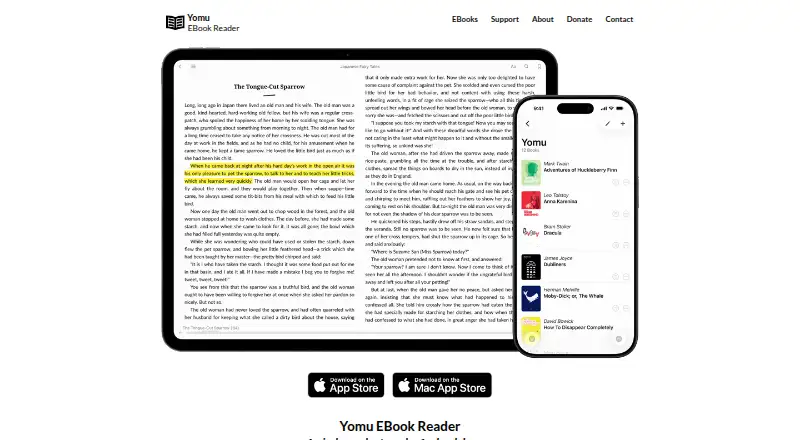
Yomu EBook Reader is an ebook app for iPhone, iPad, and Mac with reading controls for adjusting fonts and sizes, switching between day and night modes, and choosing page or scroll layouts. Readers can save their preferred settings for each book. The app handles DRM-free EPUB, MOBI, Kindle AZW/AZW3/KF8, PDF, CBZ, and CBR files. It supports text selection for notes and highlights, plus searches within EPUB, MOBI, and Kindle books.
Books can be imported through AirDrop, OPDS, Calibre, Dropbox, Google Drive, OneDrive, iTunes, or other third-party storage providers. Yomu also offers a selection of public-domain ebooks from sources including Standard Ebooks, Project Gutenberg, ManyBooks, and epubBooks. Books and annotations sync across a user's devices through Apple iCloud. The free plan provides basic features, with a document limit and possible ads. Yomu Pro costs $7.99 USD once and includes the Cloud Library with iCloud sync, unlimited documents, and no advertisements. An optional Yomu Pro (Karma) purchase costs $12.99 USD once.
Who it suits
Yomu suits readers who want to read DRM-free ebooks on iPhone, iPad, or Mac, with control over layout and appearance. It also fits people who want notes, highlights, search, and iCloud syncing across their devices.
What it does well
- Supports EPUB, MOBI, Kindle, PDF, CBZ, and CBR files.
- Offers page and scroll layouts, plus day and night modes.
- Text selection supports notes and highlights.
- Imports books from AirDrop, OPDS, Calibre, and cloud storage.
- Apple iCloud syncs books and annotations across devices.
What to know first
- The free plan limits the number of documents.
- Ads may appear on the free plan.
- Cloud Library and iCloud sync require Yomu Pro.
Limits
The free plan has a document limit, may display ads, and does not include the Pro Cloud Library. Yomu Pro costs $7.99 USD once and includes unlimited documents, iCloud sync, and no advertisements.
Plans
| Plan | Billed and limits | Price |
|---|---|---|
| Free | Basic features · ads may display · limited documents · no iCloud library sync | Free |
| Yomu Pro (Karma) | Optional Pro in-app purchase; the listing does not specify different features from Yomu Pro | $12.99, paid once |
| Yomu Pro | Cloud Library with Apple iCloud sync · unlimited documents · no advertisements | $7.99, paid once |
As yomu-reader.com lists them, read 7 Oct 2026. The maker's own page has the final word.
Getting started
- Open the Yomu website to find the app.
- Install Yomu on iOS or macOS.
- Import books using AirDrop, OPDS, Calibre, a listed cloud provider, iTunes, or another third-party storage provider.
- Use the free plan or purchase Yomu Pro for Cloud Library, iCloud sync, unlimited documents, and no ads.
Verdict
Choose Yomu if you want a reader for iOS and macOS with flexible display controls, annotations, and iCloud syncing. The free plan is limited by document count and may show ads; unlimited documents and an ad-free experience cost $7.99 USD once.
Questions
Is Yomu EBook Reader free?
Yes. The Free plan costs nothing and includes basic features, a document limit, and ads that may display.
How much does Yomu Pro cost?
Yomu Pro costs $7.99 USD once. It includes Cloud Library with Apple iCloud sync, unlimited documents, and no advertisements.
Which platforms does Yomu support?
Yomu is available for iOS and macOS.
Which ebook formats can it read?
It supports DRM-free EPUB, MOBI, Kindle AZW/AZW3/KF8, PDF, CBZ, and CBR files.
Can Yomu sync books and annotations?
Yes. The Pro Cloud Library uses Apple iCloud to sync books and annotations across a user's devices.
Who develops Yomu?
The App Store identifies Beat Raess as the app's developer and seller.
Facts from Yomu EBook Reader's own pages
- Annotations and search
- The reader supports text selection for notes and highlights, and searching inside EPUB, Mobi, and Kindle books. · yomu-reader.com, 7 Oct 2026
- Cloud sync
- Yomu stores books and annotations in Apple iCloud and syncs changes across a user's devices. · yomu-reader.com, 7 Oct 2026
- Developer
- The App Store identifies Beat Raess as the app's developer and seller. · apps.apple.com, 7 Oct 2026
- Formats
- Yomu supports DRM-free EPUB, Mobi, Kindle, PDF, and CBZ/CBR comic files. · yomu-reader.com, 7 Oct 2026
- Free version limits
- The free version includes basic features but has a document limit, can display ads, and does not include the Pro Cloud Library. · apps.apple.com, 7 Oct 2026
- Imports and integrations
- Books can be imported using AirDrop, OPDS, Calibre, Dropbox, Google Drive, OneDrive, iTunes, or other third-party storage providers. · yomu-reader.com, 7 Oct 2026
- Privacy
- The privacy policy says Yomu uses TelemetryDeck for anonymized app usage data, BugSnag for crash reports, and Umami for website traffic and in-app support resource analytics. · yomu-reader.com, 7 Oct 2026
- Public domain books
- The site offers a curated selection of ebooks and names Standard Ebooks, Project Gutenberg, ManyBooks, and epubBooks as sources of freely available titles. · yomu-reader.com, 7 Oct 2026
- Purpose
- Yomu is an independent ebook reader designed for iPhone, iPad, and Mac, with a minimal interface focused on readability. · yomu-reader.com, 7 Oct 2026
- Reading controls
- Readers can choose fonts, day and night reading modes, font sizes, and page or scroll layouts, and save defaults for each book. · yomu-reader.com, 7 Oct 2026
- Security
- Yomu says it uses commercially acceptable means to protect personal information but cannot guarantee absolute security. · yomu-reader.com, 7 Oct 2026
- Support
- For information about the app, Yomu lists hello@ yomu-reader.com as its contact address (shown on the page with [at] in place of @). · yomu-reader.com, 7 Oct 2026
Where Yomu EBook Reader stands on Freedom251
- Ebook Reader Software#25 of 27