Freedom251 › Ebook Reader Software
MapleRead
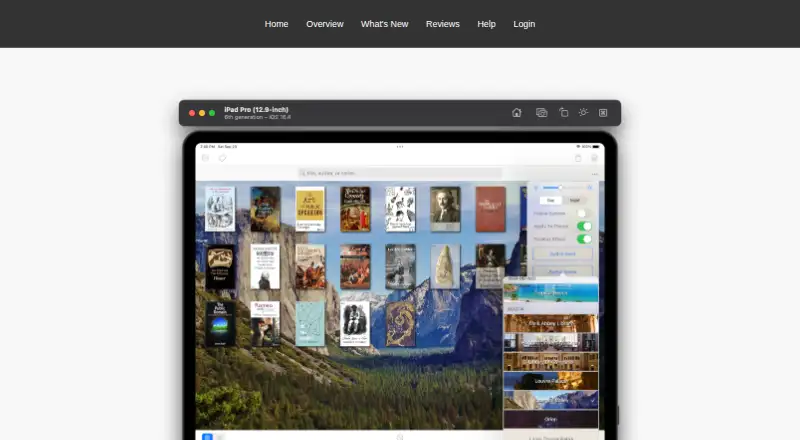
What MapleRead is
MapleRead is an iOS e-book reader family with CX, CE, and SE editions. Its EPUB reader offers adjustable reading styles, layouts, themes, and fonts, while synchronized immersion reading pairs text with generated narrator voices in more than 40 languages. Readers can look up words, translate sentences, save vocabulary, highlight passages, and write notes. Library tools organize books into sets and tags and let readers edit book metadata.
All editions read DRM-free, password-free EPUB books. SE also includes a reader for DRM-free, password-free PDFs. MapleRead works with Calibre and supports importing or transferring books through OPDS, HTML, PC Upload, iTunes, and AirDrop. Cloud sync covers reading positions, notes, vocabulary, bookmarks, and book-set membership, but not book files; synced information can be viewed in a browser on desktop or mobile devices. The maker describes MapleRead as intended for readers with large or growing collections. Maplepop’s privacy policy says accounts use an email address as the Maplepop ID and personal information is not sold, rented, or shared with third parties. It also says online services such as reading-progress sync protect information in transit using SSL.
Who it suits
MapleRead suits iOS readers who want adjustable EPUB reading, annotation, vocabulary tools, and library organization. Its editions also give readers a choice of PDF support and a built-in Library Server in SE.
What it does well
- Customizable EPUB styles, layouts, themes, and fonts
- Narrator voices in over 40 languages
- Word lookup, translation, vocabulary, highlights, and notes
- Book sets, tags, and editable metadata
- Cloud sync includes reading positions and annotations
What to know first
- Available on iOS only
- CX has limitations and in-app purchases
- Cloud sync does not include book files
Limits
CX is free with limitations and in-app purchases. CE has no PDF reader or built-in Library Server; SE includes both.
Plans
| Plan | Billed and limits | Price |
|---|---|---|
| MapleRead CX | Free to try; in-app purchases are listed. · CE with some limitations | Free |
| MapleRead SE-CE Bundle | One-time bundle purchase. · Includes MapleRead SE and MapleRead CE | $10.49, paid once |
| MapleRead CE | One-time purchase; no recurring subscription fees. · EPUB reader · no PDF reader · no built-in Library Server | $6.99, paid once |
| MapleRead SE | One-time purchase; no recurring subscription fees. · EPUB and PDF reader · built-in Library Server | $8.99, paid once |
As maplepop.com lists them, read 8 Oct 2026. The maker's own page has the final word.
Getting started
- Open the MapleRead website for product information.
- Choose the CX, CE, SE, or SE-CE Bundle edition.
- Get MapleRead on iOS.
- Import or transfer books using OPDS, HTML, PC Upload, iTunes, or AirDrop.
Verdict
Choose MapleRead if you read on iOS and want EPUB customization, learning tools, and organized collections. Choose SE if PDF reading or a built-in Library Server matters; CE omits both, while CX has limitations.
Questions
What does MapleRead cost?
CX is free to try and lists in-app purchases. CE costs 6.99 USD once, SE costs 8.99 USD once, and the SE-CE Bundle costs 10.49 USD once.
Is there a free plan or trial?
CX is listed as free, with limitations and in-app purchases. A free trial is also listed.
Which platforms and formats does it support?
MapleRead supports iOS and EPUB. SE also reads PDF; EPUB and PDF files must be DRM-free and password-free.
Does MapleRead sync books across devices?
Cloud sync covers reading positions, notes, vocabulary, bookmarks, and book-set membership, but not book files. Synced information can be viewed in a desktop or mobile browser.
What integrations and import options are available?
MapleRead works with Calibre and supports book importing and transfer through OPDS, HTML, PC Upload, iTunes, and AirDrop.
Who makes MapleRead, and what does its privacy policy say?
Maplepop’s policy says accounts use an email address as the Maplepop ID and personal information is not sold, rented, or shared with third parties. It says online services such as reading-progress sync use SSL to protect information in transit.
Facts from MapleRead's own pages
- Audio
- It can generate pseudo audiobooks with narrator voices in over 40 languages and supports synchronized immersion reading. · maplepop.com, 8 Oct 2026
- Cloud sync
- Secure cloud sync covers reading positions, notes, vocabulary, bookmarks, and book-set membership, but not the book files. · maplepop.com, 8 Oct 2026
- EPUB reading
- The EPUB reader supports customizable reading styles, layouts, themes, and fonts. · maplepop.com, 8 Oct 2026
- File compatibility
- MapleRead reads DRM-free, password-free EPUB books, while MapleRead SE also includes a PDF reader for DRM-free, password-free PDFs. · maplepop.com, 8 Oct 2026
- Integrations
- The app works with Calibre and supports importing and transferring books through OPDS, HTML, PC Upload, iTunes, and AirDrop. · maplepop.com, 8 Oct 2026
- Intended users
- The maker describes MapleRead as designed for book lovers who may have a large or growing book collection. · maplepop.com, 8 Oct 2026
- Learning tools
- Readers can look up words, translate sentences, collect vocabulary, highlight text, and write notes. · maplepop.com, 8 Oct 2026
- Library management
- The app organizes books with sets and tags and lets users edit book metadata. · maplepop.com, 8 Oct 2026
- Privacy
- The privacy policy says Maplepop accounts use an email address as the Maplepop ID and that personal information is not sold, rented, or shared with third parties. · maplepop.com, 8 Oct 2026
- Product
- MapleRead is an iOS e-book reader family with SE, CE, and CX editions. · maplepop.com, 8 Oct 2026
- Security
- The privacy policy says online services such as reading-progress synchronization protect personal information in transit using SSL. · maplepop.com, 8 Oct 2026
- Support
- The help page provides FAQs and instructions for reporting EPUB rendering bugs through the app. · maplepop.com, 8 Oct 2026
- Web access
- Synced data can be viewed in a web browser on desktop and mobile devices. · maplepop.com, 8 Oct 2026
Where MapleRead stands on Freedom251
- Ebook Reader Software#22 of 27