Freedom251 › Usability Testing Software
Superflow
What Superflow is
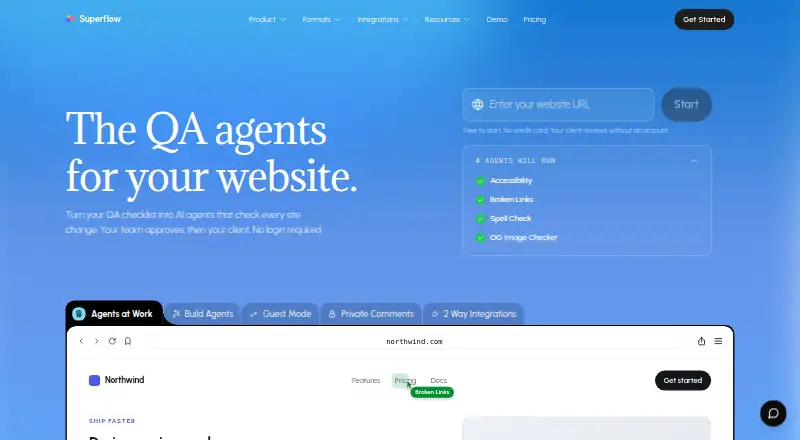
Superflow is a web-based QA platform for turning website checklists into AI agents that review site changes. The agents leave findings as comments for teams to assess and approve, while Superflow Memory carries context from one review to the next. Reviews cover websites, video, Lottie, PDFs, and images. Comments can be pinned to page elements with a screenshot of what the reviewer saw, and internal notes can be kept private. Clients can review and approve through a link without an account, including from phones and on pages behind login flows. Teams can turn comments into tasks and follow statuses and approvals on a board or through supported task integrations. The maker lists Slack, Asana, Monday, ClickUp, Webflow, WordPress, Google Tag Manager, GitHub, Vercel, webhooks, and a REST API among integrations. Supported task integrations sync statuses and sign-offs in both directions, and queued events retry if a connector goes down. Starter includes one project, one team seat, unlimited guest seats, 1GB storage, and five AI credits per month. A scan of up to 30 pages uses five credits; a rescan uses one unless more than half the site changed. Paid plans start at $24/user/mo (annual), and a 10-day trial is available.
Who it suits
Superflow suits agencies and web or marketing teams that review website changes and need clients to comment or approve through a link. It also fits teams that want to track review work on a board or sync it with supported task tools.
What it does well
- AI agents check site changes and leave findings as comments.
- Reviews cover websites, video, Lottie, PDFs, and images.
- Pinned comments include screenshots; internal notes can stay private.
- Clients can review and approve through a link without an account.
- Supported task integrations sync statuses and sign-offs both ways.
What to know first
- Starter is limited to one project and one team seat.
- Starter includes five AI credits per month.
- Paid plans start at $24/user/mo on annual billing.
Limits
Starter has one project, one team seat, 1GB storage, and five AI credits per month. A scan of up to 30 pages costs five credits; a rescan costs one credit unless more than 50% of the site changed.
Plans
| Plan | Billed and limits | Price |
|---|---|---|
| Starter | billed yearly · 1 project · 1 team seat · unlimited guest seats · 1GB storage · 5 AI credits/mo | Free |
| Growth | billed yearly · Unlimited projects · $24/mo per team seat · 10GB storage · 30 AI credits/mo | $24 a year |
| Scale | billed yearly · Unlimited projects · $28/mo per team seat · 30GB storage · 60 AI credits/mo | $28 a year |
| Enterprise | Custom · Custom team seats · 100 GB storage · custom AI credits | On request |
As usesuperflow.ai lists them, read 5 Oct 2026. The maker's own page has the final word.
Getting started
- Open the Superflow website.
- Use the free Starter plan or choose a paid plan; a 10-day trial is available.
- Set up a project and team seat on Starter, or use unlimited projects on Growth or Scale.
- Use the web platform to review site changes and leave comments.
- Invite clients to review and approve through a link without an account.
- Connect supported task tools or other listed integrations if needed.
Verdict
Choose Superflow if your team needs AI-assisted website reviews, client approvals by link, and task tracking or synchronization. Starter provides a free entry point, while teams needing more projects or credits can consider Growth at $24/user/mo on annual billing. Enterprise is the listed tier with SAML-based SSO and data self-hosting.
Questions
Does Superflow have a free plan?
Yes. Starter is free and includes one project, one team seat, unlimited guest seats, 1GB storage, and five AI credits per month.
How much do paid plans cost?
Growth is listed at $24/user/mo and Scale at $28/user/mo on annual billing. Enterprise pricing is custom.
Is there a free trial?
Yes, a 10-day trial is listed.
What platforms does Superflow support?
The listed platform is web.
Which integrations are listed?
They include Slack, Asana, Monday, ClickUp, Webflow, WordPress, Google Tag Manager, GitHub, Vercel, webhooks, and a REST API.
What security and compliance details does the maker state?
Customer data is encrypted at rest, and data in transit uses TLS 1.2 or higher. The integrations page states SOC 2 Type II, HIPAA with BAA, data residency options, and WCAG 2.1 AA on client-facing surfaces.
Facts from Superflow's own pages
- AI agents
- Its agents check sites and leave findings as comments, while Superflow Memory carries context across reviews. · usesuperflow.ai, 5 Oct 2026
- AI credit limits
- Pricing says scans use credits: a small site scan of up to 30 pages costs 5 credits, and a rescan costs 1 credit unless more than 50% of the site changed. · usesuperflow.ai, 5 Oct 2026
- Client access
- Clients can review and approve from a link without an account, including on phones and pages behind login flows. · usesuperflow.ai, 5 Oct 2026
- Compliance
- The integrations page states SOC 2 Type II, HIPAA with BAA, data residency options, and WCAG 2.1 AA on client-facing surfaces. · usesuperflow.ai, 5 Oct 2026
- Enterprise features
- Enterprise includes SAML-based SSO, REST API, and data self-hosting in the listed plan features. · usesuperflow.ai, 5 Oct 2026
- Integration behavior
- The maker says supported task integrations sync statuses and sign-offs both ways, and queued events retry if a connector goes down. · usesuperflow.ai, 5 Oct 2026
- Integrations
- The integrations page lists Slack, Asana, Monday, ClickUp, Webflow, WordPress, Google Tag Manager, GitHub, Vercel, webhooks, and a REST API. · usesuperflow.ai, 5 Oct 2026
- Intended users
- The maker describes Superflow as an AI QA reviewer for agencies and says it is trusted by web and marketing agencies. · usesuperflow.ai, 5 Oct 2026
- Pinned feedback
- Comments pin to page elements and include a screenshot of what the reviewer saw; internal notes can remain private. · usesuperflow.ai, 5 Oct 2026
- Purpose
- Superflow describes itself as a QA platform that turns website checklists into AI agents that check site changes for teams to review and approve. · usesuperflow.ai, 5 Oct 2026
- Review formats
- The site lists website, video, Lottie, PDF, and image review formats. · usesuperflow.ai, 5 Oct 2026
- Security
- The security page says customer data is encrypted at rest and Superflow uses TLS 1.2 or higher for data in transit. · usesuperflow.ai, 5 Oct 2026
- Support
- Pricing lists Community Slack support for Starter, email, Community Slack, and chat for Growth and Scale, and private Slack and Zoom for Enterprise. · usesuperflow.ai, 5 Oct 2026
- Workflow
- Comments can become tasks, and review statuses and approvals can be tracked on a board or synced to supported task tools. · usesuperflow.ai, 5 Oct 2026
Where Superflow stands on Freedom251
- Usability Testing Software#16 of 52
- Markup Software#15 of 26