Freedom251 › Goal Tracking Apps
Strides
What Strides is
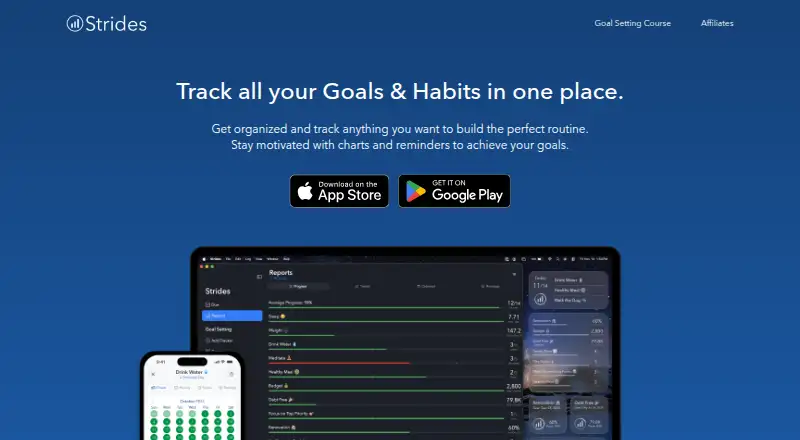
Strides is a goal and habit tracker that brings goals, habits, daily routines, tasks, and projects together. It offers four tracker types: Habit, Target, Average, and Project. To set a SMART goal, users can follow a three-step process or start with a tracker template; the app includes more than 150 templates and supports custom trackers. Progress tools include pace lines, streaks, success rates, calendars, line charts, and reports. A Daily Goals view filters trackers to those due for logging according to their repeat settings. Users can invite accountability partners to view selected goals, or collaborate on a goal through iCloud on Apple devices. Strides integrates with Apple Health and is available for Android, iOS, and macOS. The free plan covers tracking up to three goals and habits; Strides Plus and Lifetime plans remove that limit. The maker describes the company as a small business headquartered in Ohio, USA. Its privacy policy says it does not rent, sell, or share user data with other companies or advertisers. Apple-only users can store data on their devices and in iCloud; Android data is stored on the phone by default, with Firebase backup available if enabled.
Who it suits
Strides suits people who want to track habits, goals, routines, tasks, and projects in one app, with several tracker types and progress views. It may also suit users who want templates, Apple Health integration, or accountability through selected-goal sharing and iCloud collaboration on Apple devices.
What it does well
- Four tracker types cover habits, targets, averages, and projects.
- SMART goal setup uses a three-step process or a template.
- More than 150 templates are included, with custom trackers available.
- Progress views include streaks, calendars, charts, and reports.
- Apple Health integration is stated in the app listing.
- Privacy policy says user data is not rented, sold, or shared.
What to know first
- The free plan tracks up to three goals and habits.
- Goal collaboration through iCloud is for Apple devices.
Limits
The free plan covers tracking up to three goals and habits. Strides Plus and Lifetime remove that limit.
Plans
| Plan | Billed and limits | Price |
|---|---|---|
| Free | Track up to three goals and habits | Free |
| Strides Plus | Optional monthly subscription; price not stated on page · Unlimited goals and habits · sync and backup · progress reports · tags and filters · data export · goal notes | On request |
| Strides Plus | Optional annual subscription; price not stated on page · Unlimited goals and habits · sync and backup · progress reports · tags and filters · data export · goal notes | On request |
| Lifetime | One-time payment; price not stated on page · Unlimited goals and habits · sync and backup · progress reports · tags and filters · data export · goal notes | On request |
As stridesapp.com lists them, read 7 Oct 2026. The maker's own page has the final word.
Getting started
- Visit https://www.stridesapp.com/.
- Choose the version for Android, iOS, or macOS.
- Start with the free plan, which covers up to three goals and habits.
- Create a SMART goal in three steps or begin with a tracker template.
- Set repeat settings to determine when trackers are due for logging.
Strides combines habit, goal, routine, task, and project tracking in one app, with several tracker formats and unusually varied progress reports. It is best for individuals who want structured personal tracking, and for Apple users who need selective sharing or iCloud goal collaboration. Its flexibility is substantial, but the free tier becomes restrictive quickly and collaboration is not platform-neutral.
Overview
Strides supports Habit, Target, Average, and Project trackers, so a recurring behavior, numeric target, average-based measure, or multi-step effort can live in the same system. Users can build SMART goals through a three-step setup or start from a template. That range suits people managing several kinds of objectives; someone who only needs a short checklist may find the extra structure unnecessary.
The Daily Goals view shows only trackers due for logging under their repeat settings, keeping routine check-ins focused. Progress views include pace lines, streaks, success rates, calendars, line charts, and reports, allowing users to inspect consistency and trajectory instead of relying on a single completion figure. Milestone tracking is also supported.
Key features
Templates and custom tracking
More than 150 templates provide ready-made starting points, while custom trackers let users adapt the system to goals that do not fit a preset. This is a practical combination for beginners who want guidance and experienced users who need their own measurements.
Accountability and health data
Users can invite accountability partners to view selected goals. Apple-device users can collaborate on a goal through iCloud, which is useful for shared work inside that ecosystem but does not offer the same reach across platforms. The app listing also states that Strides integrates with Apple Health.
Privacy and support
Strides says it does not rent, sell, or share user data with other companies or advertisers. Apple-only users can keep data on their devices and in iCloud; Android data is stored on the phone by default, with Firebase backup available when enabled. Its stated safeguards include redundancy, daily offsite backups, SSL, and encrypted passwords. Support is routed through the in-app Help Center rather than a separate help site.
Pricing
| Plan | Price | What you get |
|---|---|---|
| Free | free | Track up to three goals and habits |
| Strides Plus | Custom pricing | Unlimited goals and habits |
| Lifetime | Custom pricing | Unlimited goals and habits |
The Free plan is suitable for a small set of priorities or for evaluating the workflow, but its combined three-goal-and-habit ceiling forces broader programs to prune their tracking. Strides Plus removes that limit and is the logical choice for ongoing, multi-area tracking. Lifetime also removes the limit, but its custom pricing means buyers should compare the one-time commitment with their expected use before choosing it.
Platforms
Strides has apps for Android, iOS, and macOS. Apple users get the additional iCloud collaboration and storage options, while Android users rely on on-device storage unless they enable Firebase backup.
Who it's for
Choose Strides for personal goal systems that mix habits, measurable targets, averages, and projects, especially when templates and detailed visual progress matter. It also fits accountability arrangements where a partner only needs access to selected goals. It is less suitable for users who need a generous free quota, cross-platform goal collaboration, or a simple, minimal tracker.
Pros and cons
- Pro: Four tracker types cover more than recurring habits, including project-style progress.
- Pro: Pace lines, streaks, success rates, calendars, charts, reports, and milestones support detailed review.
- Pro: More than 150 templates plus custom trackers shorten setup without locking users into presets.
- Pro: The stated privacy policy rejects renting, selling, or sharing data with advertisers and other companies.
- Con: Free tracking stops at three goals and habits, a serious constraint for broad personal systems.
- Con: iCloud collaboration is limited to Apple devices, reducing its usefulness for mixed-platform groups.
- Con: Plus and Lifetime pricing is custom, so costs cannot be assessed from the plan names alone.
Alternatives
For a visual goal-planning product with a 14-day full Pro trial and unlimited read access afterward, consider Goalscape. If you want a freemium service with three active goals, AI goal breakdown, a Today view limited to five tasks per day, and a web app on its free tier, Goaltree is the more targeted option. Week Plan fits readers seeking planner-oriented Lite and Ultimate tiers, while Beeminder is an alternative for users who prefer goal plans with limited free goals and unlimited data.
General Bots OKR Tracker suits organizations wanting free, self-hosted operation with unlimited users and AGPLv3 source. Weekdone is worth choosing when a free plan for up to three users and its listed OKR support are the priority. For two free SMART goals on iOS and the web, Lifetick is the narrower alternative. Perdoo is the better fit for teams seeking a free tier for up to five users with OKR/KPI tracking, strategy maps, meetings, and Slack and Teams integration. See the broader Goal Tracking Apps list for more options.
Verdict
Strides is a strong choice for individuals who want one flexible system for habits, targets, averages, and projects, backed by rich progress views and a large template library. Its main reason to choose it is the combination of tracker variety and review tools. Look elsewhere if three free goals and habits are not enough, if collaboration must work equally across platforms, or if you need transparent published pricing.
Verdict
Choose Strides if you want goal and habit tracking with multiple tracker types, templates, and detailed progress views. The free plan is capped at three goals and habits, and iCloud goal collaboration is for Apple devices.
Questions
Is Strides free?
Yes. It has a free plan covering up to three goals and habits.
What platforms does Strides support?
Strides is available on Android, iOS, and macOS.
What tracker types does it offer?
It offers Habit, Target, Average, and Project trackers.
Does Strides integrate with Apple Health?
Yes. The app listing states that Strides integrates with Apple Health.
Can other people see or work on my goals?
Users can invite accountability partners to view selected goals. They can also collaborate on a goal using iCloud on Apple devices.
How does Strides handle user data?
Its privacy policy says it does not rent, sell, or share user data with other companies or advertisers. Apple-only users can store data on their devices and in iCloud; Android data is stored on the phone by default, with Firebase backup available if enabled.
Facts from Strides's own pages
- Accountability
- Users can invite accountability partners to view selected goals or collaborate on a goal using iCloud on Apple devices. · stridesapp.com, 7 Oct 2026
- Company
- The maker describes itself as a small company headquartered in Ohio, USA. · stridesapp.com, 7 Oct 2026
- Daily Goals
- The Daily Goals view filters trackers to those due for logging based on their repeat settings. · stridesapp.com, 7 Oct 2026
- Data storage
- The policy says Apple-only users can store data on their devices and in iCloud, while Android data is stored on the phone by default and can be backed up to Firebase if enabled. · stridesapp.com, 7 Oct 2026
- Founded
- The Google Play listing says Strides was created in 2012. · play.google.com, 7 Oct 2026
- Free-plan limit
- The free plan covers tracking up to three goals and habits; Plus removes that limit. · stridesapp.com, 7 Oct 2026
- Goal setting
- Users can set SMART goals through a three-step process or start from a tracker template. · stridesapp.com, 7 Oct 2026
- Integrations
- The app listing states that Strides integrates with Apple Health. · apps.apple.com, 7 Oct 2026
- Privacy
- The privacy policy says Strides does not rent, sell, or share user data with other companies or advertisers. · stridesapp.com, 7 Oct 2026
- Progress views
- Progress tools include pace lines, streaks, success rates, calendars, line charts, and reports. · stridesapp.com, 7 Oct 2026
- Purpose
- Strides brings goals, habits, daily routines, tasks, and projects together in a tracker app. · stridesapp.com, 7 Oct 2026
- Security
- The privacy policy describes technical, administrative, and physical controls including redundancy, daily offsite backups, SSL, and encrypted passwords. · stridesapp.com, 7 Oct 2026
- Support
- The maker says the Help Center has moved in-app and directs users to contact support through the app. · stridesapp.com, 7 Oct 2026
- Templates
- The app listing states that Strides includes more than 150 templates and lets users create custom trackers. · apps.apple.com, 7 Oct 2026
- Tracker types
- The app offers Habit, Target, Average, and Project tracker types. · stridesapp.com, 7 Oct 2026
Where Strides stands on Freedom251
- Goal Tracking Apps#18 of 32
- Habit Tracking#15 of 21