Freedom251 › Goal Tracking Apps
Goalscape
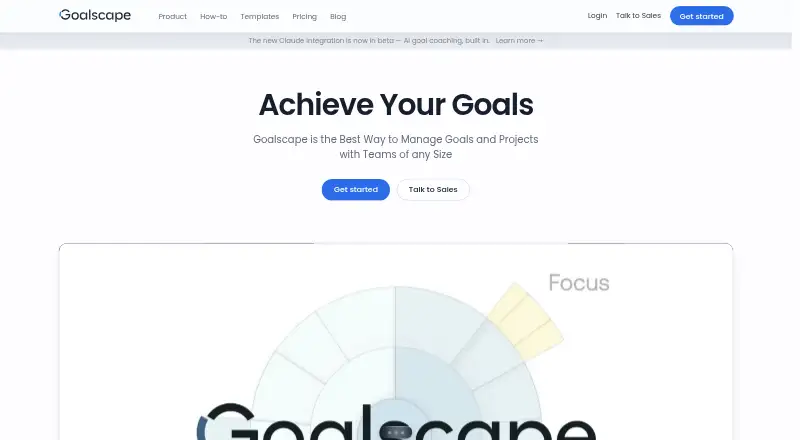
What Goalscape is
Goalscape is visual goal management software for individuals, teams, and enterprises. It arranges goals, subgoals, and tasks in a visual overview, with each goal’s displayed size reflecting its importance. Users can mark goals with Now and Next tags to show impact and urgency, and progress on subgoals rolls up to the central goal. Goals can include notes, attachments, timescales, responsible people, tags, and color coding. Teams can share private goalscapes, set collaborator access rights, invite people by email, and comment with email notifications. Public goalscapes can be shared by link. Goalscape runs in a browser on desktop or mobile and has no limit on the number of devices. It also runs natively inside Microsoft Teams and connects to Claude through a beta MCP server integration; the maker says project data is sent to Anthropic’s servers when Claude works on Goalscape projects. Users can export goals as PNG, CSV, XLSX, or DOCX and download or upload project files. Goalscape offers a free 14-day trial with full Pro functionality. Pro starts at $8.25/user/mo when billed annually, and Enterprise is available with a 50-user minimum.
Who it suits
Goalscape suits individuals and small teams that want to map goals visually, track progress across subgoals, and share plans with collaborators. Enterprises can choose a dedicated deployment and enterprise capabilities such as in-house single sign-on.
What it does well
- Visual goal size reflects each goal’s priority.
- Subgoal progress rolls up to the central goal.
- Share private goalscapes and control collaborator access.
- Export goals as PNG, CSV, XLSX, or DOCX.
- Runs natively inside Microsoft Teams.
What to know first
- After the trial or subscription ends, access is view-only.
- Enterprise requires a minimum of 50 users.
- Claude integration is a beta and sends project data to Anthropic’s servers.
Limits
The free plan includes full Pro functionality for a 14-day trial, followed by unlimited read access. After the trial expires or a subscription ends, access is view-only.
Plans
| Plan | Billed and limits | Price |
|---|---|---|
| Free | 14-day trial; no card; read-only access continues after trial · Full Pro functionality · unlimited read access after trial | Free |
| Enterprise | Billed yearly; minimum 50 users · Dedicated server · corporate branding · custom subdomain · enterprise security · in-house SSO · development partnership · priority support | $17.33 a month |
| Pro | Billed yearly; $9.90 when billed monthly · Unlimited goalscapes · visual progress and priorities · media embeds · sharing · persons/tags · search/filter · PNG and Excel exports | $8.25 a month |
As goalscape.com lists them, read 14 Oct 2026. The maker's own page has the final word.
Getting started
- Open https://www.goalscape.com/ in a browser or use a listed platform.
- Start the 14-day trial with full Pro functionality; no credit card is required.
- Map goals, subgoals, and tasks in a goalscape.
- Add priorities, Now or Next tags, and supporting details to goals.
- Invite collaborators by email or share a goalscape by link.
Goalscape is goal-management software for mapping objectives, subgoals, and tasks in a visual hierarchy. It suits individuals and teams who need to see priorities and progress in relation to a larger goal. Its visual structure is the main attraction; ongoing editing requires a subscription after the trial.
Overview
Goalscape puts a central goal at the heart of a map of subgoals and tasks. Importance changes a goal’s visual size, while Now and Next tags distinguish impact and urgency. That makes the approach useful for plans where people need to understand how pieces of work contribute to an objective. It is less suited to readers who want a conventional, flat task list.
Progress entered for subgoals rolls up to the central goal, giving a high-level view of movement across nested work. Users can add notes, attachments, timescales, responsible people, tags, and colors to goals. Reviews are manual, so the structure helps make status visible but still needs regular attention from its users.
Key features
- Visual planning and priority: Goal size reflects importance, with Now and Next tags for impact and urgency. This gives teams a way to compare priorities in context rather than scanning an unconnected list.
- Progress and milestones: Subgoal updates roll up to the central goal, and milestone tracking is supported. Progress views are advanced, but goal reviews are manual; users must keep the plan current themselves.
- Collaboration: Private goalscapes can be shared with access rights, collaborators can be invited by email, and comments can trigger email notifications. Public goalscapes can also be shared by link. These tools suit collaborative planning, though the available collaboration level is team rather than a substitute for a broader work-management system.
- Integrations and exports: Goalscape runs natively in Microsoft Teams and connects to Claude through a beta MCP server integration. The maker says project data is sent to Anthropic’s servers when Claude works on Goalscape projects, a relevant consideration for sensitive plans. Goals can be exported as PNG, CSV, XLSX, or DOCX, and project files can be downloaded or uploaded.
- Security and deployment: The maker says Goalscape complies with GDPR and uses commercially reasonable protections including encryption, password protection, and firewalls; it says it will not access customer data without express permission. Two-factor authentication is a platform feature. Enterprise customers can use a dedicated hosted instance or an on-premise installation, and in-house single sign-on is an Enterprise capability.
Pricing
A 14-day trial provides full Pro functionality without a credit card. After it expires, the free offering provides unlimited read access, but editing requires a subscription. If a subscription ends, access is also view-only.
| Plan | Price | What it includes | Best fit |
|---|---|---|---|
| Free | free | 14-day full Pro trial, then unlimited read access | People evaluating the software or keeping a read-only archive |
| Pro | $8.25 a year, billed yearly ($9.90 when billed monthly) | Unlimited goalscapes, online sharing, assigning people and tags, image and Excel report exports | Individuals and small teams that need ongoing editing |
| Enterprise | $17.33 a year, billed yearly (minimum 50 users) | Corporate Cloud, dedicated server, custom subdomain, enterprise-level security, in-house single sign-on, and priority support | Organizations needing dedicated deployment or centralized authentication |
The pricing note gives a starting rate of $8.25/user/mo on an annual term. Enterprise has a 50-user minimum, so it is aimed at organizations rather than small groups. Goalscape can be accessed in a browser on desktop or mobile, with no device limit.
Platforms
Goalscape is a cloud application accessed in a browser on desktop or mobile. Its listed platforms are Android, iOS, Linux, macOS, self-hosted, web, and Windows.
Who it's for
Goalscape is a strong fit for people and teams who think in objectives and dependencies, and want importance, responsibility, and progress visible in one map. Enterprises may value the dedicated deployment options and in-house single sign-on. It is a weaker fit for users who prefer daily task lists, need automated goal reviews, or want an editable free plan beyond the trial.
Pros and cons
- Pro: Visual sizing and Now/Next tags make priority legible across a hierarchy of goals.
- Pro: Subgoal progress rolls up to the central objective, while notes, timescales, attachments, and responsible people keep planning context close to each goal.
- Pro: Teams can control access, comment, and share by link; exports cover image, spreadsheet, and document formats.
- Con: The free tier becomes read-only after 14 days, so continued editing means paying.
- Con: Manual reviews place the burden of keeping goals current on users.
- Con: Claude integration is beta, and project data is sent to Anthropic when Claude works on it.
Alternatives
Goaltree is worth considering for users who want a freemium goal tracker with AI goal breakdown and a Today view capped at five tasks a day on its free plan; Goalscape instead emphasizes a visual goal hierarchy and progress roll-up.
Week Plan offers a free Lite plan with basic planner features and High Impact Tasks, making it a better direction for readers focused on weekly planning rather than visual goal maps.
Beeminder has a free Core Beeminder plan with limited goals and unlimited data, so it may suit readers looking for a freemium goal-tracking option with those limits.
General Bots OKR Tracker is a free, self-hosted option with unlimited users and operations and no per-user licensing fees, for readers prioritizing that deployment and licensing model.
Strides offers a free plan for tracking up to three goals and habits, a useful alternative for readers whose needs fit that cap.
Weekdone has a free plan for up to three users with full features, which may suit a small team seeking that arrangement.
Lifetick provides a free plan for two S.M.A.R.T. goals, without subtasks, financial goals, or personalized trackers; it is an option for readers whose goal count and needs fit those boundaries.
Perdoo offers a free plan for up to five users with Strategy Maps, OKR and KPI tracking, meetings, integrations, and an AI assistant and coach, making it an alternative for teams seeking those capabilities.
Browse more options in Goal Tracking Apps.
Verdict
Choose Goalscape if your work benefits from seeing objectives, subgoals, priorities, and progress together in a map, particularly when a team needs to share and export that plan. Look elsewhere if you need ongoing free editing, automated reviews, or a conventional task-list workflow. The beta Claude integration also warrants care when project data is sensitive.
Verdict
Choose Goalscape if you want a visual way to organize goals, assign priorities, and track progress across subgoals. Teams can share plans and export goal data, while enterprises can opt for dedicated deployment. Consider the Claude data handling and beta status if you plan to use that integration.
Questions
Is Goalscape free?
A free plan provides a 14-day trial with full Pro functionality and unlimited read access after the trial.
How much does Goalscape Pro cost?
Pro starts at $8.25/user/mo when billed annually. The listed monthly billing amount is $9.90.
Which platforms does Goalscape support?
Listed platforms include Android, iOS, Linux, macOS, self-hosted, web, and Windows. It is a cloud application accessed in a browser on desktop or mobile.
Can teams collaborate in Goalscape?
Users can share private goalscapes, set collaborator access rights, invite users by email, and comment with email notifications. Public goalscapes can also be shared by link.
Does Goalscape integrate with other tools?
Goalscape runs natively inside Microsoft Teams and connects to Claude through a beta MCP server integration.
What does Goalscape Enterprise include?
Enterprise includes a dedicated server, custom subdomain, in-house single sign-on, and priority support. It has a minimum of 50 users.
Facts from Goalscape's own pages
- Access and limits
- Goalscape is a cloud application accessed in a browser on desktop or mobile, with no limit on the number of devices; after a free trial expires or a subscription ends, access is view-only. · goalscape.com, 7 Oct 2026
- API and SDKs
- No general public API or SDK documentation was found; legal terms restrict access to APIs Goalscape makes available. · goalscape.com, 14 Oct 2026
- Authentication
- Two-factor authentication is listed among the platform features, while in-house single sign-on is an Enterprise capability. · goalscape.com, 7 Oct 2026
- Claude data handling
- The maker says project data is sent to Anthropic’s servers when Claude works on Goalscape projects, and the MCP integration is a beta. · goalscape.com, 7 Oct 2026
- Claude MCP
- A remote MCP connector lets Claude view projects, create or restructure goals, update progress and complete tasks after user authorization. · goalscape.com, 14 Oct 2026
- Collaboration
- Private goalscapes can be shared with invited collaborators, with access rights and email-notified comments. · goalscape.com, 14 Oct 2026
- Company
- The legal entity is Goalscape Software GmbH, based at Esmarchstrasse 51, 24105 Kiel, Germany, and managed by Marcus Baur. · goalscape.com, 14 Oct 2026
- Company intellectual property
- The company identifies U.S. Patent 9,082,316 B2 and registered German, UK and WIPO trademarks for Goalscape. · goalscape.com, 14 Oct 2026
- Documentation
- Official how-to material teaches the radial map, importance sizing, progress shading and a Define-Prioritize-Track-Repeat workflow. · goalscape.com, 14 Oct 2026
- Enterprise deployment
- Enterprise instances can run on a dedicated platform in Goalscape’s secure server environment or as an on-premise installation. · goalscape.com, 7 Oct 2026
- Exports
- Users can export goals as PNG, CSV, XLSX, or DOCX and download or upload Goalscape project files. · goalscape.com, 7 Oct 2026
- Filtering
- The Focus tools filter by dates, progress, responsibility and tags and can generate Goal Lists. · goalscape.com, 14 Oct 2026
- Founded
- Goalscape says it was founded in 2009 in Kiel; LinkedIn lists 2010 and 11–50 employees. · goalscape.com, 14 Oct 2026
- Goal hierarchy
- Users can decompose a top-level goal into nested subgoals and concrete actions. · goalscape.com, 14 Oct 2026
- Goal metadata
- Goals support notes, attachments, timescales, responsibility assignments, tags and color coding. · goalscape.com, 14 Oct 2026
- Headquarters
- Kiel, Germany · goalscape.com, 28 Sept 2026
- Imports and exports
- The service imports GSP, CSV and pasted lists and exports GSP, PNG, CSV, XLSX and DOCX files. · goalscape.com, 14 Oct 2026
- Integrations
- Goalscape runs natively inside Microsoft Teams and connects to Claude through an MCP server integration. · goalscape.com, 7 Oct 2026
- Legacy desktop
- The legacy offline desktop app is no longer sold but existing license holders can request a download link. · goalscape.com, 14 Oct 2026
- Licence
- The web service is proprietary and commercial; reverse engineering, copying and unauthorized API use are prohibited. · goalscape.com, 14 Oct 2026
- Limit: customization
- Capterra feedback says visual customization can feel limited for advanced project-management needs. · capterra.com, 14 Oct 2026
- Limit: integrations
- A SourceForge reviewer asks for more integrations and downloadable formats that synchronize with other applications. · sourceforge.net, 14 Oct 2026
- Limit: mobile and habit tracking
- A Software Advice reviewer reports that Goalscape lacks a dedicated mobile app and habit tracker. · softwareadvice.com, 14 Oct 2026
- Limit: paid collaborators
- A Capterra reviewer objects that non-paying users cannot edit a shared goalscape. · capterra.com, 14 Oct 2026
Where Goalscape stands on Freedom251
- Goal Tracking Apps#4 of 32