Freedom251 › Goal Tracking Apps

Goaltree
What Goaltree is
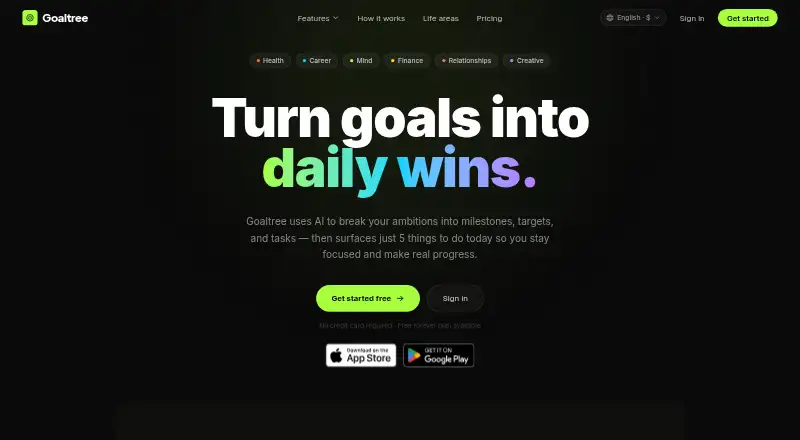
Goaltree uses AI to turn written goals into milestones, targets, and specific tasks, then selects five tasks from active goals for each day. Its selection weighs urgency, progress, and momentum; users can request more tasks after completing the surfaced ones. Replanning can follow three skips of a task, a missed milestone deadline, or a user request, while completed milestones remain intact.
Goals can be viewed as structured lists, Kanban boards, or node graphs, and grouped across Health, Career, Mind, Finance, Relationships, and Creative. Google Calendar integration checks a user's schedule when selecting tasks and adjusts the daily load. A Model Context Protocol server lets compatible AI assistants read goals, show today's tasks, and mark work complete; Goaltree says it uses OAuth. Goals can be shared by link, with editing access for collaborators and live cursors and updates. The free plan includes three active goals and five AI goal-structuring uses per month. Pro costs $9 a month, billed monthly, with annual billing also offered at 33% savings. Teams is $16 a month per user and marked “Soon.”
Who it suits
It suits people who want AI-assisted planning and daily task selection across personal goals. Teams needing shared goals can review the Teams plan, which is marked “Soon.”
What it does well
- Daily task selection accounts for urgency, progress, and momentum.
- Completed milestones stay intact during replanning.
- Google Calendar integration adjusts task load to fit the day.
- Goals can be shared with editing access and live updates.
What to know first
- Free plan is limited to three active goals.
- Free plan allows five AI goal-structuring uses per month.
- Teams plan is marked “Soon.”
Limits
The free plan is limited to three active goals and five AI goal-structuring uses per month. The Teams plan is labeled “Soon.”
Plans
| Plan | Billed and limits | Price |
|---|---|---|
| Free | 3 active goals · AI goal breakdown · Today view — 5 tasks/day · Web app · Basic analytics | Free |
| Teams | Per user; page labels the plan “Soon.” · Everything in Pro · Shared goals and progress · Team Today view · Manager dashboard · Admin controls · SSO / SAML · Dedicated onboarding | $16 a month |
| Pro | Monthly; annual billing is also offered with 33% savings. · Unlimited goals · Unlimited AI structuring and replanning · Google Calendar integration · Voice goal capture · Native iOS and Android apps · Streak tracking · Advanced analytics · Priority support | $9 a month |
As goaltree.ai lists them, read 29 Sept 2026. The maker's own page has the final word.
Getting started
- Visit goaltree.ai.
- Create an account using a magic link sent to your email address.
- Choose the Free plan or a paid plan.
- Open Goaltree on the web, or use its iOS or Android app.
- Describe a goal to have it structured into milestones, targets, and tasks.
Overview
Goaltree is an AI-assisted planner for turning broad goals into milestones and practical tasks. It suits people who want a clear daily starting point across several goals. Its strongest case is the link between goal planning and daily priorities; the free plan’s three-goal cap makes it a constrained way to manage a wider set of ambitions.
Key features
Describe a goal and Goaltree structures it into milestones, targets and tasks. That can give a vague intention a more workable shape, though users who want dedicated goal-review tools will need to look elsewhere: Goaltree’s feature set does not include them.
Each day, it selects five tasks from active goals based on urgency, progress and momentum; users can request more after completing them. This narrows the choice of what to tackle, rather than leaving users to sort through every open task. With Pro, Google Calendar integration checks the day’s schedule and adjusts the task load, making that plan more useful for people whose availability varies.
Replanning can follow three skips of a task, a missed milestone deadline or a user request, while completed milestones stay intact. List, drag-and-drop Kanban and node-graph views offer different ways to inspect goals. Goals can also be grouped across Health, Career, Mind, Finance, Relationships and Creative.
Goals can be shared by link, with editing access for collaborators and live cursors and updates. The Pro plan also offers an MCP server for compatible AI assistants to read goals, show today’s tasks and mark tasks complete; Goaltree says it uses OAuth. These features extend the planner beyond an individual workflow, but Teams is labelled “Soon,” so its broader team controls are not yet presented as ready to buy.
Pricing
| Plan | Price | What it includes |
|---|---|---|
| Free | free | Three active goals, five AI goal-structuring uses per month, Today view with five tasks per day, web app and basic analytics. |
| Pro | $9 a month, billed monthly; annual billing is offered with 33% savings. | Unlimited goals, unlimited AI structuring and replanning, Google Calendar integration, voice goal capture, native iOS and Android apps, streak tracking, advanced analytics and priority support. |
| Teams | $16 a month per user; labelled “Soon.” | Everything in Pro, shared goals and progress, a Team Today view, manager dashboard, admin controls, SSO / SAML and dedicated onboarding. |
Free is a useful way to try the daily-task approach, but three active goals and five structuring uses a month limit how far it can support someone with several changing priorities. Pro removes those caps and adds the calendar and mobile apps, so it is the practical choice for regular use across goals. Teams is aimed at organizations that need management and access controls, but its “Soon” status means it is not yet a presented purchase option. The pricing page provides [email protected] for student and nonprofit discount inquiries.
The web app can be installed as a PWA on Mac, Windows or Linux; the site also describes iOS and Android apps. The terms say users retain ownership of their content, which Goaltree licenses to store, process and display the service. They also say content is not used for advertising or sold to third parties. Accounts use magic links, so users need to keep their email address valid and secure; the service requires users to be at least 13.
Platforms
Goaltree supports web, Android, iOS, Linux, macOS and Windows. The PWA offers desktop access without a separate native desktop app, while Pro includes native iOS and Android apps.
Who it's for
Goaltree is best suited to individuals who want AI to turn goals into concrete steps and to choose a short set of daily priorities, especially if calendar-aware planning or mobile apps matter. It is less suitable for someone who needs extensive goal-review tools, or a team looking for immediately usable admin and SSO controls.
Pros and cons
- Pro: Daily selection draws from active goals using urgency, progress and momentum, helping users focus without manually ranking every task.
- Pro: Replanning can respond to repeated skips or missed deadlines while preserving completed milestones.
- Pro: Calendar integration can adapt task load to the day’s schedule, and Pro removes the free plan’s goal and structuring caps.
- Con: Free allows only three active goals and five AI structuring uses each month, limiting users managing many goals.
- Con: There are no dedicated goal-review tools, which may matter to users who want a structured review process.
- Con: Teams is marked “Soon,” leaving its team dashboard and administrative features short of an available choice.
Alternatives
For a broader goal-tracking app list, compare options by the kind of planning and tracking you need. Week Plan is another freemium planner with a free Lite plan for basic planning features and high-impact tasks; its Ultimate plan is $8.67 a month billed annually, making it worth comparing if that task-planning emphasis fits better than Goaltree’s AI goal breakdown. Beeminder offers limited goals with unlimited data on its free Core Beeminder plan, and unlimited goals on Infinibee for $8 a month; choose it if that goal-and-data model suits you better.
Weekdone offers a free plan for up to three users with full features, live chat and OKR coaching/support listed, so it is an alternative to consider for a small group seeking an OKR-oriented option. Perdoo has a free plan for up to five users with Strategy Maps, OKR and KPI tracking, meetings, Slack and Teams integration, and an AI assistant and coach; it may suit teams that want those capabilities. SmartProgress has a free account with two goals in progress, increasing with experience and level, plus team goals for up to five people; consider it if that progression-based limit fits your needs.
Range offers a free plan for 12 users and up to two teams, with three goals and limits on meeting agendas and check-in history, making it an alternative for groups that can work within those caps. Strides has a free plan for three goals and habits, an option for readers focused on that smaller set of goals and habits. LifeRPG has a free Novice plan with three active quests and 10 habits or daily missions, and a Hero plan for €6.99 a month with unlimited quests and missions; consider it if that quest-and-mission structure is a better fit.
Verdict
Choose Goaltree if you want AI to turn goals into milestones and then keep a manageable set of daily tasks in view, with replanning and calendar-aware scheduling available on Pro. Look elsewhere if your priority is dedicated goal-review tools or team administration you can use now; the three-goal free cap also makes Pro the more realistic option for managing a broad set of goals.
Verdict
Goaltree combines goal breakdown, daily task selection, and replanning, with list, board, and graph views. The free plan has goal and structuring limits; the Teams plan is not yet presented as available.
Questions
Is Goaltree free?
Yes. The Free plan costs nothing and includes three active goals and five AI goal-structuring uses per month.
How much does Goaltree Pro cost?
Pro costs $9 a month, with annual billing also offered at 33% savings.
What platforms can I use Goaltree on?
Goaltree is available on Android, iOS, Linux, macOS, the web, and Windows. Its web app can be installed as a PWA on Mac, Windows, or Linux.
Does Goaltree connect to Google Calendar?
Google Calendar integration is included in Pro. It checks the user’s schedule when selecting daily tasks and adjusts the task load.
Can I collaborate with other people in Goaltree?
Goals can be shared by link, with viewers given editing access. Collaborators can see live cursors and updates.
What is included in the Teams plan?
Teams is listed at $16 per user per month and marked “Soon.” Its listed features include shared goals and progress, a team Today view, a manager dashboard, admin controls, SSO / SAML, and dedicated onboarding.
Facts from Goaltree's own pages
- Account access
- The terms say account authentication uses magic links and users must keep their email address valid and secure. · goaltree.ai, 29 Sept 2026
- AI assistant integration
- A Model Context Protocol server lets compatible AI assistants read goals, show today's tasks, and mark tasks complete; Goaltree says it uses OAuth. · goaltree.ai, 29 Sept 2026
- Calendar integration
- Google Calendar integration checks the user's schedule when selecting daily tasks and adjusts the task load to fit the day. · goaltree.ai, 29 Sept 2026
- Collaboration
- Goals can be shared by link; viewers can be given editing access, and collaborators can see live cursors and updates. · goaltree.ai, 29 Sept 2026
- Daily task selection
- Goaltree selects five tasks from active goals based on urgency, goal progress, and momentum, and users can request more after completing them. · goaltree.ai, 29 Sept 2026
- Desktop and mobile
- The web app can be installed as a PWA on Mac, Windows, or Linux, and the site describes iOS and Android apps. · goaltree.ai, 29 Sept 2026
- Eligibility
- The terms require users to be at least 13 years old. · goaltree.ai, 29 Sept 2026
- Free tier limit
- The free plan includes three active goals and five AI goal structuring uses per month in the plan comparison. · goaltree.ai, 29 Sept 2026
- Goal planning
- Users can describe a goal and have AI structure it into milestones, targets, and concrete tasks. · goaltree.ai, 29 Sept 2026
- Goal views
- Goals can be viewed as a structured list, a drag-and-drop Kanban board, or a node graph. · goaltree.ai, 29 Sept 2026
- Life areas
- Goaltree groups goals across Health, Career, Mind, Finance, Relationships, and Creative. · goaltree.ai, 29 Sept 2026
- Product
- Goaltree uses AI to break goals into milestones, targets, and tasks, then surfaces five tasks to work on each day. · goaltree.ai, 29 Sept 2026
- Replanning
- AI replanning can trigger after a task is skipped three times, a milestone deadline is missed, or the user requests a replan; completed milestones are kept intact. · goaltree.ai, 29 Sept 2026
- Security and privacy terms
- The terms say users retain ownership of their content, which Goaltree licenses to store, process, and display to provide the service; they also say user content is not used for advertising or sold to third parties. · goaltree.ai, 29 Sept 2026
- Support
- The Pro plan includes priority support, and the pricing page provides [email protected] for student and nonprofit discount inquiries. · goaltree.ai, 29 Sept 2026
Where Goaltree stands on Freedom251
- Goal Tracking Apps#6 of 32