
StoryPad
by StoryPad
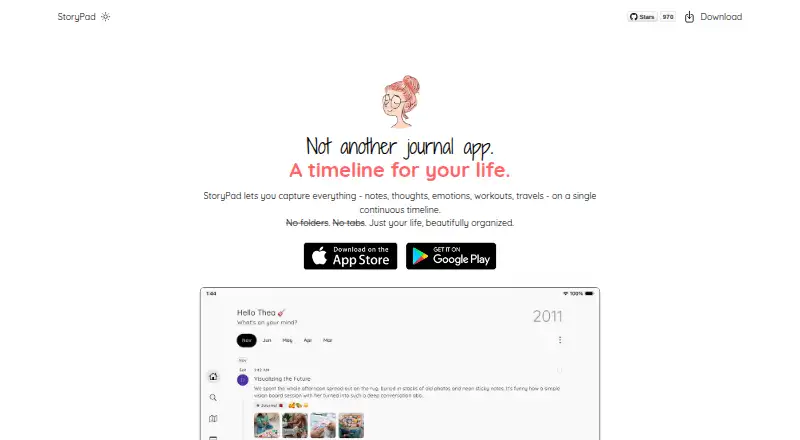
What StoryPad is
StoryPad is a journal app for keeping written and multimedia entries together in a timeline. Stories can cover notes, thoughts, emotions, workouts, and travel, and each entry can hold several pages. Writing tools include rich text, checklists, voice recordings, and images, with list, grid, and page layouts to organize each entry. Mood history and a calendar view help users follow feelings over time. Tags, bookmarks, pins, and search across titles, tags, years, and story content help surface older entries.
The app offers light and dark modes, more than 20 theme colors, and more than 1,300 Google Fonts. It works offline without an account, keeping stories on the device. Users can back up and sync through a private Google Drive folder, or export locally as StoryPad JSON, Markdown, or plain text; Markdown exports are compatible with Obsidian. The maker says it cannot access entries and images stored locally or backed up directly to Drive. StoryPad is open source under GNU GPL v3.0 and runs on Android, iOS, and macOS. Its free plan includes core journaling features with no ads. StoryPad Pro is listed at $9.99 a month, with the plan description also calling it a one-time purchase for lifetime access, future updates, and premium features.
Who it suits
StoryPad suits people looking for a personal journal with mood tracking, multimedia entries, and ways to organize and export their writing. The maker describes it as an open-source option for people who value simplicity, minimalism, and control over personal data.
What it does well
- Works offline without requiring an account.
- Entries support rich text, checklists, recordings, and images.
- Mood history includes a calendar view.
- Exports include JSON, Markdown, and plain text.
- Open source under GNU GPL v3.0.
What to know first
- The privacy policy says analytics and crash reports have no opt-out.
- StoryPad Pro is listed at $9.99 a month.
Limits
The Free plan includes core journaling features and no ads. StoryPad Pro is listed at $9.99 a month, and its description says it includes premium features, lifetime access, and future updates; it also describes the purchase as one-time.
Plans
| Plan | Billed and limits | Price |
|---|---|---|
| Free | Core journaling features · no ads | Free |
| StoryPad Pro | One-time purchase; lifetime access, including future updates and premium features · Unlocks Pro features | $9.99, paid once |
As storypad.me lists them, read 3 Oct 2026. The maker's own page has the final word.
Getting started
- Visit the StoryPad website.
- Choose Android, iOS, or macOS.
- Start using it offline without an account, or choose the Free plan for core journaling features.
- Use the free plan or select StoryPad Pro, listed at $9.99 a month.
Verdict
Choose StoryPad if you want a flexible journal that works offline and supports mood tracking, multimedia entries, and local exports. Its open-source license and stated approach to journal data may suit people who want control over personal information. Consider the Pro plan details carefully: it is listed at $9.99 a month, while its description says one-time purchase for lifetime access.
Questions
What platforms support StoryPad?
StoryPad is available for Android, iOS, and macOS.
Does StoryPad have a free plan?
Yes. The Free plan costs nothing and includes core journaling features with no ads.
How much does StoryPad Pro cost?
StoryPad Pro is listed at $9.99 a month. Its plan description says the purchase is one-time and provides lifetime access, future updates, and premium features.
Is StoryPad open source?
Yes. Its public repository states that it is licensed under GNU GPL v3.0.
Can StoryPad export entries?
Stories can be exported locally as StoryPad JSON, Markdown, or plain text. Markdown exports are compatible with Obsidian.
How does StoryPad handle journal data?
The privacy policy says entries and images are stored locally or backed up directly to Google Drive, and the maker says it cannot access that data. The policy also says anonymous usage analytics and crash reports are collected through Firebase, with no opt-out currently offered.
Facts from StoryPad's own pages
- Analytics
- The privacy policy says StoryPad collects anonymous usage analytics and crash reports through Firebase and currently offers no opt-out for those reports. · storypad.me, 3 Oct 2026
- Export
- Stories can be exported locally as StoryPad JSON, Markdown, or plain text. · storypad.me, 3 Oct 2026
- Export formats
- JSON,Markdown,plain text,CSV · storypad.me, 20 Sept 2026
- Free plan
- Yes · storypad.me, 20 Sept 2026
- Headquarters
- Phnom Penh, Cambodia · storypad.me, 28 Sept 2026
- Integrations
- The app can back up and sync through a private Google Drive folder, and exports Markdown compatible with Obsidian. · storypad.me, 3 Oct 2026
- Media support
- photos_video_audio · storypad.me, 20 Sept 2026
- Mood tracking
- The app supports mood history and a calendar view for tracking feelings over time. · play.google.com, 3 Oct 2026
- Offline use
- StoryPad can be used offline without an account, with stories stored locally on the device. · storypad.me, 3 Oct 2026
- Open source
- StoryPad's public repository states that the app is licensed under GNU GPL v3.0. · github.com, 3 Oct 2026
- Organization
- Users can tag, bookmark, pin, and search stories by title, tag, year, or content. · play.google.com, 3 Oct 2026
- Personalization
- StoryPad offers light and dark modes, more than 20 theme colors, and more than 1,300 Google Fonts. · storypad.me, 3 Oct 2026
- Available platforms
- ios,android,macos · storypad.me, 20 Sept 2026
- Privacy
- The privacy policy says journal entries and images are stored locally or backed up directly to Google Drive, and the maker says it cannot access that data. · storypad.me, 3 Oct 2026
- Prompt features
- basic · storypad.me, 20 Sept 2026
- Search scope
- full_text · storypad.me, 20 Sept 2026
- Security
- The app listing says users can lock the app with a PIN, Face ID, or fingerprint and recover access with a security question. · play.google.com, 3 Oct 2026
- Support
- The maker invites users to report issues, request features, or contribute, and lists [email protected] as its support contact. · play.google.com, 3 Oct 2026
- What it does
- StoryPad is a journal app for capturing notes, thoughts, emotions, workouts, and travels on a continuous timeline. · storypad.me, 3 Oct 2026
- Who it is for
- The maker describes StoryPad as an open-source journal for people who value simplicity, minimalism, and control over personal data. · github.com, 3 Oct 2026
- Writing and entries
- Entries can contain multiple pages and use list, grid, or page layouts, with rich text, checklists, voice recordings, and images. · storypad.me, 3 Oct 2026
Where StoryPad stands on Freedom251
- Journaling apps#8 of 37
- Journaling Software#30 of 37