Freedom251 › Storyboard Software

Storyboarder
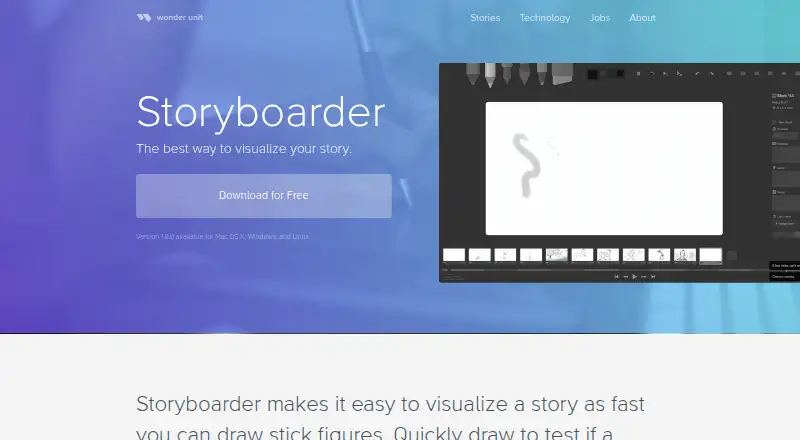
What Storyboarder is
Storyboarder is a free, open-source app for visualizing story ideas, developing boards, and making animatics. Its drawing tools include light and hard pencils, a pen, brush, note pen, and eraser. Users can print storyboard worksheets or import photographs of completed worksheets. The Shot Generator builds customizable reference shots from typed descriptions.
Timeline mode supports setting board timing, viewing audio waveforms, attaching audio, and recording from a microphone. Storyboarder can open Fountain screenplays and associate boards with script scenes using scene IDs. Boards can be opened in Photoshop, with saved edits reflected back in Storyboarder; other editors that open Photoshop files can also be configured. Exports include Premiere, Final Cut, Avid, PDF, and animated GIF. It runs on Linux, macOS, and Windows, but not Windows 7 or 32-bit computers. Real-time team collaboration is not supported.
Who it suits
Storyboarder suits story artists, directors, writers, advertisers, and others developing an idea into boards or animatics. Its screenplay, timeline, and audio features may also suit users building boards around scripts and sound.
What it does well
- Free and open source.
- Shot Generator creates customizable reference shots.
- Supports Fountain screenplay files and scene IDs.
- Exports to Premiere, Final Cut, Avid, PDF, and GIF.
What to know first
- Does not support Windows 7 or 32-bit computers.
- Real-time team collaboration is unavailable.
- Some Huion tablets may lack pressure sensitivity.
Limits
The free plan costs nothing. It does not include real-time team collaboration; Windows 7 and 32-bit computers are unsupported.
Plans
| Plan | Billed and limits | Price |
|---|---|---|
| Free and open source | Mac OS X · Windows · Linux · open source | Free |
As wonderunit.com lists them, read 30 Sept 2026. The maker's own page has the final word.
Getting started
- Visit the Storyboarder website.
- Choose the version for macOS, Windows, or Linux.
- Use the drawing tools or import photographed storyboard worksheets.
- Open a Fountain screenplay to associate boards with script scenes.
- Use the timeline, audio tools, or export options as needed.
Overview
Storyboarder is a free, open-source desktop app for turning story ideas into drawn boards and animatics. It is best suited to solo story artists, writers, directors, advertisers, and anyone developing visual ideas who wants drawing, script, timing, and delivery tools in one workflow. Its broad export and editor integration make it practical for production handoffs, while the absence of real-time team collaboration makes it a weaker choice for shared, simultaneous work.
Key features
Drawing tools include light and hard pencils, pen, brush, note pen, and eraser, with shot annotations and scene layouts available for organizing boards. The paper workflow is unusually useful: print storyboard worksheets, draw by hand, then import photographed sheets into a project. That suits artists who think on paper as well as those drawing digitally.
The Shot Generator creates customizable reference shots from typed descriptions, giving writers and directors a fast way to explore visual possibilities before refining boards. Boards can open in Photoshop and update in Storyboarder after saving. Any editor that opens Photoshop files can be configured, including Krita, Gimp, Sketchbook, and Clip Studio, so the app can serve as a storyboard hub rather than forcing users into one drawing program.
Timeline mode supports board timing, audio waveforms, attached audio files, and microphone recording, which makes it suitable for building animatics with sound cues. Fountain screenplay support and scene IDs connect boards to script scenes, a useful structure for scripted projects. Exports to Premiere, Final Cut, Avid, PDF, and animated GIF cover common editing, review, and presentation needs.
Pricing
Storyboarder has one plan: Free and open source at free, for Mac OS X, Windows, and Linux. There is no paid tier, free trial, seat charge, renewal, or usage quota. Wonder Unit released the source under an open-source model and hosts it on GitHub, making this a strong fit for individuals, students, and small productions that need a capable storyboard workflow without subscription costs.
The trade-off is not a cheaper-versus-dearer feature ladder; every user receives the same offering. Teams cannot buy a collaboration tier to add simultaneous editing, because real-time team collaboration is not supported.
Platforms
Storyboarder runs on macOS, Windows, and Linux. It does not support Windows 7 or 32-bit computers. Most Wacom tablets work with current Mac and Windows drivers, while pressure sensitivity may not work with some Huion tablets. Check hardware compatibility before committing to a tablet-centered workflow.
Who it's for
Choose Storyboarder for individual story artists, directors, writers, advertisers, and other creators who need to move from an idea or Fountain script to drawn boards, timed audio sequences, and industry-oriented exports. It is particularly well matched to mixed paper-and-digital workflows and to artists who already prefer Photoshop, Krita, Gimp, Sketchbook, or Clip Studio. Production teams that require live, simultaneous collaboration should look elsewhere.
Pros and cons
- Pro: The complete toolset is free and open source, removing subscription and seat-cost barriers.
- Pro: Fountain scene IDs, timeline audio, microphone recording, and animatic exports support a coherent script-to-sequence workflow.
- Pro: Worksheet import and configurable external editors accommodate established paper and art workflows.
- Con: Real-time team collaboration is unavailable, limiting live multi-user production.
- Con: Windows 7 and 32-bit computers are unsupported, and some Huion tablets may lose pressure sensitivity.
Alternatives
For a broader app directory, see Storyboard Software. StoryTribe is a freemium option on Android, iOS, macOS, web, and Windows; its free plan includes unlimited projects but limits projects to 10 shots and applies watermarked downloads, making it better for cross-platform, AI-assisted work with modest free-project limits.
Shot Designer offers Android, iOS, macOS, and Windows access; its free plan keeps one scene saved but removes file management, export, sync, and team sharing, so it suits basic scene blocking rather than Storyboarder's export-heavy workflow. Krock.io is a web, macOS, Windows, and extension-based freemium platform with a free tier for one user, 2 GB storage, one workspace, and two projects; choose it when review and workspace limits matter more than desktop drawing.
Mari is a paid Linux and Windows tool with a non-commercial free plan, appropriate when texture-painting work is the priority. Previs Pro runs on iOS, macOS, and the web; its free plan limits projects to one animatic and watermarked exports, while paid plans remove those constraints. AIM Previz is a free web, extension, and API option with monthly credits and a seven-day Pro trial, suited to credit-based previs workflows.
Boords is web-only, with a free single-user plan offering 250 AI images per month and unlimited storyboards and scripts, making it a stronger browser choice. Cineboard is another web option with a free plan limited to one project, 20 shot cards, 50 moodboard items, and 5 GB of storage.
Verdict
Storyboarder is the right choice for creators who want a no-cost, open-source path from sketches or scripts to timed animatics and production exports across macOS, Windows, or Linux. Its main reason to choose it is the unusually complete solo workflow and editor flexibility; its main reason to look elsewhere is the lack of real-time collaboration for teams.
Verdict
Storyboarder offers drawing, script, timeline, and export tools at no charge. Note its system restrictions and lack of real-time team collaboration.
Questions
How much does Storyboarder cost?
Its Free and open source plan is listed as free.
Is Storyboarder open source?
Yes. Wonder Unit says the app is free and open source, with its source hosted on GitHub.
Which platforms does Storyboarder support?
It supports macOS, Windows, and Linux. Windows 7 and 32-bit computers are unsupported.
What can Storyboarder export?
Export formats include Premiere, Final Cut, Avid, PDF, and animated GIF.
Does Storyboarder support real-time team collaboration?
No. Real-time team collaboration is not supported. The GitHub project invites users to submit issues and pull requests.
Can I use a drawing tablet?
Most Wacom tablets work with current Mac and Windows drivers. Some Huion pressure sensitivity may not work.
Facts from Storyboarder's own pages
- Collaboration
- The GitHub repository lists collaboration through GitHub and invites users to submit issues or pull requests. · github.com, 30 Sept 2026
- Drawing tools
- The app includes light pencil, hard pencil, pen, brush, note pen, and eraser tools. · wonderunit.com, 30 Sept 2026
- External editors
- Any editor that opens Photoshop files can be configured, including Krita, Gimp, Sketchbook, and Clip Studio. · wonderunit.com, 30 Sept 2026
- Intended users
- The maker lists story artists, directors, writers, advertisers, dreamers, and anyone with an idea as users. · wonderunit.com, 30 Sept 2026
- Open source
- Wonder Unit states that Storyboarder was released free and open source, with the source hosted on GitHub. · wonderunit.com, 30 Sept 2026
- Paper worksheets
- Users can print storyboard worksheets and import photographed worksheets into a project. · wonderunit.com, 30 Sept 2026
- Photoshop editing
- Boards can be opened in Photoshop and automatically updated in Storyboarder after saving. · wonderunit.com, 30 Sept 2026
- Purpose
- Storyboarder helps users quickly visualize stories, test story ideas, and create animatics. · wonderunit.com, 30 Sept 2026
- Script integration
- Storyboarder can open Fountain screenplays and adds scene IDs to associate storyboard files with script scenes. · github.com, 30 Sept 2026
- Shot generator
- The Shot Generator creates customizable reference shots from typed descriptions. · wonderunit.com, 30 Sept 2026
- Tablet support
- Most Wacom tablets work with current Mac and Windows drivers, while some Huion pressure sensitivity may not work. · wonderunit.com, 30 Sept 2026
- Timeline and audio
- Timeline mode lets users set board timing, view audio waveforms, attach audio files, and record from a microphone. · wonderunit.com, 30 Sept 2026
- Unavailable features
- Real-time team collaboration is not currently supported because the maker says large file sizes make it difficult. · wonderunit.com, 30 Sept 2026
- Unsupported systems
- Storyboarder does not support Windows 7 or 32-bit computers. · wonderunit.com, 30 Sept 2026
- Video exports
- Storyboarder exports to Premiere, Final Cut, Avid, PDF, and animated GIF formats. · wonderunit.com, 30 Sept 2026
Where Storyboarder stands on Freedom251
- Storyboard Software#10 of 30