Freedom251 › Storyboard Software
Shot Designer
What Shot Designer is
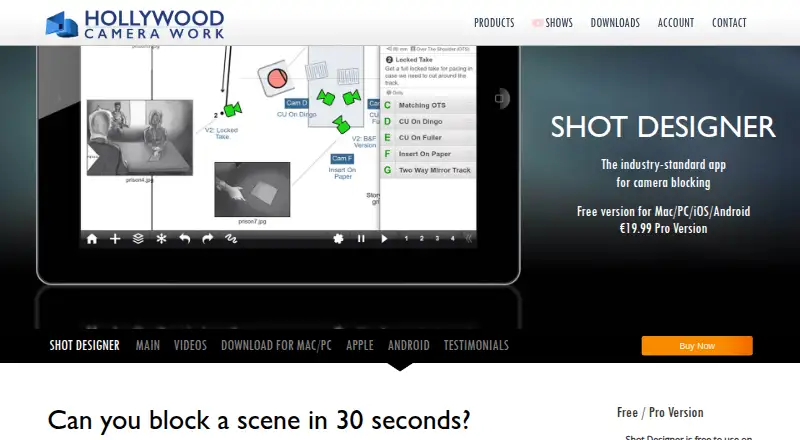
Shot Designer is a camera-blocking tool for planning scenes, combining camera diagrams, shot lists, storyboards, animation, a Director’s Viewfinder, and team sharing. The app can move cameras automatically when characters shift in a diagram. Its shot list and diagram stay linked, so changes to one can update the other. Users can animate characters and cameras in real time to preview scene rhythm. The Viewfinder supports major camera formats and records the lens used for a shot. Other design resources include set and lighting tools, production-drawing imports, templates, and a prop and furniture library. The Free plan costs nothing and saves the current scene, but permits one scene at a time and has no file management, export, or syncing and team sharing. Pro costs 19.99 USD once and adds file management, sync and team sharing, Scene Freeze, and PDF, JPG, and Excel export. The app is available for Android, iOS, macOS, and Windows, and is positioned for directors and directors of photography.
Who it suits
Shot Designer suits directors and directors of photography planning camera blocking, shot lists, storyboards, or set and lighting design. It is available on mobile and desktop platforms.
What it does well
- Camera positions can update when characters move
- Shot lists and diagrams update together
- Animates characters and cameras in real time
- Viewfinder records the lens used
- Pro exports PDF, JPG, and Excel
What to know first
- Free plan allows one scene at a time
- Free plan has no file management
- Free plan has no export or syncing and team sharing
- Pro costs 19.99 USD once
Limits
The Free plan saves one current scene at a time and has no file management, export, or sync and team sharing. The 19.99 USD Pro Upgrade adds file management, sync and team sharing, Scene Freeze, and PDF, JPG, and Excel export.
Plans
| Plan | Billed and limits | Price |
|---|---|---|
| Free | One scene at a time · current scene stays saved · no file management, export, or sync/team sharing | Free |
| Pro Upgrade | In-app purchase; App Store lists “Pro Version Upgrade $19.99” · File management · Mac/PC version · sync and team sharing · PDF/JPG/Excel export · Scene Freeze | $19.99, paid once |
As hollywoodcamerawork.com lists them, read 30 Sept 2026. The maker's own page has the final word.
Getting started
- Visit the Shot Designer website.
- Choose the Free plan or the Pro Upgrade in-app purchase.
- Use the version for Android, iOS, macOS, or Windows.
- Create a scene diagram and build its connected shot list.
Shot Designer is a scene-planning app for directors and directors of photography. It is strongest when blocking, shot lists, and camera movement need to stay coordinated as a scene develops. Choose it for that connected workflow; choose another tool if you need a free workspace for managing multiple scenes.
Overview
Shot Designer brings camera diagrams, shot lists, animation, storyboards, a Director’s Viewfinder, and team sharing into one production-planning tool. Its distinguishing strength is the link between the diagram and shot list: edits to either can update the other. That makes it more useful for evolving scene plans than for someone seeking only a static storyboard.
Key features
Automatic camera movement follows characters as they move in the diagram, reducing the work of keeping camera positions aligned with blocking changes. The integrated shot list also updates with diagram edits, and shot-list edits change the diagram. This two-way connection is the practical center of the app: it helps keep planning artifacts in step, though it also means Shot Designer is best suited to users who want both views in their process.
Real-time animation of characters and cameras lets users preview scene rhythm before filming. The Director’s Viewfinder supports major camera formats and records the lens used for a shot, making it a useful companion to camera planning. Set and lighting design tools, production-drawing imports, templates, and a prop and furniture library extend the app into broader pre-production work.
Shot annotations and scene layouts support more detailed planning. Pro adds file management, PDF, JPG, and Excel exports, emailing of diagrams and shot lists, syncing across devices, and sharing scene folders with teams via Dropbox. The maker says 3D animation, script integration, voice recording, and speech synthesis are planned, so they should not be treated as current capabilities.
Pricing
| Plan | Price | What it includes |
|---|---|---|
| Free | free | One scene at a time; the current scene stays saved, but there is no file management, export, sync, or team sharing. |
| Pro Upgrade | $19.99, paid once | File management, Mac/PC version, sync and team sharing, PDF/JPG/Excel export, and Scene Freeze. |
The free plan is a reasonable way to work on one scene, but the single-scene cap and lack of file management make it a poor fit for ongoing multi-scene production. The one-time Pro Upgrade is the practical choice for users who need to organize scenes, export work, or coordinate across devices and with a team. It is billed as an in-app purchase; the App Store lists “Pro Version Upgrade $19.99.”
Platforms
Shot Designer supports Android, iOS, macOS, and Windows. The Pro Upgrade includes the Mac/PC version as well as syncing across devices, so it suits users who want to move planning between mobile and desktop workflows.
Who it's for
Directors and directors of photography are the clearest fit, especially when camera blocking, shot planning, and movement need to be considered together. Its design tools also make it relevant to production teams handling set and lighting plans. It is less suited to users who need a multi-scene project library without upgrading, or who only need a straightforward storyboard workflow.
Pros and cons
- Pro: Diagram and shot-list edits work in both directions, helping keep related planning in sync.
- Pro: Animation and the Director’s Viewfinder connect blocking decisions with movement preview and lens planning.
- Pro: Set and lighting tools, drawing imports, templates, and a prop and furniture library broaden its use beyond camera diagrams.
- Con: Free users are limited to one saved scene and cannot use file management, export, syncing, or team sharing.
- Con: The app’s integrated planning approach is less compelling for someone who only wants a static storyboard.
Alternatives
Storyboard Software is a useful category starting point for comparing tools focused on storyboarding.
- StoryTribe is an option for storyboard work with a free plan that allows unlimited projects and 10 shots per project, with watermarked downloads and exports.
- Krock.io may suit teams seeking a collaboration workspace; its free plan includes one user, one workspace, two projects, and unlimited reviewers.
- Mari is an alternative for Linux and Windows users considering a tool with a free non-commercial plan.
- Previs Pro may fit iOS, macOS, or web users who want an animatic-oriented option; its free plan allows one animatic per project with watermarked exports.
- Storyboarder is a free, open-source option for Mac, Windows, and Linux.
- Boords is a web-based alternative whose free Solo plan includes unlimited storyboards and scripts for one user.
- Cineboard is a web-based alternative with a free plan limited to one project and 20 Shot Cards.
- Storyboard That is a web option with a free plan limited to two storyboards per week and watermarked downloads.
Verdict
Shot Designer is a strong choice for directors and cinematographers who want camera blocking, shot lists, and movement planning connected in one workflow. Its main reason to choose it is the two-way diagram and shot-list relationship, reinforced by animation and camera-planning tools. Look elsewhere if a free plan must manage several scenes, or if your priority is a dedicated storyboard tool rather than integrated blocking.
Verdict
Shot Designer links diagrams and shot lists and adds animation and a Director’s Viewfinder. The free version is restricted to a single saved scene without file management, export, or syncing and team sharing.
Questions
Is Shot Designer free?
Yes. The Free plan costs nothing and saves the current scene.
What does Pro cost?
Pro Upgrade costs 19.99 USD once as an in-app purchase.
Which platforms does it support?
Shot Designer is available on Android, iOS, macOS, and Windows.
What can I export with Pro?
Pro includes PDF, JPG, and Excel export, and emailing of camera diagrams and shot lists.
Does the free plan include team sharing?
No. Sync and team sharing are Pro features.
Facts from Shot Designer's own pages
- Animation
- Users can animate characters and cameras in real time to preview scene rhythm. · hollywoodcamerawork.com, 30 Sept 2026
- Audience
- The maker positions Shot Designer for directors and directors of photography, and its tutorials cover camera blocking, shot lists, storyboards, and set and lighting design. · hollywoodcamerawork.com, 30 Sept 2026
- Automatic diagrams
- The app can automatically move cameras when characters move in the diagram. · hollywoodcamerawork.com, 30 Sept 2026
- Data handling
- The privacy policy says the company may process account, order, activation, device, and usage data, and generally retains operational usage logs for up to 14 days. · hollywoodcamerawork.com, 30 Sept 2026
- Design tools
- The app includes set and lighting designers, production-drawing imports, templates, and a prop and furniture library. · hollywoodcamerawork.com, 30 Sept 2026
- Exports
- Pro includes PDF, JPG, and Excel export and emailing of camera diagrams and shot lists. · hollywoodcamerawork.com, 30 Sept 2026
- Headquarters
- Florence, Italy · hollywoodcamerawork.com, 28 Sept 2026
- Integration
- The app listing describes syncing scenes across devices and sharing scene folders with teams via Dropbox as Pro features. · play.google.com, 30 Sept 2026
- Notable limits
- The maker says 3D animation and script integration, voice recording, and speech synthesis are planned features. · hollywoodcamerawork.com, 30 Sept 2026
- Platforms
- The maker lists Shot Designer for iOS, Android, Mac, and PC; its download page offers Mac Universal and Windows 64-bit builds. · hollywoodcamerawork.com, 30 Sept 2026
- Privacy and payments
- The privacy policy says full card details are not seen or stored by the company and payment processing is handled by third-party providers. · hollywoodcamerawork.com, 30 Sept 2026
- Purpose
- Shot Designer is a camera-blocking tool that combines camera diagrams, animation, shot lists, storyboards, a director’s viewfinder, and team sharing. · hollywoodcamerawork.com, 30 Sept 2026
- Security
- The maker says it uses measures that may include encryption, access controls, password hashing, logging, security reviews, and reputable infrastructure providers. · hollywoodcamerawork.com, 30 Sept 2026
- Shot lists
- Its integrated shot list updates with diagram edits, and shot-list edits also change the diagram. · hollywoodcamerawork.com, 30 Sept 2026
- Support
- The maker lists [email protected] for support and privacy inquiries. · hollywoodcamerawork.com, 30 Sept 2026
- Viewfinder
- The integrated Director’s Viewfinder supports major camera formats and records the lens used for a shot. · hollywoodcamerawork.com, 30 Sept 2026
Where Shot Designer stands on Freedom251
- Storyboard Software#4 of 30