Freedom251 › Statistical Analysis Software
StatsDirect
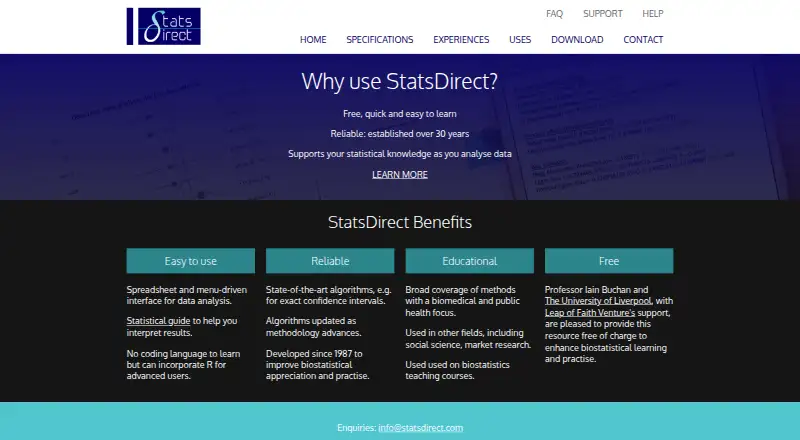
What StatsDirect is
StatsDirect is desktop statistical analysis software for research, education, and learning statistics. It offers methods including regression, ANOVA, meta-analysis, survival analysis, exact tests, and sample size estimation, alongside Bayesian analysis and scripting. Its data interface works like Microsoft Excel, while reports use a simple word-processor-style interface. The software includes a statistics guide and context-sensitive help for results and reports. It imports Excel files, common spreadsheet data, and formatted or plain text, and writes Excel files and reports in RTF or HTML. StatsDirect emphasizes confidence interval inference and uses exact profile likelihood methods wherever practical. The listed plan is free, with no license fees or restrictions on uses. StatsDirect is written for Windows; Mac use requires virtual Windows through Parallels or VMware Fusion. Listed system requirements include Windows with .Net Framework version 10 or later and at least 1GB of free memory.
Who it suits
StatsDirect suits researchers, educators, and learners working with statistical analysis, particularly in biomedical and public health fields as well as other disciplines. Its spreadsheet-style data interface and built-in guidance may suit users who want help interpreting results and reports.
What it does well
- Includes regression, ANOVA, meta-analysis, and survival analysis
- Supports Bayesian analysis and scripting
- Imports Excel, spreadsheet, and text data
- Writes reports in RTF or HTML
- Free plan has no use restrictions
What to know first
- Windows is required, including virtual Windows on Mac
- Requires .Net Framework version 10 or later
- At least 1GB of free memory is required
- Support by email requires a support license
Limits
The free plan has no license fees or restrictions on uses. The listed system requirements are Windows with .Net Framework version 10 or later and at least 1GB of free memory; Mac use is through virtual Windows.
Plans
| Plan | Billed and limits | Price |
|---|---|---|
| StatsDirect | No license fees or restrictions on uses | Free |
As statsdirect.com lists them, read 7 Oct 2026. The maker's own page has the final word.
Getting started
- Visit https://www.statsdirect.com/.
- Use a Microsoft Windows computer, or run virtual Windows on a Mac through Parallels or VMware Fusion.
- Confirm Windows has .Net Framework version 10 or later and at least 1GB of free memory.
- Download the Version 5 EXE or MSI installer from the download page.
- Import Excel, common spreadsheet, or formatted or plain text data.
StatsDirect is desktop statistics software for research, education and learning, with particular relevance to biomedical and public-health work. It suits researchers who want spreadsheet-style data handling alongside guided statistical reporting. Its broad method coverage and unrestricted free plan make it compelling, while Windows dependence and licensed email support narrow its convenience.
Overview
StatsDirect combines a Microsoft Excel-like data interface with a report editor that behaves like a simple word processor. It imports Excel workbooks, formatted or plain text, and other common spreadsheet data, then exports reports in RTF or HTML. The software includes a statistics guide and context-sensitive help for results and reports, so it is aimed at users who need interpretation support as well as calculations.
The method list covers regression, ANOVA, meta-analysis, survival analysis, exact tests and sample-size estimation. Confidence-interval inference is a central emphasis, with exact profile-likelihood methods used where practical. That focus is valuable when interval estimates matter more than a narrow concentration on significance tests.
Key features
- Statistical methods: Statistical tests, regression models, Bayesian analysis and scripting support cover both standard coursework and more advanced analytical workflows.
- Data exchange: Reading and writing Microsoft Excel files, importing spreadsheet and text data, and linking with Excel reduce friction for teams already working in spreadsheets.
- Reporting: RTF and HTML output gives users portable report formats rather than confining results to the application.
- Guidance: The built-in guide and result-sensitive help can assist learners and frontline researchers, although users seeking a fully code-first workflow may prefer a programming environment.
- R connection: R can be incorporated for advanced use, extending the desktop workflow beyond the built-in interface.
Pricing
The StatsDirect plan costs free. It has no license fees and no restrictions on uses, making it suitable for students, educators, researchers and organizations that need broad usage without seat or quota charges. There is no paid tier to unlock additional usage in the stated plan, so the principal trade-off is platform and support arrangements rather than metered capacity.
Technical questions can be emailed to [email protected] when the user has a support license. That requirement matters for institutions that expect routine vendor assistance: the software itself is free, but email support is tied to an additional license.
Platforms
StatsDirect is a Windows desktop application, supplied through Version 5 EXE and MSI installers. Windows requires Microsoft .Net Framework version 10 or later and at least 1GB of free memory. Mac users must run it inside virtual Windows through Parallels or VMware Fusion, adding setup and licensing overhead compared with native macOS software.
Who it's for
StatsDirect is a strong fit for frontline researchers, educators and learners who want guided statistical procedures, confidence-interval emphasis and familiar spreadsheet handling. Its biomedical and public-health orientation is relevant to clinical and population research, while the broad method list supports other fields. It is less suitable for Mac users who want a native application or for teams that require included email support without a support license.
Pros and cons
Pros
- Unrestricted free use: The free plan carries no license fees or usage restrictions.
- Wide analytical scope: Regression, ANOVA, meta-analysis, survival analysis, exact tests, Bayesian analysis and sample-size estimation cover varied research needs.
- Practical spreadsheet workflow: Excel-compatible import, export and linking fit established data processes.
- Guided interpretation: Context-sensitive help and a statistics guide benefit learners and researchers who want assistance around results.
Cons
- Windows-first deployment: macOS requires virtual Windows through Parallels or VMware Fusion.
- Support licensing: Email technical support requires a support license, so free users should not assume direct vendor assistance.
- Desktop setup: Users seeking browser access or native Linux support need another tool.
Alternatives
Choose jamovi instead if you want browser access, native Linux support or point-and-click analyses powered by R; its free Guest plan includes the full module library and requires no credit card.
JASP is a free alternative for users on Linux, macOS or Windows who can meet its 64-bit, 4GB RAM and 4GB disk requirements.
Pick EViews when you need its commercial econometrics environment and are prepared for paid licensing, including a 700.00 USD monthly academic single-user plan requiring current academic affiliation.
GNU PSPP suits users wanting free software with no artificial limits on cases or variables.
gretl is the choice for free, open-source software distributed and modified under the GNU GPL.
PAST fits users seeking spreadsheet-style entry, univariate and multivariate statistics, and graphical analysis on Windows or macOS.
Pingouin is a free, open-source Python package for Linux users.
LatentGOLD is an option for Windows users who need a licensed latent-class-focused product and accept annual pricing.
See the broader Statistical Analysis Software list for more choices.
Verdict
Choose StatsDirect if you want a genuinely free, unrestricted desktop statistics package with extensive methods, Excel-compatible workflows and built-in guidance, especially for biomedical, public-health or educational work. Look elsewhere if native macOS, Linux or browser deployment is essential, or if included email support is a requirement.
Verdict
StatsDirect combines a broad set of statistical methods with spreadsheet and report interfaces, plus guidance for results. Its free plan has no use restrictions, but Mac users need virtual Windows and support by email requires a support license.
Questions
What does StatsDirect cost?
The listed StatsDirect plan is Free, with no license fees or restrictions on uses.
Which platforms does StatsDirect support?
It is written for Microsoft Windows. The maker says it can run on a Mac through virtual Windows using Parallels or VMware Fusion.
What data can it import?
It imports Microsoft Excel (.xlsx and .xls), common spreadsheet data, and formatted or plain text.
Can StatsDirect use R?
The homepage says users can incorporate R for advanced use.
Who develops StatsDirect?
It is developed not-for-profit by Professor Iain Buchan at the University of Liverpool, with support from Leap of Faith Ventures.
Is technical support included?
Technical support questions can be emailed to [email protected] if the user has a support license.
Facts from StatsDirect's own pages
- Bayesian analysis
- Yes · statsdirect.com, 20 Sept 2026
- Confidence intervals
- StatsDirect emphasizes confidence interval inference and uses exact profile likelihood methods wherever practical. · statsdirect.com, 7 Oct 2026
- Data exchange
- It reads and writes Microsoft Excel files, imports common spreadsheet and text data, and writes reports in RTF or HTML. · statsdirect.com, 7 Oct 2026
- Data import formats
- Microsoft Excel (.xlsx, .xls), formatted or plain text, common spreadsheet data · statsdirect.com, 20 Sept 2026
- Deployment
- desktop · statsdirect.com, 20 Sept 2026
- Developer
- StatsDirect is developed not-for-profit by Professor Iain Buchan at the University of Liverpool, with support from Leap of Faith Ventures. · statsdirect.com, 7 Oct 2026
- Excel integration
- The maker says StatsDirect can link easily with Microsoft Excel. · statsdirect.com, 7 Oct 2026
- Free plan
- Yes · statsdirect.com, 20 Sept 2026
- Intended users
- The maker describes StatsDirect as designed for frontline research and education, with a biomedical and public health focus and use in other fields. · statsdirect.com, 7 Oct 2026
- Interface
- Its data interface works like Microsoft Excel, and its report interface works like a simple word processor. · statsdirect.com, 7 Oct 2026
- Mac platform
- The maker says StatsDirect can run on a Mac through virtual Windows using Parallels or VMware Fusion. · statsdirect.com, 7 Oct 2026
- Methods
- Its listed methods include regression, ANOVA, meta-analysis, survival analysis, exact tests, and sample size estimation. · statsdirect.com, 7 Oct 2026
- Purpose
- StatsDirect is statistical analysis software for research, education, and learning statistics. · statsdirect.com, 7 Oct 2026
- Regression models
- Yes · statsdirect.com, 20 Sept 2026
- R integration
- The homepage says users can incorporate R for advanced use. · statsdirect.com, 7 Oct 2026
- Scripting support
- Yes · statsdirect.com, 20 Sept 2026
- Statistical guide
- The software includes a statistics guide and context-sensitive help for results and reports. · statsdirect.com, 7 Oct 2026
- Statistical tests
- Yes · statsdirect.com, 20 Sept 2026
- Support
- Technical support questions can be emailed to [email protected] if the user has a support license. · statsdirect.com, 7 Oct 2026
- System requirements
- The specifications list Microsoft Windows with .Net Framework version 10 or later and at least 1GB of free memory. · statsdirect.com, 7 Oct 2026
- Windows platform
- StatsDirect is written for Microsoft Windows and the download page offers Version 5 EXE and MSI installers. · statsdirect.com, 7 Oct 2026
Where StatsDirect stands on Freedom251
- Statistical Analysis Software#14 of 106