Freedom251 › Pixel Art Software
SpritePaint
What SpritePaint is
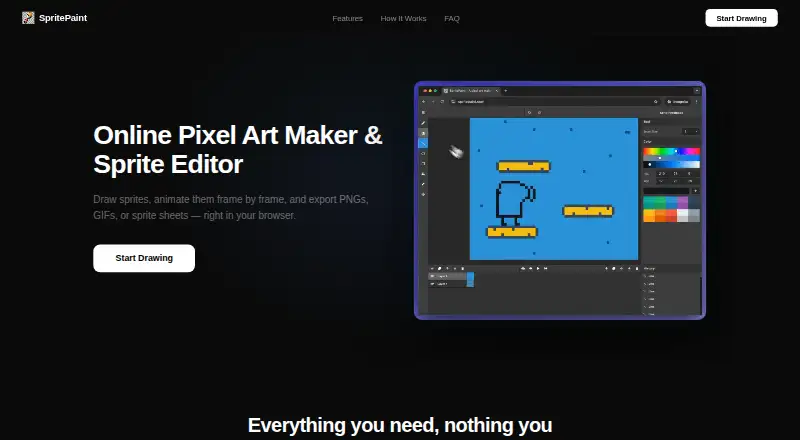
SpritePaint is a free browser-based pixel art maker and sprite editor for drawing, animating, and exporting sprites. Its tools include pencil, eraser, line, circle, rectangle, fill, eyedropper, and lasso selection, with brush sizes from 1 to 64 pixels. Artwork can be organized into layers and nested groups that can be duplicated, reordered, renamed, shown, or hidden. The animation timeline supports up to 100 frames, onion skinning, custom frame rates, and real-time preview. Exports include PNG, animated GIF, sprite sheets, and MP4 video in supported browsers, with scaling from 1x to 64x. Color controls include built-in and saved palettes, RGB and HSL sliders, and an eyedropper. Users can create shareable animation links, and exported work is described as ready for Unity, Godot, and GameMaker. SpritePaint runs in Chrome, Firefox, Safari, and Edge on Windows, Mac, Linux, and Chromebook. Work auto-saves in the browser, and .spritepaint files can be saved for transfer or backup.
Who it suits
It suits pixel artists, students, and game creators who want browser-based sprite drawing and animation without installation or an account. Chromebook and school-computer users are specifically included in its stated audience.
What it does well
- Free with no account required
- Animation supports up to 100 frames
- Onion skinning and real-time preview
- Exports PNG, GIF, and sprite sheets
- Runs across major desktop browsers
What to know first
- Canvas sizes stop at 500x500 pixels
- MP4 export depends on browser support
- Work auto-saves to browser storage
- No installation option is listed
Plans
| Plan | Billed and limits | Price |
|---|---|---|
| Free | No hidden fees · no export watermarks · no account required | Free |
As spritepaint.com lists them, read 11 Oct 2026. The maker's own page has the final word.
Verdict
SpritePaint offers a focused free workflow for pixel sprites, layered artwork, animation, and game-ready exports. Its browser storage and canvas-size limits are worth considering for larger projects.
Facts from SpritePaint's own pages
- Animation
- Users can create animations with up to 100 frames, onion skinning, custom frame rates, and real-time preview. · spritepaint.com, 11 Oct 2026
- Audience
- The maker describes it as suitable for school computers and Chromebooks, with no installation or account required. · spritepaint.com, 11 Oct 2026
- Browser support
- SpritePaint runs in Chrome, Firefox, Safari, and Edge on Windows, Mac, Linux, and Chromebook. · spritepaint.com, 11 Oct 2026
- Canvas limit
- Canvas sizes range from 2x2 to 500x500 pixels. · spritepaint.com, 11 Oct 2026
- Color
- The editor includes built-in palettes such as NES colors, user-saved palettes, RGB and HSL sliders, and an eyedropper. · spritepaint.com, 11 Oct 2026
- Drawing tools
- Tools include pencil, eraser, line, circle, rectangle, fill bucket, eyedropper, and lasso selection, with brush sizes from 1 to 64 pixels. · spritepaint.com, 11 Oct 2026
- Exports
- Exports include PNG, animated GIF, sprite sheets, and MP4 video in supported browsers, scaled from 1x to 64x. · spritepaint.com, 11 Oct 2026
- Integrations
- The site says exported work is ready for game engines including Unity, Godot, and GameMaker. · spritepaint.com, 11 Oct 2026
- Layers
- Artwork can be organized in layers and nested groups, and layers can be duplicated, reordered, renamed, shown, or hidden. · spritepaint.com, 11 Oct 2026
- Product
- SpritePaint is an online pixel art maker and sprite editor for drawing, animating, and exporting sprites in a browser. · spritepaint.com, 11 Oct 2026
- Saving
- Work auto-saves to the browser, and users can save a .spritepaint file to back up or transfer between computers. · spritepaint.com, 11 Oct 2026
- Sharing
- Users can generate a shareable animation link, which recipients can view and play in a browser. · spritepaint.com, 11 Oct 2026
Where SpritePaint stands on Freedom251
- Pixel Art Software#53 of 70