Freedom251 › Virtual Recording Studio Software
SonoBus
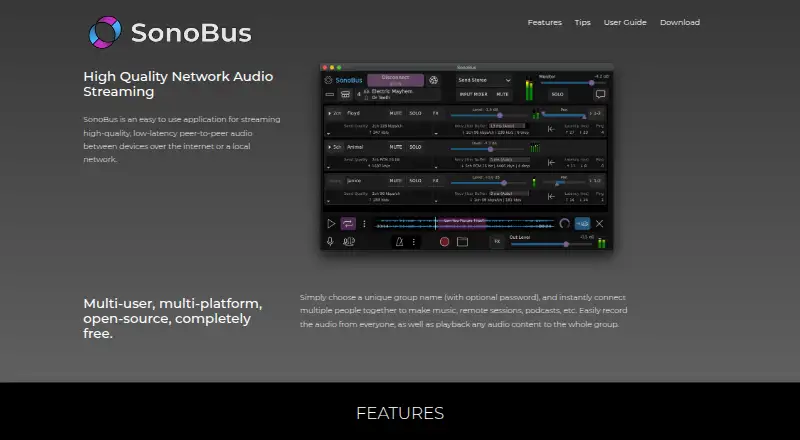
What SonoBus is
SonoBus streams audio between devices in real time over the internet or a local network. Participants join using a group name, with an optional password, and can adjust latency, quality, and mix. Optional controls include compression, a noise gate, equalization, and master reverb; sessions can be recorded, and users can play audio to the group. It supports uncompressed PCM at 16, 24, or 32 bit and compressed Opus at 16–256 kbps per channel. SonoBus is free software for Android, iOS, Linux, macOS, and Windows. Plugin formats include AU, VST, and AAX on macOS and Windows, and VST3 and LV2 on GNU/Linux. Its guide describes using it as an OBS VST filter and running Zoom alongside it for video. Audio travels peer-to-peer, but communications are not encrypted. The maker recommends wired Ethernet for lower latency; Wi-Fi may require a larger jitter buffer. SonoBus has no echo cancellation or automatic noise reduction, and headphones are recommended with a live microphone.
Who it suits
SonoBus suits people who already have a group with whom they want to share real-time audio. Its plugin formats and described OBS and Zoom setup may suit users combining audio tools with video workflows.
What it does well
- Free software for five listed platforms.
- Groups can be optionally password-protected.
- Sessions can be recorded or play audio to the group.
- Supports several audio controls and plugin formats.
What to know first
- Data communications are not encrypted.
- No echo cancellation or automatic noise reduction.
- Wi-Fi may increase latency.
- Practical participant counts depend on device and network conditions.
Plans
| Plan | Billed and limits | Price |
|---|---|---|
| SonoBus | Free software · standalone apps and audio plugins | Free |
As sonobus.net lists them, read 4 Oct 2026. The maker's own page has the final word.
Getting started
- Visit the SonoBus website.
- Install the standalone app for Android, iOS, Linux, macOS, or Windows, or use a supported plugin format.
- Choose a group name to connect; add a password if desired.
- For lower latency, use wired Ethernet as recommended by the maker.
- If needed, specify your own connection server or use the standalone app's local server functionality.
Verdict
SonoBus offers real-time group audio, adjustable sound controls, and recording across desktop and mobile platforms. Its lack of encryption and echo cancellation is important to consider before using it with a live microphone.
Questions
How much does SonoBus cost?
SonoBus is free software. Its listed plan is free.
Which platforms does SonoBus support?
Standalone platforms are Android, iOS, Linux, macOS, and Windows. Plugin formats include AU, VST, and AAX on macOS and Windows, and VST3 and LV2 on GNU/Linux.
Does SonoBus offer a free trial?
No. SonoBus has a free plan, and no free trial is listed.
Is SonoBus open source?
The facts describe it as free software but do not state whether it is open source.
Does SonoBus integrate with OBS or Zoom?
The user guide describes using SonoBus as a VST plugin filter in OBS and running Zoom alongside it for video.
Are SonoBus communications encrypted?
No. Data communications are not encrypted; audio travels peer-to-peer, and a connection server helps group members find one another.
Facts from SonoBus's own pages
- Audience and limits
- The user guide describes SonoBus as intended for people who already have a group to share real-time audio and says practical participant counts depend on device, network, and bandwidth conditions. · sonobus.net, 4 Oct 2026
- Audio controls
- Users can adjust latency, quality, and mix, with optional compression, noise gate, equalization, and master reverb. · sonobus.net, 4 Oct 2026
- Audio quality
- SonoBus supports uncompressed PCM at 16, 24, or 32 bit and compressed Opus at 16–256 kbps per channel. · sonobus.net, 4 Oct 2026
- Echo handling
- SonoBus does not use echo cancellation or automatic noise reduction, and the maker recommends headphones when using a live microphone. · sonobus.net, 4 Oct 2026
- Group sessions
- Users connect by choosing a group name and can optionally protect the group with a password. · sonobus.net, 4 Oct 2026
- Integrations
- The user guide describes using SonoBus as a VST plugin filter in OBS and running Zoom alongside it for video. · sonobus.net, 4 Oct 2026
- Local server option
- The user guide says users can specify their own connection server, and the standalone app can provide connection-server functionality on a local network. · sonobus.net, 4 Oct 2026
- Network requirements
- The maker recommends wired Ethernet for lower latency and says Wi-Fi can require a larger jitter buffer and increase latency. · sonobus.net, 4 Oct 2026
- Plugin formats
- The app is available as AU, VST, and AAX plugins on macOS and Windows, and VST3 and LV2 plugins on GNU/Linux. · sonobus.net, 4 Oct 2026
- Purpose
- SonoBus streams high-quality, low-latency audio between devices over the internet or a local network. · sonobus.net, 4 Oct 2026
- Recording and playback
- Users can record session audio and play audio content to the group. · sonobus.net, 4 Oct 2026
- Security
- SonoBus currently does not encrypt data communications; audio travels peer-to-peer, while the connection server helps group members find each other. · sonobus.net, 4 Oct 2026
- Support
- The maker directs users to its Google users group, support email, and Discord server for feedback and answers. · sonobus.net, 4 Oct 2026
Where SonoBus stands on Freedom251
- Virtual Recording Studio Software#7 of 18
- Music Collaboration Software#14 of 28