Freedom251 › Code Snippet Managers
SnippetPilot
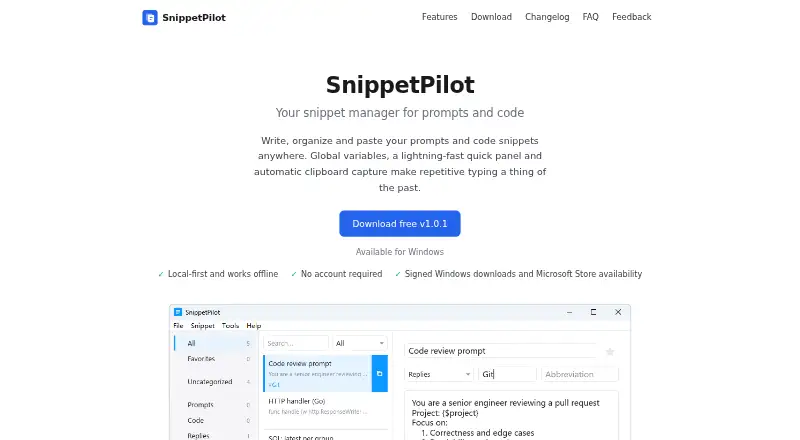
What SnippetPilot is
SnippetPilot is a Windows app for managing reusable prompts and code, then pasting them into other applications. Users can sort snippets into folders and tags, and search by title or content. A floating panel opens through a global hotkey, allowing users to find, copy, or paste text without leaving the current app. The app can also capture copied text automatically; captured items can be named, tagged, edited, or discarded. Global variables store reusable values such as signatures, email addresses, or project names, and changes update snippets that use them. Snippets, folders, tags, and variables are stored locally by default, and the app works offline without uploading snippet content to its maker. No account is needed. SnippetPilot is free for personal or commercial use on devices the user controls, subject to the applicable terms. It supports 64-bit Windows 10 and later and is offered as an installer, portable ZIP, or through Microsoft Store. The maker says macOS and Linux editions are not available; built-in cross-device sync is not provided.
Who it suits
SnippetPilot suits Windows users who repeatedly reuse prompts, code, or other text across applications. It may also suit people who want offline access and local snippet storage.
What it does well
- Free for personal or commercial use
- Folders, tags, and content search organize snippets
- Hotkey opens a floating quick panel
- Works offline with local storage by default
- No account required
What to know first
- Only available for Windows 10 or later
- No built-in cross-device sync
- macOS and Linux editions have not been released
Plans
| Plan | Billed and limits | Price |
|---|---|---|
| SnippetPilot | Currently free · 64-bit Windows 10 or later | Free |
As snippetpilot.com lists them, read 5 Oct 2026. The maker's own page has the final word.
Getting started
- Visit https://snippetpilot.com/
- Choose the signed Windows installer, portable ZIP, or Microsoft Store version
- Install or open the app on 64-bit Windows 10 or later
- Create and organize snippets with folders, tags, and variables
- Use the global hotkey to open the quick panel
Verdict
SnippetPilot brings reusable text, automatic clipboard capture, and editable variables into a local Windows library. Users who need access across devices should note that syncing is not a built-in feature.
Questions
Is SnippetPilot free?
Yes. The SnippetPilot plan costs nothing and is currently free.
Does it require an account?
No account is required to use the desktop app.
Which systems support it?
It supports 64-bit Windows 10 and later. macOS and Linux editions have not been released.
Does it sync snippets between devices?
Cross-device sync is not provided as a product feature. You can place the data folder inside your own sync folder.
Where is snippet data stored?
Snippets, folders, tags, and global variables are stored locally by default.
Facts from SnippetPilot's own pages
- Accounts
- No account is required to use the desktop app. · snippetpilot.com, 5 Oct 2026
- Clipboard capture
- Text copied to the clipboard is automatically captured in the library, where it can later be named, tagged, edited, or discarded. · snippetpilot.com, 5 Oct 2026
- Distribution
- The Windows app is offered as a signed installer, a portable ZIP, and through the Microsoft Store. · snippetpilot.com, 5 Oct 2026
- Global variables
- Variables can hold values such as signatures, emails, and project names that update wherever a snippet uses them. · snippetpilot.com, 5 Oct 2026
- Integrations
- The maker describes copying or pasting snippets into other apps and allows users to place the data folder inside their own sync folder. · snippetpilot.com, 5 Oct 2026
- License
- The terms permit personal or commercial use on devices the user controls, subject to the terms and store terms that apply. · snippetpilot.com, 5 Oct 2026
- Offline and local storage
- Snippets, folders, tags, and global variables are stored locally by default; the app works offline and does not upload snippet content to the maker. · snippetpilot.com, 5 Oct 2026
- Organization
- Snippets can be organized with folders and tags and searched by title and content. · snippetpilot.com, 5 Oct 2026
- Privacy
- The maker says it does not collect snippet content and that the website does not load analytics scripts, advertising networks, or third-party fonts. · snippetpilot.com, 5 Oct 2026
- Product
- SnippetPilot is a snippet manager for reusable prompts and code that lets users organize and paste text into other apps. · snippetpilot.com, 5 Oct 2026
- Quick panel
- A floating panel opens with a global hotkey and lets users find, copy, or paste a snippet without leaving the current app. · snippetpilot.com, 5 Oct 2026
- Security
- The Windows installer is code-signed, and the download page provides SHA-256 hashes for downloads. · snippetpilot.com, 5 Oct 2026
- Support
- Users can submit bugs, feature requests, or other messages through the Feedback page; they can leave an email address if they want a reply. · snippetpilot.com, 5 Oct 2026
- Supported system
- The app is available for 64-bit Windows 10 and later; the FAQ says macOS and Linux editions have not been released. · snippetpilot.com, 5 Oct 2026
Where SnippetPilot stands on Freedom251
- Code Snippet Managers#26 of 33