Freedom251 › Code Snippet Managers
Snippet Box
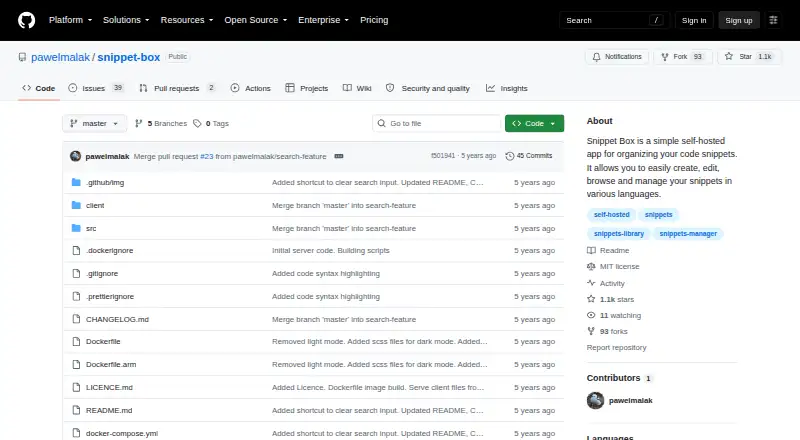
What Snippet Box is
Snippet Box is a self-hosted app for creating, editing, and organizing code snippets in different languages. A built-in editor handles snippet creation and changes, while syntax highlighting and a detail view help users read each entry and its documentation. Markdown support lets users attach notes or simple documentation to snippets. The library uses tags to organize and filter entries, and users can pin favorite or important snippets to the home screen. Search covers snippet titles and descriptions, with language and tag filters that can be combined in one query. The project describes two deployment routes: Docker, or running the built server with Node.js without Docker. Its backend stack includes Node.js, TypeScript, Express.js, Sequelize, and SQLite; the frontend uses React, TypeScript, and Bootstrap. The Docker example mounts a host data directory at /app/data, and the build instructions cover Linux and ARM platforms, including arm/v7 and arm64. The public repository identifies the project as MIT licensed. Snippet Box is listed as free for its self-hosted app.
Who it suits
Snippet Box suits developers who want a self-hosted library for code snippets, with tags, language filters, and Markdown notes. It also fits people who can deploy with Docker or run the built server with Node.js.
What it does well
- Built-in editor supports creating and editing snippets.
- Markdown notes can accompany code snippets.
- Search combines title or description terms with language and tag filters.
- Pinned snippets appear on the home screen.
- MIT-licensed project with Docker and Node.js deployment paths.
What to know first
- The listed platforms are Linux, self-hosted, and web.
- Using the app requires a self-hosted deployment.
Plans
| Plan | Billed and limits | Price |
|---|---|---|
| Snippet Box | Self-hosted app · MIT license | Free |
As github.com lists them, read 7 Oct 2026. The maker's own page has the final word.
Getting started
- Open the Snippet Box project page on GitHub.
- Choose a Docker deployment or the documented Node.js route without Docker.
- For Docker, follow the build instructions for Linux or an ARM target.
- Use the built-in editor to create snippets.
- Organize entries with tags, Markdown notes, and pinned snippets.
Verdict
Pick Snippet Box if you want a free, self-hosted place to manage snippets with tags, search, Markdown notes, and syntax highlighting. It is best suited to users comfortable deploying through Docker or running the built server with Node.js.
Questions
Is Snippet Box free?
Yes. The listed plan is free for the self-hosted app.
Does Snippet Box have a free trial?
No free trial is listed; Snippet Box is listed as free.
Which platforms does it support?
The listed platforms are Linux, self-hosted, and web. Docker build instructions include Linux and ARM platforms, including arm/v7 and arm64.
Is Snippet Box open source?
The public GitHub repository identifies the project as MIT licensed.
Can I add notes to snippets?
Yes. Built-in Markdown support lets users add notes or simple documentation to code snippets.
How can I deploy it?
The project documents Docker deployment and a route without Docker that runs the built server with Node.js.
Facts from Snippet Box's own pages
- Architecture
- The README lists Node.js, TypeScript, Express.js, Sequelize, and SQLite for the backend and React, TypeScript, and Bootstrap for the frontend. · github.com, 7 Oct 2026
- Code display
- The README lists built-in syntax highlighting and snippet details and documentation among the snippet view features. · github.com, 7 Oct 2026
- Data storage
- The listed backend uses Sequelize ORM with SQLite, and the Docker example mounts a host data directory at /app/data. · github.com, 7 Oct 2026
- Deployment
- The project documents Docker deployment and an installation path without Docker that runs the built server with Node.js. · github.com, 7 Oct 2026
- Deployment targets
- The README includes Docker build instructions for Linux and ARM platforms, including arm/v7 and arm64. · github.com, 7 Oct 2026
- Editing
- A built-in editor is used to create and edit snippets. · github.com, 7 Oct 2026
- License
- The public GitHub repository identifies the project license as MIT. · github.com, 7 Oct 2026
- Markdown
- Built-in Markdown support lets users add notes or simple documentation to code snippets. · github.com, 7 Oct 2026
- Pinned snippets
- Users can pin favorite or important snippets to the home screen for quick access. · github.com, 7 Oct 2026
- Purpose
- Snippet Box is a self-hosted app for creating, editing, browsing, and managing code snippets in different languages. · github.com, 7 Oct 2026
- Search
- Search supports terms in snippet titles or descriptions and filters for languages and tags, including multiple filters in one query. · github.com, 7 Oct 2026
- Snippet library
- The snippet library lets users filter and access their code using tags. · github.com, 7 Oct 2026
Where Snippet Box stands on Freedom251
- Code Snippet Managers#22 of 33
- Code Snippet Management Software#15 of 22