Freedom251 › Code Snippet Managers
SnippetsLab
What SnippetsLab is
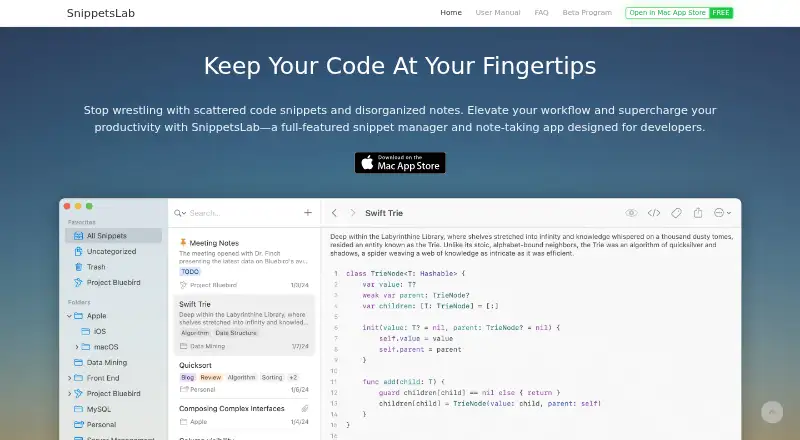
SnippetsLab is a free macOS app for developers who want a personal library of code snippets and notes. Content can be arranged with nested folders, tags, smart groups, shortcuts, and multiple tabs inside a snippet. Syntax highlighting supports more than 600 languages and text formats, while automatic detection handles 50 popular languages. Markdown features include side-by-side previews, Mermaid diagrams, MathJax formulas, code blocks, and customizable CSS themes. Full-text fuzzy search, smart filters, intelligent ranking, a menu-bar assistant, and Quick Actions help users locate and access saved material. SnippetsLab connects with Alfred, Raycast, macOS Services, GitHub Gists, a command-line tool, and an MCP server for compatible AI agents. It can import from Quiver, CodeBox, GitHub Gists, JSON, and plain text, and export libraries as JSON, XML, or text files. iCloud Sync synchronizes a library across Macs signed into the same Apple ID, and automatic backups are retained at several intervals. The app is available only through the Mac App Store, requires macOS 14.6 or later, and supports Apple Silicon and Intel. Its Free plan costs nothing, with no ads, in-app purchases, or subscriptions.
Who it suits
SnippetsLab is suited to developers on macOS who want to collect code, technical notes, and reference material in one searchable library. It also fits users who value Markdown notes, connections to developer tools, and iCloud synchronization across Macs using the same Apple ID.
What it does well
- Syntax highlighting covers over 600 languages and text formats.
- Automatic language detection supports 50 popular languages.
- Markdown includes Mermaid diagrams and MathJax formulas.
- Import from Quiver, CodeBox, GitHub Gists, JSON, and plain text.
- The free plan has no ads, in-app purchases, or subscriptions.
What to know first
- Available only for macOS through the Mac App Store.
- Requires macOS 14.6 or later.
- iCloud Sync works across Macs signed into the same Apple ID.
Limits
SnippetsLab is restricted to Macs running macOS 14.6 or later and is distributed only through the Mac App Store. Its free plan is listed without ads, in-app purchases, or subscriptions.
Plans
| Plan | Billed and limits | Price |
|---|---|---|
| Free | Mac only · no ads · no in-app purchases · no subscriptions | Free |
As renfei.org lists them, read 3 Oct 2026. The maker's own page has the final word.
Getting started
- Visit https://www.renfei.org/snippets-lab/.
- Get SnippetsLab through the Mac App Store.
- Use it on a Mac running macOS 14.6 or later.
- Import material from a supported source, or organize new content with folders, tags, and smart groups.
- Enable iCloud Sync to keep the library synchronized across Macs signed into the same Apple ID.
Verdict
Choose SnippetsLab if you use a supported Mac and want a free, feature-rich home for code snippets and notes. Look elsewhere if you need an app for a platform other than macOS or a system older than macOS 14.6.
Questions
How much does SnippetsLab cost?
The Free plan costs nothing. It has no ads, in-app purchases, or subscriptions.
Which platforms does SnippetsLab support?
SnippetsLab is exclusive to macOS and requires macOS 14.6 or later. It supports Apple Silicon and Intel and is available through the Mac App Store.
Does it support Markdown notes?
Yes. Markdown tools include side-by-side preview, Mermaid diagrams, MathJax formulas, code blocks, and customizable CSS themes.
Can I sync my library across devices?
iCloud Sync synchronizes the library across Macs signed in with the same Apple ID.
What can I connect SnippetsLab to?
Listed integrations include Alfred, Raycast, macOS Services, GitHub Gists, a command-line tool, and an MCP server for compatible AI agents.
Is SnippetsLab open source?
The listed details do not say whether SnippetsLab is open source.
Facts from SnippetsLab's own pages
- AI agent access limits
- The CLI and MCP server are read-only by default; when write access is enabled, agents can create snippets but cannot edit, move, or delete existing content. · renfei.org, 3 Oct 2026
- GitHub access
- For GitHub integration, credentials are stored locally in Keychain and the app requests only the gist scope, without access to repositories or profile information. · renfei.org, 3 Oct 2026
- Import and export
- It imports from Quiver, CodeBox, GitHub Gists, JSON, and plain text, and exports libraries as JSON, XML, or text files. · renfei.org, 3 Oct 2026
- Integrations
- It supports Alfred, Raycast, macOS Services, GitHub Gists, a command-line tool, and an MCP server for compatible AI agents. · renfei.org, 3 Oct 2026
- Language support
- It supports syntax highlighting for over 600 languages and text formats, with automatic language detection for 50 popular languages. · renfei.org, 3 Oct 2026
- Markdown
- Markdown features include side-by-side preview, Mermaid diagrams, MathJax formulas, code blocks, and customizable CSS themes. · renfei.org, 3 Oct 2026
- Organization
- It organizes content with nested folders, tags, smart groups, shortcuts, and multiple tabs within a snippet. · renfei.org, 3 Oct 2026
- Platform and availability
- SnippetsLab is exclusive to macOS, requires macOS 14.6 or later, supports Apple Silicon and Intel, and is available only through the Mac App Store. · renfei.org, 3 Oct 2026
- Privacy
- The privacy policy says usage and device data are collected anonymously, encrypted in transit, and not used for advertising, targeting, or cross-site tracking. · renfei.org, 3 Oct 2026
- Purpose
- SnippetsLab is a snippet manager and note-taking app for developers to build a personal coding knowledge base. · renfei.org, 3 Oct 2026
- Search and access
- The app offers full-text fuzzy search, smart filters, intelligent ranking, a menu-bar assistant, and Quick Actions. · renfei.org, 3 Oct 2026
- Support
- The maker invites feature suggestions and support requests by email at [email protected]. · renfei.org, 3 Oct 2026
- Sync and backups
- iCloud Sync keeps the library synchronized across Macs signed in with the same Apple ID, and automatic backups are kept at several intervals. · renfei.org, 3 Oct 2026
Where SnippetsLab stands on Freedom251
- Code Snippet Managers#27 of 33
- Code Snippet Management Software#18 of 22