Smarkup
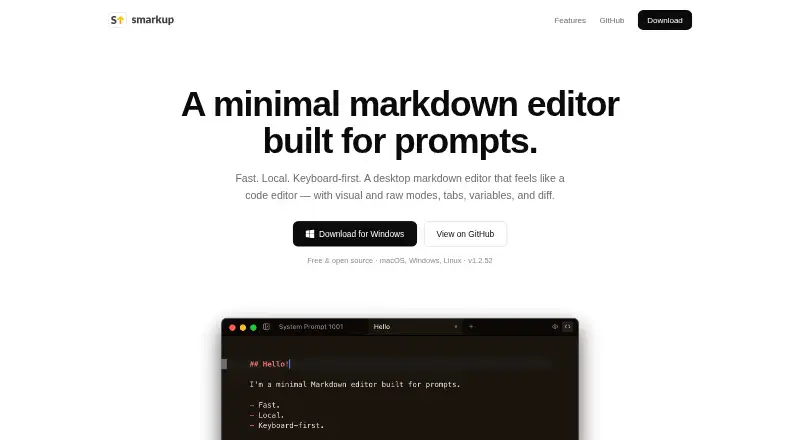
What Smarkup is
Smarkup is a free, open-source desktop Markdown editor for working with prompts. It runs on macOS, Windows, and Linux, and keeps files on the user's disk rather than syncing them to the cloud. Users can switch between a visual editor powered by Tiptap and raw Markdown editing through CodeMirror. Draggable tabs allow several documents to remain open, while Quick Open helps locate files. A keyboard command palette uses fuzzy search for actions including opening files, changing editor modes, comparing files, and enabling auto-save. Smarkup also supports reusable, highlighted {{variables}}, shown in a sidebar, and a side-by-side view for comparing two document versions. Light and dark themes are available, with an option to match the system appearance. A file watcher detects changes made outside the editor and reloads files automatically. The desktop app is described as auto-updating. Downloads are offered as a macOS Universal build for Intel and Apple Silicon, a Windows installer, and Linux AppImage and .deb packages. The project links to its GitHub repository and issue tracker.
Who it suits
Smarkup suits people who write or manage prompt documents in Markdown and want local desktop editing across macOS, Windows, or Linux. Its reusable variables and comparison view may also suit people maintaining related document versions.
What it does well
- Free and open source.
- Runs on macOS, Windows, and Linux.
- Supports both visual and raw Markdown editing.
- Compares document versions side by side.
- Files remain on the user's disk.
What to know first
- No cloud sync.
- Desktop app only.
Plans
| Plan | Billed and limits | Price |
|---|---|---|
| Free | Free and open source · desktop app | Free |
As smarkup.com lists them, read 9 Oct 2026. The maker's own page has the final word.
Getting started
- Visit https://smarkup.com/.
- Choose a download for macOS, Windows, or Linux.
- Install or open the downloaded desktop app.
- Open local Markdown files and choose visual or raw editing.
Verdict
Smarkup combines prompt-focused Markdown editing with local file handling, reusable variables, and document comparison. It is a fit for users who prefer a desktop editor and do not need cloud sync.
Questions
How much does Smarkup cost?
The Free plan costs nothing. The product is described as free and open source.
Is Smarkup open source?
Yes. The maker describes it as free and open source and links to its GitHub source repository.
Which platforms does it support?
Smarkup is available for macOS, Windows, and Linux. Downloads include a macOS Universal build, a Windows installer, and Linux AppImage and .deb packages.
Does Smarkup sync files to the cloud?
No. Files stay on the user's disk, and the app supports local files.
Who makes Smarkup?
The site credits Adam as the maker.
Facts from Smarkup's own pages
- Cloud sync
- No · smarkup.com, 20 Sept 2026
- Command palette
- The command palette supports fuzzy search for actions such as opening files, switching editor modes, and comparing files. · smarkup.com, 9 Oct 2026
- Cost and license
- The site describes Smarkup as free and open source. · smarkup.com, 8 Oct 2026
- Diff view
- Smarkup can compare two document versions side by side. · smarkup.com, 9 Oct 2026
- Editing modes
- It offers a WYSIWYG visual editor powered by Tiptap and a raw CodeMirror view. · smarkup.com, 9 Oct 2026
- Free plan
- Yes · smarkup.com, 20 Sept 2026
- Local file support
- Yes · smarkup.com, 20 Sept 2026
- Local storage
- Files stay on the user's disk, with no cloud storage, and a built-in file watcher reloads external changes. · smarkup.com, 9 Oct 2026
- Maker
- The site credits Adam as the maker; his personal site identifies him as Adam Sabla. · adamsabla.com, 9 Oct 2026
- Open source
- The maker describes Smarkup as free and open source, and links to its source repository on GitHub. · smarkup.com, 9 Oct 2026
- Platforms
- Downloads are listed for macOS Universal (Intel and Apple Silicon), Windows (.exe installer), and Linux (AppImage and .deb). · smarkup.com, 8 Oct 2026
- Product
- Smarkup is a minimal desktop markdown editor built for prompts. · smarkup.com, 9 Oct 2026
- Support
- The site links to the project's GitHub repository and issue tracker. · smarkup.com, 8 Oct 2026
- Supported downloads
- Downloads are offered for macOS Universal (Intel and Apple Silicon), Windows installer, and Linux AppImage and .deb. · smarkup.com, 9 Oct 2026
- Tabs and quick open
- Users can work with multiple draggable document tabs and quickly find files. · smarkup.com, 9 Oct 2026
- Themes
- The editor supports light and dark modes and can follow the system setting. · smarkup.com, 9 Oct 2026
- Updates
- The site describes Smarkup as auto-updating, and the repository README says the app checks for releases and offers a download link when an update is available. · github.com, 9 Oct 2026
- Variables
- Users can define and reuse highlighted variables across documents, with variables listed in the sidebar. · smarkup.com, 9 Oct 2026
Where Smarkup stands on Freedom251
- Markdown editors#16 of 31