Freedom251 › AI Detection Software
SlopProx
What SlopProx is
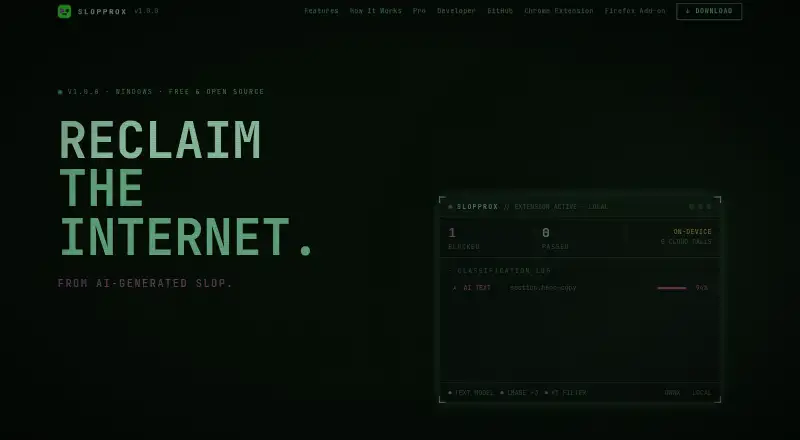
SlopProx detects and hides AI-generated text, images, and YouTube videos while browsing. It is offered as a Windows desktop app and Chrome and Firefox extensions, with listed platform support for Linux, macOS, and Windows. Text checks combine more than 76 curated phrases and structural signals with an on-device ONNX transformer. Image checks use three ONNX vision models and inspect C2PA manifests, EXIF data, and PNG metadata. For YouTube, the filter checks the AI disclosure before the player renders and can overlay a video or dim feed and search cards. Optional Enhanced Mode uses a local HTTPS proxy to block 29 listed ad networks; it installs a local CA certificate in the user certificate store without requiring admin rights. The maker says processing runs locally, without cloud calls or telemetry, and that no data leaves the machine. The project is open source under GPL-3.0. Its free Open Source plan is listed as free forever. Pro is marked coming soon; its planned forensic view would show a verdict, confidence, and detection signals for selected text or images.
Who it suits
SlopProx suits people who want AI-content filtering while browsing, including users of email, Google Docs, or a CMS through a browser extension. Its maker identifies newsrooms, universities, journalists, researchers, freelance editors, and legal or research users for the planned Pro features.
What it does well
- Free forever Open Source plan.
- Text and image detection runs on-device.
- YouTube filter checks disclosures before rendering.
- Enhanced Mode blocks 29 listed ad networks.
What to know first
- False positives and false negatives can occur.
- Pro is marked coming soon.
- Broader device and system support is planned.
Limits
The free Open Source plan is described as free forever, open source, and on-device; no quota or seat limit is stated. False positives and false negatives can occur. Pro is marked coming soon.
Plans
| Plan | Billed and limits | Price |
|---|---|---|
| Open Source | Free forever · Open source · On-device | Free |
| Teams | seat / month · billed annually · minimum 5 seats · Shared licence key · Covers the whole team | £10 a month |
| Individual Pro | per year · Single seat · All model updates included | £49 a year |
As slopprox.com lists them, read 8 Oct 2026. The maker's own page has the final word.
Getting started
- Visit https://slopprox.com/.
- Choose the free Open Source plan or review the listed Pro plans.
- Install the browser extension or use the Windows desktop app.
- For browser use, apply the extension to email, Google Docs, or a CMS.
- Enable Enhanced Mode if you want its local proxy and ad-network blocking.
SlopProx is a Windows desktop app and browser extension that screens text, images, and YouTube videos for AI-related signals. It suits people who want those checks to happen while browsing, especially when they prefer on-device processing. Its case is less compelling for anyone who needs conclusive authorship judgments or a currently available forensic report.
Overview
SlopProx brings text and image screening together with a YouTube filter in Chrome and Firefox, alongside a Windows desktop app. The extension is also intended for use with email, Google Docs, and a CMS, which makes it relevant to editors and researchers reviewing material in those workflows.
The project is open source under GPL-3.0. Its maker says processing runs locally, without cloud calls or telemetry, and that data stays on the machine. That is a useful distinction for people handling sensitive drafts or images. It does not make the results definitive: the maker warns that false positives and false negatives can occur.
Key features
Text and image detection
Text screening combines more than 76 curated phrases and structural signals with an on-device ONNX transformer. Image screening uses three ONNX vision models and checks C2PA manifests, EXIF data, and PNG metadata. The range of signals gives users more than a single type of check, but it should be treated as an aid to review, not proof of how content was made.
YouTube filtering
The YouTube filter checks a video's AI disclosure before the player renders. It can overlay videos or dim cards in feeds and search results, making it useful for people who want to spot disclosed AI content without interrupting browsing to run a separate check. Its described check is tied to YouTube's disclosure, not a general guarantee about a video's origin.
Enhanced Mode
Optional Enhanced Mode uses a local HTTPS proxy to block 29 listed ad networks. It installs a local CA certificate in the user certificate store without requiring administrator rights. That adds a distinct browsing function, but users should weigh the certificate installation and proxy setup against their need for ad and tracker blocking.
Pro forensic view
Pro is described as offering a browser-based breakdown for selected text or images, including a verdict, confidence, and the signals that fired. That could help users who need to inspect why a result was produced, but Pro is marked as coming soon, so it is not a present reason to choose SlopProx.
Pricing
The Open Source plan costs nothing and is free forever. It is open source and on-device, making it the straightforward choice for individuals who want the core local checks without a subscription.
Individual Pro costs £49 a year, billed per year, for one seat with all model updates included. It is aimed at an individual who wants the paid tier and ongoing model updates; its advertised forensic breakdown depends on Pro becoming available.
Teams costs £10 a month per seat, billed annually, with a minimum of 5 seats. The shared licence key covers the whole team, so it is designed for organizations buying access for a group rather than a lone user. At the minimum, the annual billing requirement makes it a more substantial commitment than the free plan.
Pro is not yet available, and the page invites visitors to register interest. The free plan remains the practical option for trying SlopProx now.
Platforms
SlopProx is available as a Windows desktop app and as Chrome and Firefox extensions. The project also names Linux and macOS as platforms. The browser extension is the relevant route for people who want checks inside email, Google Docs, or a CMS.
Who it's for
SlopProx is a good fit for editors, journalists, researchers, and teams that want local screening of text, images, or YouTube content as part of browsing. Its Pro page specifically targets newsrooms, universities, journalists, researchers, freelance editors, and legal or research users. The local-processing approach may appeal to people working with sensitive material, while the acknowledged error risk makes it unsuitable as the sole basis for high-stakes authorship decisions.
Pros and cons
Pros
- Local processing: the maker says there are no cloud calls or telemetry and that data does not leave the machine.
- Multiple content types: text, images, and YouTube disclosures can be checked in the browsing workflow.
- Open-source free tier: the Open Source plan is free forever and licensed under GPL-3.0.
- Optional network blocking: Enhanced Mode adds blocking for 29 listed ad networks through a local proxy.
Cons
- Results can be wrong: false positives and false negatives limit its use as conclusive evidence.
- Pro is forthcoming: the forensic breakdown is not yet available.
- Windows is the named desktop app: Linux and macOS are named as platforms, but the product description specifically identifies a Windows desktop app.
- Team pricing requires a group commitment: Teams is billed annually and starts at five seats.
Alternatives
For a broader set of detector choices, browse AI Detection Software.
Trinka is a freemium option with a free plan and platforms including API, extension, macOS, self-hosted, web, and Windows; consider it when those platform choices matter.
Grammarly has a free plan for individuals with 100 AI prompts per month, while Pro costs $12 a month and includes 2,000 AI prompts per member per month. It is the more relevant alternative for readers whose priority is its stated AI prompt allowance.
Sapling offers a free plan with 2,000 AI detector characters per check, five detector files per batch, and 20 snippets, plus a free trial. Choose it if those explicit checking limits and its API, extension, self-hosted, web, or Windows platforms better fit your workflow.
ZeroTrue has a free plan with 100 detections per month, API access, a web dashboard, and community support. It is a reasonable alternative when a monthly detection allowance and API access are the priority.
AI Detect is a free option for Linux, macOS, self-hosted, and Windows use, with no API key or usage limits and local use. Pick it when those platform and limit terms matter more than SlopProx's browser-based YouTube filtering.
AI Detector Pro offers a web-based free plan with three AI scans per month, zero humanizations, and extra API costs. It may suit readers specifically seeking a web option with a small free scan allowance.
Detecto is a web-based freemium alternative with a free tier that includes starter credits, full report fidelity, and no card requirement. Its Student plan costs $6.99 a month, billed at $83.88 a year, for 60 credits per month and text and image checks; consider it if those terms suit your expected usage.
GPTZero has a free plan with 10,000 words per month and 50,000 characters, and an Essential plan at $8.33 a month when paying annually. It is worth comparing when a stated monthly word allowance is more useful than screening content as it appears in the browser.
Verdict
SlopProx is best for people who want open-source, locally processed checks across text, images, and YouTube while browsing. Its strongest reason to choose it is that those checks stay on-device according to its maker; its strongest reason to look elsewhere is that detection can be wrong and Pro's forensic view is not yet available. Treat it as a screening aid, not a final judgment about authorship.
Verdict
SlopProx combines text, image, and YouTube filtering with locally processed detection. Readers should account for the maker's warning that results can include false positives and negatives, and that Pro is not yet available.
Questions
Is SlopProx free?
Yes. The Open Source plan is listed as free and described as free forever.
What platforms does it support?
Platforms listed are extension, Linux, macOS, and Windows. The app is described as a Windows desktop app, alongside Chrome and Firefox extensions.
Is SlopProx open source?
Yes. The project is licensed under GPL-3.0.
How much do the paid plans cost?
Individual Pro is listed at £49 a year. Teams is £10 a month, billed per seat annually, with a five-seat minimum.
What does Pro include?
Pro is marked coming soon. Its described forensic breakdown for selected text or images includes a verdict, confidence, and signals that fired.
Who makes SlopProx?
The page credits Ross Walpole, a JavaScript and Outsystems developer in the United Kingdom, and says it began as his personal project.
Facts from SlopProx's own pages
- Ad and tracker blocking
- Optional Enhanced Mode uses a local HTTPS proxy to block 29 listed ad networks; it installs a local CA certificate in the user certificate store without requiring admin rights. · slopprox.com, 8 Oct 2026
- Image detection
- Image detection uses three ONNX vision models and scans C2PA manifests, EXIF data, and PNG metadata. · slopprox.com, 8 Oct 2026
- Integrations
- The page describes use with email, Google Docs, and a CMS through the browser extension. · slopprox.com, 8 Oct 2026
- Intended users
- The Pro page names newsrooms, universities, journalists, researchers, freelance editors, and legal or research users. · slopprox.com, 8 Oct 2026
- License
- The open-source project is licensed under GPL-3.0. · slopprox.com, 8 Oct 2026
- Limitations
- The maker says false positives and false negatives can occur and that it plans to broaden support for devices and systems. · slopprox.com, 8 Oct 2026
- Maker
- The page credits Ross Walpole, a JavaScript and Outsystems developer in the United Kingdom, and says SlopProx began as his personal project. · slopprox.com, 8 Oct 2026
- Privacy
- The maker says processing runs locally, with no cloud calls or telemetry and no data leaving the machine. · slopprox.com, 8 Oct 2026
- Pro availability
- SlopProx Pro is marked coming soon, and the page invites visitors to register interest. · slopprox.com, 8 Oct 2026
- Pro capabilities
- Pro is described as providing a browser-based forensic signal breakdown for selected text or images, including verdict, confidence, and signals that fired. · slopprox.com, 8 Oct 2026
- Purpose
- A Windows desktop app and Chrome and Firefox extensions detect and hide AI-generated text, images, and YouTube videos while browsing. · slopprox.com, 8 Oct 2026
- Text detection
- Text detection combines 76+ curated phrases and structural signals with an on-device ONNX transformer. · slopprox.com, 8 Oct 2026
- YouTube filtering
- The YouTube filter checks its AI disclosure before the player renders and can overlay videos or dim feed and search cards. · slopprox.com, 8 Oct 2026
Where SlopProx stands on Freedom251
- AI Detection Software#11 of 30