Freedom251 › Open Educational Resource Platforms
SkillsCommons
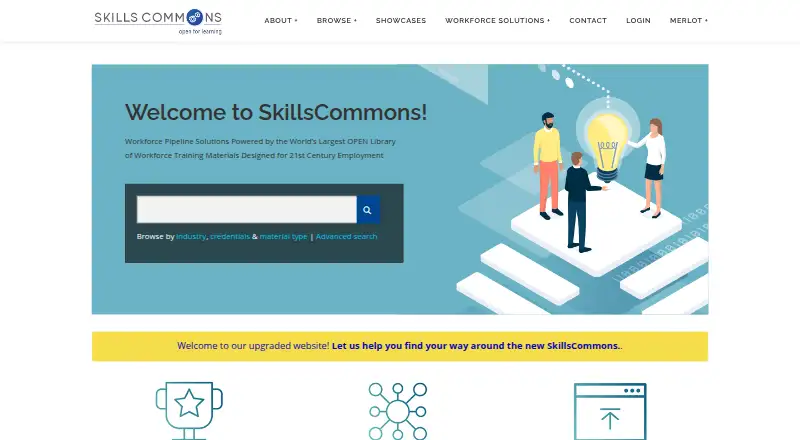
What SkillsCommons is
SkillsCommons is a free repository of learning resources and program support materials for job-driven workforce development. It is not an LMS: it does not enroll students in courses or award course credit. People can search and download materials without an account, while institutions and organisations can apply for accounts to contribute. Contributors may submit items individually or in bulk using a CSV of metadata, and can restrict attached files until an embargo date; after that, requesters may ask the submitter for access. Courses exported from an LMS can be uploaded, with LMS-specific and IMS Common Cartridge formats recommended when available. Programmatic discovery is available through keyword search, item METS data, and OAI metadata harvesting. The interface supports screen readers, keyboard access, captions, Able Player, and viewing Word and PDF files on devices without plugins. SkillsCommons says it works toward Section 508 and WCAG 2.0 accessibility, aligned with WCAG 2.0 AA. Its FAQ says there is no file-size limit, although very large uploads may need support planning for connection speed and bandwidth.
Who it suits
SkillsCommons suits individuals and organisations seeking workforce-development learning materials, as well as institutions and organisations that want to contribute them. It is not suited to running courses or enrolling students.
What it does well
- Search and download materials without an account.
- Contributors can submit collections in bulk.
- Embargo controls can restrict attached files.
- Discovery options include keyword search and OAI harvesting.
What to know first
- An account is required to upload materials.
- The repository does not enroll students or offer course credit.
- Very large uploads may require support planning.
Limits
Browsing and downloads are free. No file-size limit is stated, but very large uploads may require contacting support to plan around connection speed and bandwidth; operational costs for large hosted collections are discussed with contributors.
Plans
| Plan | Billed and limits | Price |
|---|---|---|
| SkillsCommons repository — browsing and downloads | Search and download materials without an account · public learning and workforce development resources | Free |
| SkillsCommons repository — hosting contributions | Small collections hosted for free · operational costs discussed for large collections · account required to upload | On request |
As skillscommons.org lists them, read 2 Oct 2026. The maker's own page has the final word.
Getting started
- Open the SkillsCommons website to browse and download public materials without an account.
- Search the repository for learning or workforce development resources.
- Apply for an account as an institution or organization if you plan to upload materials.
- Submit materials individually or in bulk with a CSV of metadata.
- Export courses from an LMS before uploading; use LMS-specific or IMS Common Cartridge formats when available.
Overview
SkillsCommons is a resource repository for people and institutions working on employment-focused education. It is best suited to people seeking reusable learning materials and organisations ready to share them; it is not a place to teach or manage courses.
Its strongest case is open access to workforce-development resources, including search and downloads without an account. Contributors get a route to publish and manage materials, but institutions looking for enrolment, instruction or course credit will need another service.
Key features
- Browse and reuse: Visitors can search and download without registering. Remixing and adaptation are supported, which makes the repository useful for people who want to work with existing materials rather than simply read them.
- Contribution workflow: Institutions and organisations can apply for an account and submit materials individually or in bulk with a CSV of metadata. A publishing workflow supports those contributions. Small collections are hosted for free; operational costs are discussed for large collections, so large-scale contributors should plan for that conversation.
- Embargoes: Contributors can restrict attached files until an embargo date. After it passes, requesters may ask the submitter for access; this gives contributors control over timing but means those files are not necessarily immediately available.
- LMS exports and formats: Courses exported from an LMS can be uploaded, with LMS-specific formats and IMS Common Cartridge recommended when available. Supported download formats include IMS Common Cartridge, ZIP, office documents, PDFs, video and audio formats. This helps with resource reuse, but does not turn SkillsCommons into a course-delivery system.
- Programmatic discovery: Unauthenticated options include keyword search, item METS data and OAI metadata harvesting. These are useful for organisations building discovery workflows without requiring an account.
- Accessibility and support: The web interface supports screen readers, keyboard access, captions and Able Player; DocReader handles Word and PDF documents on devices without plugins. SkillsCommons says it works toward Section 508 and WCAG 2.0 and aligns its commitment with WCAG 2.0 AA. Guides, FAQs and email support are available, and webinar scheduling can be arranged through support.
- Account responsibilities: The terms say the service collects personal information and browser data, and make users responsible for password confidentiality and activity under their accounts. Contributors should factor those responsibilities into account use.
Pricing
Browsing and downloads cost nothing, and no account is needed for those activities. There is no free trial because access is free. Hosting small collections is free for contributors, who need an account; operational costs are discussed for large collections, with custom pricing. The service says there is no file-size limit, though very large uploads may require contacting support to plan around connection speed and bandwidth.
Platforms
SkillsCommons lists Android, iOS, macOS, Windows, web and API support. The API and metadata options suit programmatic discovery; the web experience includes the stated accessibility features. Its formats also cover documents, packaged courses, audio and video.
Who it's for
Individuals and organisations seeking job-driven learning resources can browse without an account. Educational institutions and other organisations can apply to contribute materials, including in bulk. SkillsCommons is a poor fit for anyone who needs student enrolment, course delivery or credit: it offers none of those functions.
Pros and cons
- Pro: Public search and downloads require no account, lowering the barrier for resource seekers.
- Pro: Bulk CSV submissions, remixing and adaptation give institutions a practical path to contribute reusable material.
- Pro: Embargo controls and unauthenticated metadata discovery serve contributors managing access and organisations integrating discovery.
- Con: It does not enrol students, deliver courses or award credit, so it cannot replace an LMS.
- Con: Large collections may involve operational costs, and very large uploads may need support planning.
- Con: Contributors need an account and are responsible for password confidentiality and account activity.
Alternatives
For broader options in the same category, see Open Educational Resource Platforms. Choose LibreTexts instead when textbook access, instructor ADAPT access or authoring with H5P and ADAPT is the priority; its free core platform is capped at five custom textbooks per institution. African Storybook is a better fit for thousands of openly licensed picture storybooks and free Reader and Maker apps. Choose DIKSHA for its free offering and Sunbird-based, MIT-licensed open-source technology. B.C. Open Collection suits readers seeking public materials they can use, customise and share. StoryWeaver offers free reading, creation, translation and downloads. OER Commons is another free digital library, with Open Author and group-creation tools. Lumen Learning is worth considering for course support, including a per-student course-support fee of $35, paid once, billed per student per term, and a Success Accelerator plan priced at 350.00 USD. Open Michigan is another free option.
Verdict
SkillsCommons is a strong choice for workforce-development resource seekers and institutions publishing reusable materials, especially when open browsing, bulk contribution or metadata discovery matters. Its defining limitation is equally clear: it is a repository, not a system for running courses. Look elsewhere if your priority is enrolment, instruction or credit.
Verdict
SkillsCommons offers free access to a workforce-development resource repository, with ways for eligible organisations to contribute. It is a repository rather than a course-delivery platform.
Questions
Does SkillsCommons cost anything to use?
The browsing and downloads plan is free. Small hosted collections are free; operational costs for large collections are discussed.
Do I need an account to download materials?
No. Users can search and download materials without creating an account. An account is required to upload.
Who can contribute materials?
Institutions and organizations can apply for an account and submit materials individually or in bulk using a CSV of metadata.
Can I upload a course from an LMS?
Yes. Courses can be exported from an LMS and uploaded. The support FAQ recommends LMS-specific formats and IMS Common Cartridge when available.
Does SkillsCommons work as an LMS?
No. It does not enroll students in courses or offer course credit.
What accessibility support does it provide?
The web interface supports screen readers, keyboard access, captions, and Able Player. DocReader supports Word and PDF documents on devices without plugins.
Facts from SkillsCommons's own pages
- Accessibility
- The web interface supports screen readers, keyboard access, captions, and the Able Player; DocReader supports Word and PDF documents on devices without plugins. · support.skillscommons.org, 2 Oct 2026
- Accessibility standard
- SkillsCommons says it works toward Section 508 and WCAG 2.0 accessibility and aligns its commitment with WCAG 2.0 AA. · support.skillscommons.org, 2 Oct 2026
- API and metadata access
- The site describes unauthenticated options for programmatic discovery, including keyword search, item METS data, and OAI metadata harvesting. · support.skillscommons.org, 2 Oct 2026
- Audience
- Its mission is to help individuals, communities, educational institutions, organizations, and businesses prepare people for successful employment. · support.skillscommons.org, 2 Oct 2026
- Contribution process
- Institutions and organizations can apply for an account and submit materials individually or in bulk using a CSV of metadata. · support.skillscommons.org, 2 Oct 2026
- Embargo
- Contributors can restrict access to attached files until an embargo date, after which requesters may request access from the submitter. · support.skillscommons.org, 2 Oct 2026
- Limits
- The FAQ says there is no file-size limit, but very large uploads may require contacting support to plan around connection speed and bandwidth. · support.skillscommons.org, 2 Oct 2026
- LMS compatibility
- Courses can be exported from an LMS and uploaded, with the support FAQ recommending LMS-specific and IMS Common Cartridge formats when available. · support.skillscommons.org, 2 Oct 2026
- Privacy and account security
- Its terms say the service collects personal information and browser data, and users are responsible for account password confidentiality and activity under their accounts. · support.skillscommons.org, 2 Oct 2026
- Repository versus courses
- SkillsCommons does not enroll students in courses or offer course credit. · support.skillscommons.org, 2 Oct 2026
- Search and download
- Users can search and download materials without creating an account; an account is needed to upload materials. · support.skillscommons.org, 2 Oct 2026
- Support
- The support center provides guides and FAQs and lists [email protected] for assistance; webinar scheduling is available by contacting support. · support.skillscommons.org, 2 Oct 2026
- What it is
- SkillsCommons is a repository of free and open learning materials and program support materials for job-driven workforce development; it is not an LMS. · support.skillscommons.org, 2 Oct 2026