Freedom251 › Disk Health Monitoring Software
SK hynix Drive Manager: Easy Kit
What SK hynix Drive Manager: Easy Kit is
SK hynix Drive Manager: Easy Kit is a free Windows utility for checking drives and handling storage maintenance. It provides SSD information, firmware updates, drive erasure, performance reports, and drive monitoring. Although it supports both SSDs and HDDs, every feature is available only when used with an SK hynix SSD. The firmware update process described in the manual involves selecting an installed SK hynix SSD and uploading firmware downloaded separately.
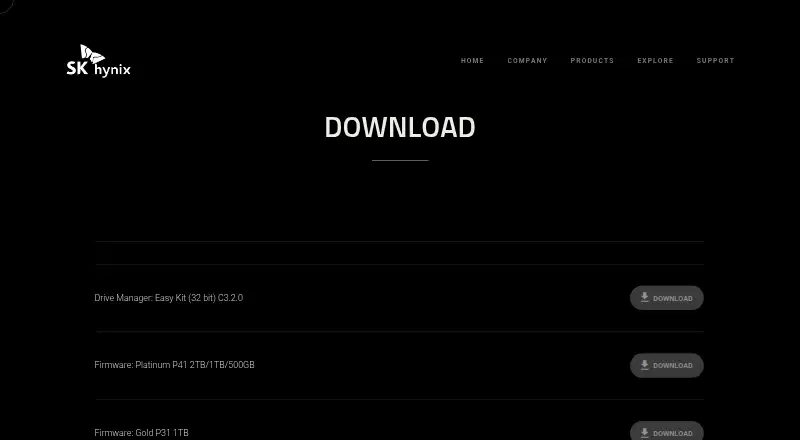
The download page offers version C3.2.0 in 32-bit and 64-bit editions. The manual also describes a command option alongside the standard utility. Listed operating systems are Windows Server 2012 x64, Windows 10, Windows 8, Windows 8.1, and Windows 7 for SATA drives only. SATA and PCIe are the listed drive interfaces. Installation and use require administrator privileges.
The manual lists English, Korean, Simplified Chinese, Traditional Chinese, and Japanese as language choices. SK hynix’s SSD support page links to FAQ and customer service resources. The company is described as making and selling semiconductor devices. Its SSD website privacy policy covers information collected on that site and electronic messages with it, and says personal information is not used for marketing or advertising.
Who it suits
This utility suits Windows users who want drive information, monitoring, performance reports, erasure, or firmware updates, especially owners of SK hynix SSDs. It may also suit users of other SSDs or HDDs who need the features available for those drives.
What it does well
- Free 32-bit and 64-bit Windows downloads are available.
- Provides drive information, monitoring, erasure, and performance reports.
- Supports SATA and PCIe interfaces.
- Offers English, Korean, Chinese, and Japanese language choices.
- The support page links to FAQ and customer service resources.
What to know first
- All features are available only for SK hynix SSDs.
- Windows 7 support is limited to SATA drives.
- Administrator privileges are required for installation and access.
Limits
All features are available only for SK hynix SSDs. Windows 7 support applies to SATA drives only.
Plans
| Plan | Billed and limits | Price |
|---|---|---|
| SK hynix Drive Manager: Easy Kit | 32-bit and 64-bit downloads · Windows utility | Free |
As ssd.skhynix.com lists them, read 4 Oct 2026. The maker's own page has the final word.
Getting started
- Open the SK hynix SSD download page.
- Choose the 32-bit or 64-bit Drive Manager: Easy Kit C3.2.0 download.
- Install the utility with administrator privileges.
- Launch the standard utility or the command option.
- Select an installed SK hynix SSD to upload downloaded firmware when updating.
Verdict
Choose SK hynix Drive Manager: Easy Kit if you use Windows and want its drive maintenance features, particularly with an SK hynix SSD. Users of other drive brands should look elsewhere if they need the full feature set.
Questions
How much does SK hynix Drive Manager: Easy Kit cost?
The listed plan is free.
Which operating systems are listed?
Windows Server 2012 x64, Windows 10, Windows 8, Windows 8.1, and Windows 7 for SATA only.
Does it work with SSDs and HDDs?
It supports SSDs and HDDs, but all features are available only for SK hynix SSDs.
What does the utility do?
It provides SSD information, firmware updates, drive erasure, performance reports, and drive monitoring.
Who makes the utility?
The maker is SK hynix, whose semiconductor business includes manufacturing and selling semiconductor devices.
What administrator access is required?
Administrator privileges are required to install and access the utility.
Facts from SK hynix Drive Manager: Easy Kit's own pages
- Administrator access
- Administrator privileges are required to install and access the utility. · ssd.skhynix.com, 4 Oct 2026
- Command option
- The manual refers to launching either SK hynix Drive Manager Easy Kit or SK hynix Drive Manager Easy Kit - Command. · ssd.skhynix.com, 4 Oct 2026
- Current download
- The download page lists Drive Manager: Easy Kit C3.2.0 in 32-bit and 64-bit versions. · ssd.skhynix.com, 4 Oct 2026
- Data security
- The policy says internet transmissions are not completely secure and that SK hynix cannot guarantee the security of personal information transmitted to its website. · ssd.skhynix.com, 4 Oct 2026
- Drive support
- It supports SSDs and HDDs, but all features are available only for SK hynix SSDs. · ssd.skhynix.com, 4 Oct 2026
- Firmware update
- The manual describes selecting an installed SK hynix SSD and uploading downloaded firmware to update it. · ssd.skhynix.com, 4 Oct 2026
- Interfaces
- The listed drive interfaces are SATA and PCIe. · ssd.skhynix.com, 4 Oct 2026
- Languages
- The manual says users can choose English, Korean, Simplified or Traditional Chinese, and Japanese. · ssd.skhynix.com, 4 Oct 2026
- Maker
- The company page names SK hynix and lists its semiconductor business as manufacture and sales of semiconductor devices. · ssd.skhynix.com, 4 Oct 2026
- Operating systems
- The manual lists Windows Server 2012 x64, Windows 10, Windows 8, Windows 8.1, and Windows 7 (SATA only). · ssd.skhynix.com, 4 Oct 2026
- Privacy and marketing
- The policy says SK hynix does not collect, store, use, or sell personal information for marketing or advertising. · ssd.skhynix.com, 4 Oct 2026
- Privacy policy scope
- SK hynix's SSD website privacy policy covers information collected on that website and electronic messages with it. · ssd.skhynix.com, 4 Oct 2026
- Purpose
- The utility provides SSD information, firmware updates, drive erasure, performance reports, and drive monitoring. · ssd.skhynix.com, 4 Oct 2026
- Support
- The SSD support page links to FAQ and customer service resources. · ssd.skhynix.com, 4 Oct 2026
Where SK hynix Drive Manager: Easy Kit stands on Freedom251
- Disk Health Monitoring Software#19 of 30