Freedom251 › AI image generators
Shedevrum
by Shedevrum
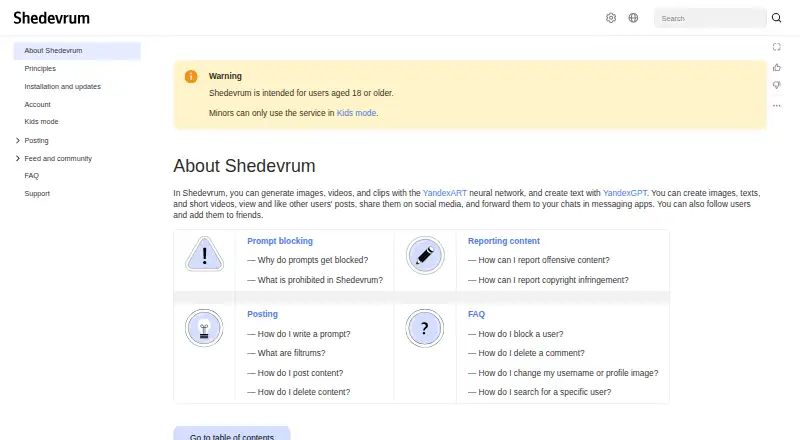
What Shedevrum is
Shedevrum is a generative AI service from Shedevrum, headquartered in Moscow, Russia. It creates images, videos, clips, and text with YandexART and YandexGPT. Image generation supports Alice AI ART v.1.0 plus YandexART v.2.7 and v.2.5, accepts prompts in any language, and usually finishes in under a minute. Users can provide reference images and edit generated images. To make a short video, describe an idea, select a generated first frame, and apply an animation effect. Clips combine three to 30 content items, can include music from Yandex Music, and can run for up to two minutes. Shedevrum also has a social layer: people can view and like posts, follow users, add friends, and share posts through social networks or messaging apps. Moderation uses automatic filters, manual review for ambiguous cases, and team review for complex cases; reported posts are reviewed within 24 hours. Kids mode adds stricter moderation, voice prompts, and privacy controls that block follows, friend additions, and comments on a child’s profile. The service is intended for people aged 18 or older, with minors limited to Kids mode. Shedevrum runs on Android, iOS, and the web.
Who it suits
Shedevrum suits adults who want image, video, clip, and text generation in one service, with prompts accepted in any language. It also fits creators who want reference-image editing, social sharing, and short clips with music.
What it does well
- Generates images, videos, clips, and text
- Accepts prompts in any language
- Supports reference images and image editing
- Image generation usually takes under a minute
- Clips support three to 30 content items
- Includes Kids mode privacy protections
What to know first
- Commercial use is limited
- The free app requires an internet connection
- Clips are limited to two minutes
- Users must be 18 or use Kids mode
Limits
The free app costs nothing and requires an internet connection, Android 7.0 or later, or iOS 15.0 or later. Commercial use is limited; clips can contain up to 30 items and last no longer than two minutes.
Plans
| Plan | Billed and limits | Price |
|---|---|---|
| Free app | Free app; internet connection required · Android 7.0+ or iOS 15.0+ | Free |
| Shedevrum | Free app · image, video, clip and text generation · Yandex ID required for generation | Free |
| Shedevrum Pro | Cost and conditions are governed by Yandex Plus terms · Additional paid features · Pro activation available only in Russia | On request |
As yandex.ru lists them, read 12 Oct 2026. The maker's own page has the final word.
Getting started
- Open Shedevrum on Android, iOS, or the web
- Create an image, video, clip, or text prompt
- Add a reference image when creating or editing an image
- Choose a generated first frame and animation effect for a short video
- Combine three to 30 items for a clip and add music if wanted
- Use the feedback form and choose “Ask support” for help
Shedevrum is a multilingual creative app for generating images, text, short videos and edited clips, with a built-in social feed. It suits creators who want one mobile, browser or tablet-style workspace for experimentation and sharing. Its broad toolkit is attractive for casual and multilingual creation, but limited commercial use and short-form video constraints matter for professional work.
Overview
Shedevrum combines YandexART image generation with YandexGPT text creation, then places the results in a community where users can view, like, follow and befriend other creators. Posts can be shared to social networks and messaging apps, making the service more social than a purely private image tool. That is useful for inspiration and quick publishing, but less relevant if your priority is a controlled production pipeline.
Image generation normally takes under a minute and offers Alice AI ART v.1.0 plus YandexART v.2.7 and v.2.5. Prompts work in any language, a meaningful advantage for multilingual users. Commercial use is limited, so confirm that the rights fit your intended project before relying on outputs for paid client or marketing work.
Key features
Images and text
Text-to-image generation, reference images and image editing cover the central process from concept to revision. Multiple image models give users some choice over generation behavior, while YandexGPT adds text creation in the same service. The more advanced source-image workflows are reserved for Shedevrum Pro: uploading your own images, background removal and portrait editing with YandexGPT, YandexFace and Inpainting. Users who only need prompt-based experiments can stay on the free app; anyone building edits around supplied assets will need Pro.
Video and clips
Video creation turns a written idea into a short sequence: choose a generated first frame, then apply an animation effect. It is a straightforward route to motion from a still image, but the workflow is designed for short effects rather than long-form production. Clip projects can contain three to 30 content items, include music and run for up to two minutes. Music can come from Yandex Music, which is convenient for assembling a shareable clip, while the duration ceiling rules out longer edits.
Community and safeguards
Users can follow creators, add friends, like posts and share them externally. Automatic filters handle routine moderation, ambiguous cases receive manual review, and particularly complex cases go to a team; reported posts are reviewed within 24 hours. Shedevrum is intended for adults aged 18 and over. Minors must use Kids mode, which adds stricter moderation, voice prompts and privacy controls that block follows, friend requests and comments on the child’s profile.
Pricing
| Plan | Price | What it includes |
|---|---|---|
| Free app | free | Free app with an internet connection required; Android 7.0+ or iOS 15.0+. |
| Shedevrum Pro | Custom pricing | Additional image-generation models, Shedevrum Studio, portrait editing with YandexGPT, YandexFace and Inpainting, background removal, and uploads of your own images. |
The free plan is the sensible starting point for prompt-led images, text and basic clip creation, and a seven-day trial gives prospective subscribers a short window to assess Pro workflows. Pro is the relevant choice when source-image upload, portrait retouching, background removal or Studio tools are essential. The cheaper tier gives up those advanced editing and upload capabilities, while the published terms do not establish a larger free quota or a recurring Pro price. Treat the limited commercial-use policy as a constraint on both plans.
Platforms
Shedevrum runs on Android, iOS and the web. The free mobile app requires Android 7.0 or later or iOS 15.0 or later, and an internet connection is required.
Who it's for
Choose Shedevrum for multilingual image exploration, reference-based edits, social sharing and quick animated clips in one place. It is especially well suited to hobbyists, educators and creators who value a community feed and do not need long videos. Look elsewhere for unrestricted commercial rights, a clearly priced professional plan, or extended video timelines.
Pros and cons
- Pros: prompts in any language support international users; three named image models provide choice; reference images and editing support iterative creation; clips accept up to 30 items and two minutes of content; Kids mode adds meaningful profile privacy protections.
- Cons: commercial use is limited, weakening its fit for paid production; key workflows such as own-image uploads, background removal and portrait editing require Pro; video creation is limited to short animations and clips; Pro pricing is custom rather than transparent.
Alternatives
Browse AI image generators for a wider directory of image-focused options. Pick Adobe Firefly instead if you want a freemium Adobe service with a free tier offering limited daily generations and a Standard plan with 2,000 monthly credits and up to twenty five-second videos. FLUX is the better direction for API, desktop, self-hosted or Windows deployment and reference-image generation priced by megapixel.
Choose Microsoft Image Creator for a free Android, iOS and web option with 15 fast image creations per day. Recraft suits API users who prefer a free allowance of 30 daily credits and credit-based paid tiers. Leonardo.Ai offers API access with 150 fast tokens per day on its free plan. Stable Image is worth considering when a community license supports researchers, developers, small businesses and creators under $1 million in annual revenue. SeaArt AI provides Android, iOS, web and API access, including 130 stamina per day and two simultaneous tasks on its free plan. Ideogram is an alternative with a free allowance of 10 weekly credits for eligible accounts and a $20 monthly Plus plan.
Verdict
Shedevrum is a strong fit for multilingual users who want image generation, reference-based editing, short video effects and community sharing in one service. Choose it for that breadth and its accessible free tier; choose another tool when clear commercial rights, transparent professional pricing or longer-form video are central requirements.
Verdict
Pick Shedevrum for multilingual generative creation with image references, editing, video effects, and a built-in community. Consider another service if you need unrestricted commercial use or longer clips.
Questions
Is Shedevrum free?
A free app plan is listed as free. Shedevrum also lists a 7-day trial and a Pro plan.
Which devices support Shedevrum?
Shedevrum is available on Android, iOS, and the web.
What does Shedevrum generate?
It generates images, videos, clips, and text using YandexART and YandexGPT.
Can I use my own images?
Reference images and image editing are supported; the Pro plan lists uploading your own images.
How long can clips be?
Clips can use three to 30 content items and run for up to two minutes.
Who can use the service?
Shedevrum is intended for users aged 18 or older. Minors can use it only in Kids mode.
Facts from Shedevrum's own pages
- Account requirement
- Unauthenticated visitors can browse recent and popular posts, but generation, likes and comments require Yandex ID login. · yandex.ru, 14 Oct 2026
- Age requirement
- Shedevrum is intended for users aged 18 or older; minors can use it only in Kids mode. · yandex.ru, 12 Oct 2026
- Clip editing
- Clips can use 3 to 30 content items, include music, and be up to two minutes long. · yandex.ru, 12 Oct 2026
- Clip editor
- Clips combine three to thirty posts with transitions, timing edits and music, and clips may run up to two minutes. · yandex.ru, 14 Oct 2026
- Commercial use
- Generated content is allowed for personal noncommercial use with attribution, while commercial use requires prior Yandex approval. · yandex.ru, 14 Oct 2026
- Community
- Users can view and like other users’ posts, share posts on social media or in messaging apps, follow users, and add them as friends. · yandex.ru, 12 Oct 2026
- Content restrictions
- Rules prohibit political, religious, violent, criminal, explicit, shocking, hateful and gambling-related prompts or posts. · yandex.ru, 14 Oct 2026
- Content rights
- Yandex states that rights to the service software, design and AI technology belong to Yandex. · yandex.ru, 14 Oct 2026
- Data protection
- Google Play reports no third-party data sharing, encryption in transit and the ability to request data deletion. · play.google.com, 14 Oct 2026
- Free plan
- Yes · yandex.ru, 20 Sept 2026
- Friends limit
- A user can add up to 200 friends. · yandex.ru, 14 Oct 2026
- Generative AI
- Shedevrum generates images, videos, and clips with YandexART and creates text with YandexGPT. · yandex.ru, 12 Oct 2026
- Headquarters
- Moscow, Russia · yandex.ru, 28 Sept 2026
- Image editing
- Yes · yandex.ru, 20 Sept 2026
- Image generation
- Image generation supports Alice AI ART v1.0 and YandexART v2.7 and v2.5 models, with prompt-based creation and photo filters. · yandex.ru, 14 Oct 2026
- Integrations
- Users can share posts to social media and messaging apps, and clips can use music from Yandex Music. · yandex.ru, 12 Oct 2026
- Kids mode
- Kids mode adds voice prompts, password-protected exit, stricter generation and feed moderation, and disables follows, friends and comments for child profiles. · yandex.ru, 14 Oct 2026
- Language support
- Prompts may be written in any language, while generated answers are provided in Russian according to the FAQ. · yandex.ru, 14 Oct 2026
- Launch and adoption
- Yandex reported that Shedevrum launched in April 2023, quickly topped Russian app charts and approached 10 million downloads by the fourth quarter of 2023. · sec.gov, 14 Oct 2026
- Legal entity
- Crunchbase identifies the legal name as YANDEX LLC and lists the company as active and for-profit. · crunchbase.com, 14 Oct 2026
- Limit: missing controls
- Google Play reviewers complain about absent negative prompts, seed control, inpainting and prompt-weight controls. · play.google.com, 14 Oct 2026
- Limit: reduced free allowance
- A RuStore reviewer says free image generations were reduced from 60 to 10. · rustore.ru, 14 Oct 2026
- Limit: regional Pro access
- A Google Play reviewer reports that Shedevrum Pro cannot be activated outside Russia, which the developer confirms. · play.google.com, 14 Oct 2026
- Limit: service incidents
- RuStore reviewers dated October 11–14, 2026 report missing creations, broken comments and notifications, login failures and generation delays of several hours. · rustore.ru, 14 Oct 2026
Where Shedevrum stands on Freedom251
- AI image generators#11 of 124