Freedom251 › AI image generators
Stable Image
by Stable Image
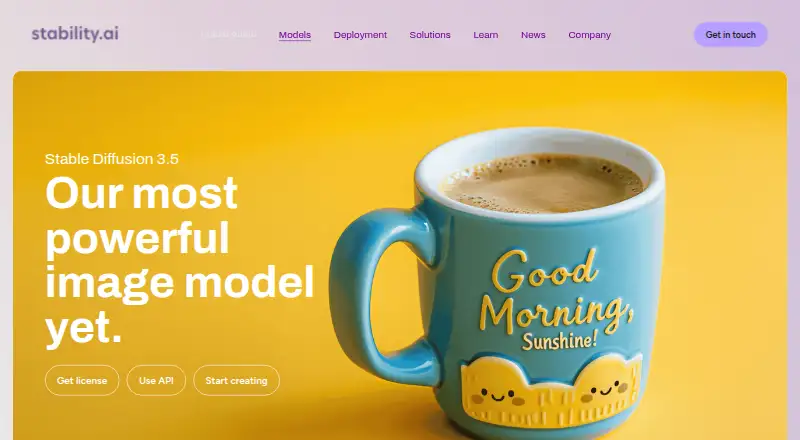
What Stable Image is
Stable Image is a paid image-generation and editing service built around Stability AI’s Stable Diffusion 3.5 models. It works through web applications, an API, or deployment on a customer’s own infrastructure, and accepts text prompts and reference images. The model family covers several uses: Stable Diffusion 3.5 Large is positioned for professional work at 1 megapixel, Turbo targets high-quality generation in four steps, and Medium is designed for consumer hardware. Styles include 3D, photography, painting, and line art, with prompt adherence described by Stability AI as market-leading. Editing services include erase, inpaint, outpaint, background removal, search and recolor, and search and replace. Additional controls include Creative, Conservative, and Fast upscalers, along with Sketch, Structure, and Style tools. Generated files can be JPEG, PNG, or WebP. Stability AI says its foundation models are available through Amazon Bedrock and Amazon SageMaker JumpStart, while Stable Diffusion models are available on Microsoft Azure AI Foundry. Hosted applications and APIs filter prompts and outputs for unsafe content. Licensing includes a free Community License for eligible users, pay-per-use API credits, and custom enterprise terms.
Who it suits
It suits creators, developers, researchers, and small businesses that need generation, reference-image workflows, or image editing through web, API, or self-hosted deployment. Larger enterprises and API providers can consider the enterprise license with commercial use and implementation support.
What it does well
- Web, API, and self-hosted deployment options
- Supports text prompts and reference images
- Large, Turbo, and Medium model choices
- Editing includes erase, inpaint, outpaint, and background removal
- JPEG, PNG, and WebP output formats
- Free Community License for eligible users
What to know first
- Enterprise pricing is custom
- API usage is charged by credits
- Community License eligibility excludes businesses over $1M annual revenue
- Unsafe prompts and outputs are filtered
Limits
The Community License is free only for researchers, developers, small businesses, and creators with less than $1M in annual revenue. API access uses paid credits after 25 free starter credits, with service-specific credit costs; enterprise pricing is custom.
Plans
| Plan | Billed and limits | Price |
|---|---|---|
| Community License | For researchers, developers, small businesses, and creators with less than $1M in annual revenue · includes Stable Diffusion 3.5 Suite | Free |
| Stability AI API credits | 1 credit = $0.01; 25 free credits to get started · Pay per API use in credits · price varies by service | $0.01, paid once |
| Enterprise License | For enterprises, API providers, and businesses with annual revenue exceeding $1M · includes commercial use and implementation support · custom pricing | On request |
As stability.ai lists them, read 12 Oct 2026. The maker's own page has the final word.
Getting started
- Open the Stable Image website
- Select web access, API use, or deployment on your infrastructure
- Use the Community License if eligible
- Start API use with the available free credits, then purchase credits as needed
- Connect through Amazon Bedrock, Amazon SageMaker JumpStart, or Microsoft Azure AI Foundry where applicable
Stable Image is a Stable Diffusion 3.5 suite for generating and editing images through a web app, API, or self-hosted deployment. It suits creators, developers, and organizations that need model choice and image controls rather than a single locked-down workflow. The broad deployment options are its biggest advantage, while licensing, usage-based API charges, and content filters require careful planning.
Overview
Stable Image combines text-to-image generation with reference-image input and editing services. The Stable Diffusion 3.5 family spans three distinct targets: Large is positioned as the most capable model for professional work at 1 megapixel, Medium is intended for consumer hardware, and Turbo aims for high-quality results in four steps. Styles include 3D, photography, painting, and line art. Stability AI describes the family as having market-leading prompt adherence, though output quality will still depend on the prompt and chosen workflow.
The service also handles practical revisions: erase, inpaint, outpaint, background removal, search and recolor, and search and replace. That combination makes it more useful for production work than a generator that stops after the first image. API pricing varies by service, so frequent automated use needs service-level budgeting rather than one universal subscription assumption.
Key features
Generation and editing
Text prompts create images from descriptions, while reference images provide visual guidance. Creative, Conservative, and Fast upscalers give different enlargement approaches, and Sketch, Structure, and Style controls offer additional ways to steer results. JPEG, PNG, and WebP output fit common publishing and application pipelines.
Deployment and integrations
Teams can run Stable Diffusion 3.5 on their own infrastructure, call it through the API, or use web-based applications. Stability AI also makes its foundation models available through Amazon Bedrock and Amazon SageMaker JumpStart, with Stable Diffusion models available on Microsoft Azure AI Foundry. Self-hosting offers control over deployment, while hosted routes avoid operating model infrastructure.
Safety and support
Hosted applications and APIs filter prompts and outputs for unsafe content that violates Stability AI’s terms. The Acceptable Use Policy prohibits unlawful or harmful uses and allows access to be suspended or terminated for violations. Support is provided through a request form in the knowledge base.
Pricing
Community License
The Community License costs nothing and includes the Stable Diffusion 3.5 Suite. It is aimed at researchers, developers, small businesses, and creators with less than $1M in annual revenue. This is the clearest starting route for eligible individuals and smaller organizations, but enterprises above that revenue threshold need a different license.
Stability AI API credits
API use is pay per use: 1 credit costs $0.01, with 25 free credits to get started. Stable Image Ultra is listed at 8 credits per generation, equivalent to $0.08 for that service. Because prices vary by service, this model fits developers who want metered consumption, not teams seeking a fixed monthly generation allowance.
Enterprise License
The Enterprise License has custom pricing and is intended for enterprises, API providers, and businesses with annual revenue exceeding $1M. It includes commercial use and implementation support, making it the appropriate route for larger commercial deployments, but the lack of a published price prevents straightforward cost comparison.
Platforms
Stable Image supports web access, API integration, and self-hosted deployment. Its cloud integrations add Amazon Bedrock, Amazon SageMaker JumpStart, and Microsoft Azure AI Foundry as routes for organizations already using those services.
Who it's for
Choose Stable Image if you need generation and substantial editing in one tool, want to switch between Large, Medium, and Turbo models, or require API and self-hosting options. It is particularly suited to developers building image workflows and creators who need reference images, upscaling, and targeted revisions. It is less suitable for buyers who need one predictable subscription price, because API charges are service-specific and enterprise licensing is custom. Policy-based filtering also matters for projects that require unrestricted content handling.
Pros and cons
Pros
- Broad model range: Large, Medium, and Turbo address professional resolution, consumer hardware, and fast four-step generation needs.
- Strong editing coverage: Erase, inpaint, outpaint, background removal, recolor, and search-and-replace support complete image workflows.
- Flexible deployment: Web, API, self-hosted, and major cloud-platform integrations accommodate different technical requirements.
- Common output formats: JPEG, PNG, and WebP work across typical publishing and software pipelines.
Cons
- Variable API cost: Services use different credit prices, so ongoing spend is harder to forecast than with a single subscription.
- Enterprise pricing is custom: Larger businesses cannot assess total cost from a published rate.
- Content restrictions apply: Hosted prompts and outputs are filtered, and policy violations can lead to suspension or termination.
Alternatives
AI image generators is the broader directory for comparing tools across this category.
Pick Adobe Firefly instead if you want Android, iOS, web, and API access with a freemium model; its Free plan has limited daily generations, while Standard includes 2,000 credits per month at custom pricing.
FLUX is a better fit when Linux, macOS, Windows, or self-hosting support is important; its FLUX.2 [max] plan lists $0.07 a month plus per-megapixel and reference-image charges.
Choose Microsoft Image Creator for a free Android, iOS, and web option with 15 fast image creations per day.
Recraft suits users who prefer credit tiers, including a free plan with 30 daily credits and paid 1,000-, 2,000-, and 4,000-credit plans at custom pricing.
Leonardo.Ai offers a freemium API route with 150 fast tokens per day on its Free plan and larger token allowances on paid tiers.
Choose Shedevrum if its Android, iOS, and web applications and additional portrait-editing tools match your workflow.
SeaArt AI is an alternative with Android, iOS, web, and API access, a free tier, and a free trial.
Ideogram is worth considering if you prefer a credit subscription, including a 20.00 USD monthly Plus plan with 1,000 credits and eight running or queued generations.
Verdict
Stable Image is best for creators and developers who value Stable Diffusion 3.5 model choice, integrated editing, and the freedom to use web, API, cloud, or self-hosted deployment. Its strongest reason to choose it is the combination of generation controls and revision tools across flexible environments. Look elsewhere if you need one fixed enterprise price or content handling without policy-based filters.
Verdict
Choose Stable Image for flexible Stable Diffusion 3.5 generation and editing across hosted, API, and self-managed environments. Its model variants, editing tools, controls, and cloud integrations cover varied workflows. Look elsewhere if you require a single fixed enterprise price or unrestricted content handling.
Questions
Is Stable Image free?
A Community License costs nothing for eligible users under the stated annual-revenue threshold. API use starts with 25 free credits, then costs $0.01 per credit.
What platforms are available?
Stable Image is available through API, self-hosted deployment, and web applications.
Which image formats can it produce?
Supported output formats are JPEG, PNG, and WebP.
What editing tools are included?
Services include erase, inpaint, outpaint, background removal, search and recolor, and search and replace, plus upscalers and Sketch, Structure, and Style controls.
Who can use the enterprise license?
The Enterprise License is for enterprises, API providers, and businesses with annual revenue exceeding $1M, with commercial use and implementation support at custom pricing.
Does Stable Image provide API access?
Yes. API credits cost $0.01 per credit, and Stable Image Ultra is listed at eight credits per generation.
Facts from Stable Image's own pages
- API access
- Yes · stability.ai, 19 Sept 2026
- API pricing
- The API pricing page says 1 credit costs $0.01 and lists Stable Image Ultra at 8 credits per generation. · platform.stability.ai, 12 Oct 2026
- Deployment
- Stable Diffusion 3.5 can be deployed on a customer's own infrastructure, used through the API, or accessed through web-based applications. · stability.ai, 12 Oct 2026
- Editing tools
- Image services include erase, inpaint, outpaint, background removal, search and recolor, and search and replace. · stability.ai, 12 Oct 2026
- Free plan
- No · stability.ai, 19 Sept 2026
- Headquarters
- London, United Kingdom · stability.ai, 28 Sept 2026
- Image editing
- Yes · stability.ai, 19 Sept 2026
- Integrations
- Stability AI says its foundation models are available on Amazon Bedrock and Amazon SageMaker JumpStart, and Stable Diffusion models are available on Microsoft Azure AI Foundry. · stability.ai, 12 Oct 2026
- Large model
- Stable Diffusion 3.5 Large is described as the family’s most powerful model, intended for professional use at 1 megapixel resolution. · stability.ai, 12 Oct 2026
- Medium model
- Stable Diffusion 3.5 Medium is designed to run on consumer hardware. · stability.ai, 12 Oct 2026
- Output formats
- jpeg,png,webp · stability.ai, 19 Sept 2026
- Product
- Stable Image offers Stable Diffusion 3.5 image generation models and image editing services. · stability.ai, 12 Oct 2026
- Prompt following
- Stability AI describes Stable Diffusion 3.5 as having market-leading prompt adherence. · stability.ai, 12 Oct 2026
- Reference images
- Yes · stability.ai, 19 Sept 2026
- Safety
- Stability AI says its hosted applications and APIs apply filters to prompts and outputs to screen for unsafe content that violates its terms. · stability.ai, 12 Oct 2026
- Styles
- The models can generate styles including 3D, photography, painting, and line art. · stability.ai, 12 Oct 2026
- Support
- Stability AI provides a support request form through its knowledge base. · kb.stability.ai, 12 Oct 2026
- Text-to-image
- Yes · stability.ai, 19 Sept 2026
- Turbo model
- Stable Diffusion 3.5 Turbo is designed to generate high-quality images in four steps. · stability.ai, 12 Oct 2026
- Upscaling and control
- The page lists Creative, Conservative, and Fast upscalers, plus Sketch, Structure, and Style controls. · stability.ai, 12 Oct 2026
- Usage policy
- The Acceptable Use Policy prohibits unlawful or harmful uses and says access may be suspended or terminated for policy violations. · stability.ai, 12 Oct 2026
Where Stable Image stands on Freedom251
- AI image generators#9 of 124