Freedom251 › Email Scheduling Software
SendLater
What SendLater is
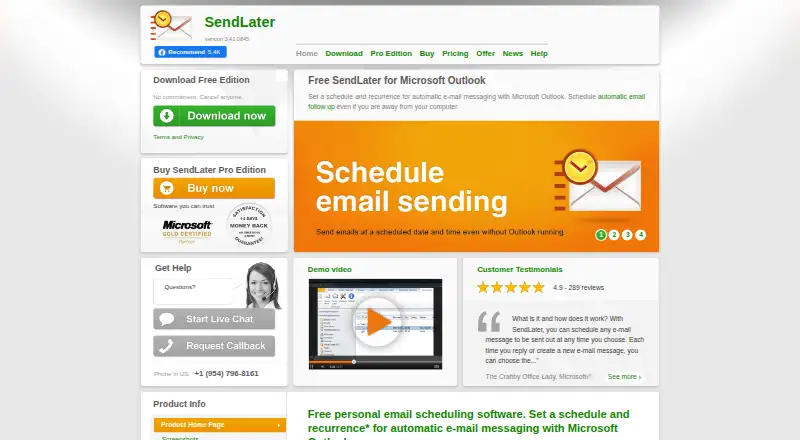
SendLater is a Windows add-in for Microsoft Outlook that schedules email to go out at a chosen time. The free edition schedules a message once, and its resend delay is limited to a maximum of four hours. Pro supports daily, weekly, monthly, yearly, and custom recurring schedules, and can resend a follow-up at intervals until a reply arrives. With an Exchange or SMTP account configured, it can send scheduled messages while Outlook is closed. Pro also includes DocTrack for sending linked documents when they are modified, and file or folder links can provide the latest version on a schedule. For group mail, Pro can send to all recipients or send each a separate copy that hides the others; it can also load recipients from a CSV file. Listed system requirements range from Windows XP SP2 through Windows 10 and Outlook 2003 through Outlook 2019 32-bit, plus Microsoft 365. Outlook for Mac is not supported. A Pro full license is $39.95, paid once and includes one year of updates and support.
Who it suits
SendLater may suit Outlook users on Windows who schedule messages or recurring follow-ups. Pro adds tools for linked documents, group email, and CSV-based recipient lists.
What it does well
- Schedules messages for a chosen time
- Pro supports custom recurring schedules
- Can send while Outlook is closed with Exchange or SMTP
- Pro includes automatic follow-ups
What to know first
- Outlook for Mac is not supported
- Free edition schedules each message once
- Free resend delay is limited to four hours
- Pro full license costs $39.95, paid once
Limits
The free edition schedules a message once and limits its resend delay to a maximum of four hours. The $30 a year Pro Upgrade and Maintenance plan requires an existing product license.
Plans
| Plan | Billed and limits | Price |
|---|---|---|
| SendLater Free | Schedule email once · resend delay limited to maximum 4 hours | Free |
| SendLater Pro Upgrade | Annual upgrade and maintenance plan · Per license · requires existing product license | $30 a year |
| SendLater Pro (full license) | 1 year of free updates and free support included · Per-user license · more than one license has quantity pricing | $39.95, paid once |
| SendLater Pro Upgrade and Support, Lifetime | Requires primary software license · lifetime support and upgrades | $49.95, paid once |
As sendlateremail.com lists them, read 30 Sept 2026. The maker's own page has the final word.
Getting started
- Open the SendLater website.
- Install the add-in for a listed Windows and Outlook environment.
- Choose SendLater Free or a Pro option that matches your license status.
- Configure an Exchange or SMTP account if scheduled messages need to send while Outlook is closed.
- Schedule a message for the chosen send time.
Verdict
SendLater offers basic one-time scheduling for free, with recurring sends and additional workflow features in Pro. Check the listed Windows and Outlook requirements before choosing it, particularly if you use Outlook for Mac.
Questions
Is SendLater free?
Yes. SendLater Free costs nothing and schedules each message once, with resend delay limited to a maximum of four hours.
How much does SendLater Pro cost?
The Pro full license costs $39.95, paid once and includes one year of free updates and support. The Pro Upgrade and Maintenance plan is $30 a year and requires an existing product license; lifetime support and upgrades are $49.95, paid once and also require a primary software license.
Does SendLater work with Outlook for Mac?
No. Outlook for Mac is not supported. Listed system requirements include Windows XP SP2 through Windows 10 and Outlook 2003 through Outlook 2019 32-bit, plus Microsoft 365.
Can it send messages while Outlook is closed?
Yes, when an Exchange or SMTP account is configured.
What does Pro add?
Pro supports recurring schedules, follow-ups until a reply arrives, DocTrack linked documents, group messages or personal copies, and loading recipients from a CSV file.
Who makes SendLater?
The maker identifies itself as 4Team Corporation and lists an address in Coral Springs, Florida, USA.
Facts from SendLater's own pages
- Contacts
- Pro can automatically load email recipients from a CSV file. · sendlateremail.com, 30 Sept 2026
- Documents
- Pro's DocTrack feature can send linked documents when they are modified, and file or folder links can deliver the latest version on schedule. · sendlateremail.com, 30 Sept 2026
- Follow-ups
- Pro can resend an email at intervals until a reply is received. · sendlateremail.com, 30 Sept 2026
- Founded
- 1999 · sendlateremail.com, 23 Sept 2026
- Free edition limit
- The free edition schedules a message once, and its resend delay is limited to a maximum of four hours. · sendlateremail.com, 30 Sept 2026
- Group email
- Pro can send a group message to all recipients or send each recipient a personal copy that hides other recipients. · sendlateremail.com, 30 Sept 2026
- Headquarters
- Coral Springs, Florida, USA · sendlateremail.com, 23 Sept 2026
- Integrations
- The product works with Microsoft Outlook and supports Exchange or SMTP accounts for sending while Outlook is closed. · sendlateremail.com, 30 Sept 2026
- Mac support
- The system requirements page says Outlook for Mac is not supported. · sendlateremail.com, 30 Sept 2026
- Maker and location
- The maker identifies itself as 4Team Corporation and lists an address in Coral Springs, Florida, USA. · sendlateremail.com, 30 Sept 2026
- Offline sending
- With an Exchange or SMTP account configured, SendLater can send scheduled messages while Outlook is closed. · sendlateremail.com, 30 Sept 2026
- Product
- SendLater is an email scheduling add-in for Microsoft Outlook that schedules messages to send at a chosen time. · sendlateremail.com, 30 Sept 2026
- Recurring schedules
- Pro supports daily, weekly, monthly, yearly, and custom recurrence intervals. · sendlateremail.com, 30 Sept 2026
- Support and refunds
- Each license includes one year of free updates and support, and the pricing page offers a full refund if requested within 14 days of purchase. · sendlateremail.com, 30 Sept 2026
- Supported environment
- The system requirements list Windows XP SP2 through Windows 10 and Outlook 2003 through Outlook 2019 32-bit, plus Microsoft 365. · sendlateremail.com, 30 Sept 2026
Where SendLater stands on Freedom251
- Email Scheduling Software#15 of 30