Freedom251 › Reporting Software
SeekTable
by SeekTable
What SeekTable is
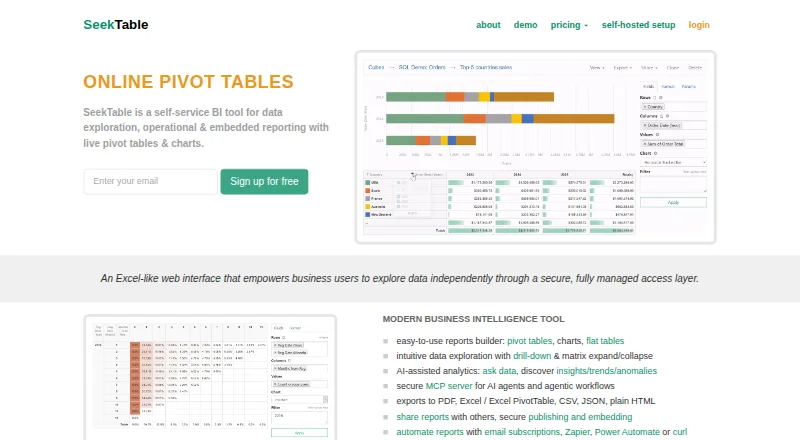
SeekTable is a self-service BI tool for exploring tabular data and creating operational or embedded reports. Users can build live pivot tables, charts, and flat table reports, then export them to PDF, CSV, Excel, JSON, or plain HTML. It accepts sources including CSV, TSV, Excel, DBF, SQL databases, MongoDB, Elasticsearch, and XMLA OLAP endpoints. Database-backed reports query current data; CSV reports can be updated by uploading a newer file. Reports can be published on the web or embedded with an iframe, with secure embedding and row-level security available in the self-hosted version. AI features include natural-language Ask Data, semantic search, analysis for insights and anomalies, and an MCP server for AI agents. Automation can use Zapier, Microsoft Power Automate, Integromat, or the Web API. A free account is available; paid plans start at $25 a month billed annually. Cloud accounts may encounter an error above 1,000,000 pivot-table cells, and heavy-load accounts may be asked to reconfigure or move instances.
Who it suits
SeekTable may suit business users who explore tabular data and make operational reports for areas such as sales, finance, production, or audits. It also fits teams that need web-published or embedded reports, including self-hosted secure embedding with row-level security.
What it does well
- Builds pivot tables, charts, and flat table reports.
- Exports reports to PDF, CSV, Excel, JSON, or HTML.
- Database-backed reports query current data directly.
- Self-hosted version supports secure embedding with row-level security.
What to know first
- Free accounts allow up to 50 Web API calls daily.
- Cloud pivots may error above 1,000,000 cells.
- Paid plans start at $25 a month billed annually.
Limits
The free account is for individual use, allows up to 50 Web API calls per day, and stops email delivery and API access after 90 days of inactivity. Cloud pivots may return an error above 1,000,000 cells; the Advanced Publishing/Embedding plan allows up to 500 Web API calls per day, while heavy-load accounts may be asked to reconfigure or move instances.
Plans
| Plan | Billed and limits | Price |
|---|---|---|
| Free account | 50 API calls/day · API and email delivery stop after 90 days inactive · individual use | Free |
| Team sharing | billed annually ($299/year) · 1 team · 50 members capacity · paid creator, free viewers | $25 a month |
| Advanced publishing/embedding | billed annually ($299/year) · 500 API calls/day · parameterized exports · secure links and embedding · unlimited viewers under fair-use policy | $25 a month |
| Managed dedicated server | billed annually · single-tenant EC2 t3.small · setup, upgrades, troubleshooting and daily backups · custom domain · Let's Encrypt SSL | $250 a month |
| Self-hosted team sharing | per installation · unlimited team viewers · one master user | $1,297 a year |
| White-label mode | custom logo and brand · CSS styling · localized UI · requires System/users admin | $1,499 a year |
| Self-hosted advanced publishing | per installation · white-label · one publisher · unlimited viewers | $2,796 a year |
| System/users admin | self-hosted administration · user management · 2FA and SMTP controls | $499 a year |
The first 8 of 10 plans, as seektable.com lists them, read 15 Oct 2026. The maker's own page has the final word. Every plan
Getting started
- Visit the SeekTable website to choose cloud use or a self-hosted installation.
- For self-hosting, run SeekTable in Docker on Linux or macOS, or use Windows 11 with a Linux VM or Docker Desktop.
- Choose a free account for individual use, or review Team Sharing and Advanced Publishing/Embedding plans.
- Use the 14-day trial for cloud Team Sharing or Advanced Publishing; request a trial for self-hosted premium features.
- For installation questions or complications, contact [email protected].
SeekTable is a self-service business intelligence and reporting tool for business users working with tabular data. It is a strong fit for teams that need live pivots, recurring operational reports, or embedded analytics, and for individuals exploring files. Its deployment options are broad, but cloud quotas, pivot size, and plan-specific sharing limits matter.
Overview
SeekTable brings data exploration, operational reporting, and embedded reporting together. Users can create pivot tables, charts, and flat-table reports. Database-backed reports query current data; CSV reports can be refreshed by uploading a newer file. That makes live database connections useful for changing records, while file-based reporting depends on someone supplying updated data.
Reports can be exported to PDF, CSV, Excel, JSON, or plain HTML, and published to the web or embedded with an iframe. AI features include natural-language Ask Data, semantic search, report analysis for insights and anomalies, and an MCP server for AI agents. The combination is useful for teams that want more than static exports, though the product’s clearest focus is structured business data.
Key features
- Report building and exports: Pivots, charts, and flat reports suit different ways of examining and presenting data. Multiple export formats help teams share results or use them elsewhere.
- Data sources: SeekTable supports CSV, TSV, Excel, DBF, SQL databases, MongoDB, Elasticsearch, and XMLA OLAP endpoints. This range serves organizations with varied tabular sources, although it does not remove the work of connecting and maintaining them.
- Automation: Report delivery can use Zapier, Microsoft Power Automate, Integromat, or SeekTable’s Web API. That gives teams several routes to automate reporting without relying solely on manual exports.
- Publishing and embedding: Web publishing and iframe embedding suit reports intended for viewers outside the report-building workflow. Secure embedding with row-level security is supported in the self-hosted version, which is especially relevant when different viewers must see different data.
- Self-hosted security and control: The self-hosted installation can run without internet access, is isolated from SeekTable’s cloud, and collects no telemetry. Security guidance recommends HTTPS, and forced two-factor authentication is supported. These controls suit organizations that need deployment and access choices beyond a cloud account.
Pricing
SeekTable uses a freemium model, with a free account and paid plans starting at $25 a month billed annually. The cloud Team Sharing and Advanced Publishing features have a free 14-day trial; self-hosted premium features also have a free 14-day trial by request.
| Plan | Price | What it includes and who it suits |
|---|---|---|
| Free account | free | For individual use, with up to 50 Web API calls per day. Email delivery and API access stop after 90 days of account inactivity, so it is a poor fit for unattended, long-running reporting. |
| Team sharing | $25 a month, billed annually ($299/year) | Per team, with up to 50 free viewer accounts. It suits teams that need to share reports with a defined audience; the viewer allowance may constrain larger deployments. |
| Advanced publishing/embedding | $25 a month, billed annually ($299/year) | Per user, with up to 500 Web API calls per day and unlimited viewers subject to fair use. It is aimed at publishing and embedding at broader scale, but is priced per user rather than per team. |
| Managed dedicated server | $250 a month, billed annually; starts at | A single-tenant managed instance including Team Sharing and Advanced Publishing for one user. This suits buyers seeking a dedicated managed deployment, at a substantially higher starting price. |
| PivotData Microservice license (self-hosted) | $499 a year, billed $499/year | Per deployment, required for non-personal use or any premium feature. It is the relevant paid route for self-hosted users beyond personal use or the free feature set. |
Cloud accounts may hit a “Resulting pivot table is too large” error above 1,000,000 cells. Accounts under heavy load may be asked to reconfigure or move to another instance, so cloud workloads with large pivots or sustained demand should account for that operational constraint.
Platforms
SeekTable is available on the web and through an API, and supports self-hosting on Linux, macOS via Docker, or Windows 11 using a Linux VM or Docker Desktop. The self-hosted version can run without internet access, giving teams deployment flexibility that a cloud-only reporting tool would not provide.
Who it's for
SeekTable suits business users exploring tabular data and producing operational reports for areas such as sales, finance, production, and audits. It is a particularly strong match for teams needing current database-backed reports, multiple export formats, or embedded analytics. Individual users can start with the free account, but its API quota and inactivity cutoff make it less suitable for persistent automated use. Buyers needing very large cloud pivots should weigh the cell ceiling before committing.
Pros and cons
- Pro: Flexible reporting outputs. Pivots, charts, flat tables, and five export formats support both exploration and sharing.
- Pro: Deployment choice. Cloud and self-hosted options, including offline self-hosting, serve organizations with different infrastructure needs.
- Pro: Embedding with access control. Self-hosted secure embedding supports row-level security, useful when report viewers should see different slices of data.
- Con: The free account has practical ceilings. Its 50 daily Web API calls and 90-day inactivity cutoff limit suitability for unattended or high-volume workflows.
- Con: Cloud pivots have a size threshold. More than 1,000,000 cells can trigger an error, which may rule out some large-table use cases.
- Con: Sharing terms differ by plan. Team Sharing allows up to 50 free viewer accounts, while Advanced Publishing is per user and subjects unlimited viewers to fair use.
Alternatives
Reporting Software and Business Intelligence Tools are useful starting points for comparing products in those categories.
- FastReport is another freemium option with a free cloud plan for one user and stated storage limits, worth considering if those constraints match your reporting needs.
- ReportServer offers a free Community Edition and Linux, self-hosted, web, and Windows platforms; consider it if those deployment options are a closer fit.
- Porter Metrics has a free plan with three connected data source accounts, up to 30-day history, and 100 monthly AI credits for Automation, making it an alternative for those specific allowances.
- Power My Analytics offers a free Sample Data plan with unlimited sample-data sources, all destinations, Data Builder access, one admin, and MCP and API access; consider it if that sample-data setup suits your needs.
- Exago BI is another option for readers comparing paid tools with API, Linux, self-hosted, web, and Windows platforms.
- Logi Composer is a paid option with API, Linux, macOS, self-hosted, web, and Windows platforms; its price is obtained by contacting insightsoftware.
- FineReport has a 30-day free trial with full features and two concurrent users, a useful alternative for evaluating a time-limited trial.
- Jaspersoft offers a free Community edition download; consider it if a free edition is the priority.
Verdict
SeekTable is a good choice for business users and teams that need flexible exploration of tabular data, live database-backed reports, and options to publish or embed results. Its self-hosted deployment and row-level-secure embedding are particularly compelling when cloud-only reporting is not enough. Look elsewhere if your cloud reports need pivots above 1,000,000 cells, or if the free account’s API and inactivity limits do not suit your workflow.
Verdict
SeekTable combines data exploration, report exports, and embedding, with both cloud and self-hosted options. Consider the free account's API and inactivity limits, and the cloud pivot size limit, when choosing a setup.
Questions
Is SeekTable free?
Yes. The Free account costs nothing and is for individual use, with up to 50 Web API calls per day.
What do the paid plans cost?
Team Sharing and Advanced Publishing/Embedding each cost $25.00 per month, billed annually at $299/year. Managed dedicated server starts at $250.00 per month, billed annually, and the self-hosted PivotData Microservice license costs $499.00 per year.
Is there a free trial?
Cloud Team Sharing and Advanced Publishing include a free 14-day trial. Self-hosted premium features also have a free 14-day trial by request.
Which platforms does SeekTable support?
The listed platforms are API, Linux, macOS, self-hosted, web, and Windows. Self-hosted SeekTable runs in Docker on Linux and macOS, or on Windows 11 using a Linux VM or Docker Desktop.
Can SeekTable connect to other tools?
Report automation can use Zapier, Microsoft Power Automate, Integromat, or SeekTable’s Web API. Supported data sources include CSV, TSV, Excel, DBF, SQL databases, MongoDB, Elasticsearch, and XMLA OLAP endpoints.
Who makes SeekTable?
SeekTable is made by SeekTable, founded in 2017 and headquartered in Ukraine.
Facts from SeekTable's own pages
- AI analytics
- The product offers Ask Data, semantic cube search and AI-assisted insight and anomaly analysis; chat with data is listed as coming soon. · seektable.com, 15 Oct 2026
- API limits
- Cloud free accounts are limited to 50 API calls per day, Advanced publishing raises this to 500, and on-premise deployments have no API call limit. · seektable.com, 15 Oct 2026
- Automation integrations
- Scheduled delivery can use built-in subscriptions, Zapier, Microsoft Power Automate or direct curl/API scripts. · seektable.com, 15 Oct 2026
- Charts
- Pivot reports can be visualized as bar, stacked bar, horizontal bar, line, scatter, area, pie and donut charts. · seektable.com, 15 Oct 2026
- Company profile
- LinkedIn lists SeekTable as a privately held software-development company with 2–10 employees, headquartered in Kyiv, Ukraine, founded in 2017. · linkedin.com, 15 Oct 2026
- CSV limits
- Cloud uploads support CSV files up to 50 MB, compressed CSV up to 500 MB, and Excel, Numbers and DBF files up to 5 MB. · seektable.com, 15 Oct 2026
- Data connectors
- Supported sources include CSV, TSV, Excel, DBF, SQL Server, MySQL, PostgreSQL, Oracle, BigQuery, Snowflake, ClickHouse, Trino, DuckDB, Teradata, Databricks, SAP HANA, MongoDB, Elasticsearch and XMLA. · seektable.com, 15 Oct 2026
- Data isolation
- Self-hosted installations use an isolated SQLite database and do not collect telemetry; backups can be made by copying Docker volumes. · seektable.com, 15 Oct 2026
- Data sources
- Supported sources include CSV, TSV, Excel, DBF, SQL databases, MongoDB, Elasticsearch, and XMLA OLAP endpoints. · seektable.com, 29 Sept 2026
- Documentation depth
- The help center includes setup guides, connector references, report tutorials, API endpoints, embedding, security, SSO, localization, backups, AI and release notes. · seektable.com, 15 Oct 2026
- Embedded analytics
- Reports can be published to the web or embedded in a page using an iframe, and secure embedding with row-level security is supported in the self-hosted version. · seektable.com, 29 Sept 2026
- Embedding security
- JWT embed tokens can restrict report IDs and carry hidden parameters for row-level security; token generation must run server-side. · seektable.com, 15 Oct 2026
- Exports
- Reports can be exported to PDF, CSV, Excel, Excel PivotTable, HTML, JSON and PNG depending on report and API context. · seektable.com, 15 Oct 2026
- Flat tables
- Flat-table reports show unaggregated records with selectable columns, sorting, filtering and server-side pagination. · seektable.com, 15 Oct 2026
- Founded
- 2017 · seektable.com, 28 Sept 2026
- Free plan
- Yes · seektable.com, 20 Sept 2026
- Funding and ownership
- The official FAQ describes SeekTable as fully bootstrapped and self-funded, developed in Ukraine. · seektable.com, 15 Oct 2026
- Headquarters
- Ukraine · seektable.com, 28 Sept 2026
- Integrations
- Report automation can use Zapier, Microsoft Power Automate, Integromat, or SeekTable’s Web API. · seektable.com, 29 Sept 2026
- Intended use
- SeekTable presents itself for business users exploring tabular data and generating operational reports across areas such as sales, finance, production, and audits. · seektable.com, 29 Sept 2026
- Licence terms
- The free self-hosted web image may be used by a company but cannot be made publicly accessible with open signup, and modifying application files is prohibited; the PivotData engine is separately commercial. · seektable.com, 15 Oct 2026
- Limit: documentation and security concerns
- Software Advice reviewers requested more documentation and examples, while one reviewer said encryption assurances were needed when uploading large amounts of data. · softwareadvice.com, 15 Oct 2026
- Limit: filtering and organization
- Software Advice reviews mention that report filtering could improve, cube and report grouping could be better organized, and some users found the team license expensive for simple use cases. · softwareadvice.com, 15 Oct 2026
- Live data
- Database-backed reports query current data directly, while CSV reports can be refreshed by uploading a newer file. · seektable.com, 29 Sept 2026
Where SeekTable stands on Freedom251
- Reporting Software#7 of 40
- Business Intelligence Tools#16 of 89