Freedom251 › Document Redaction Software
SecureRedact (RedactPDF.dev)
What SecureRedact (RedactPDF.dev) is
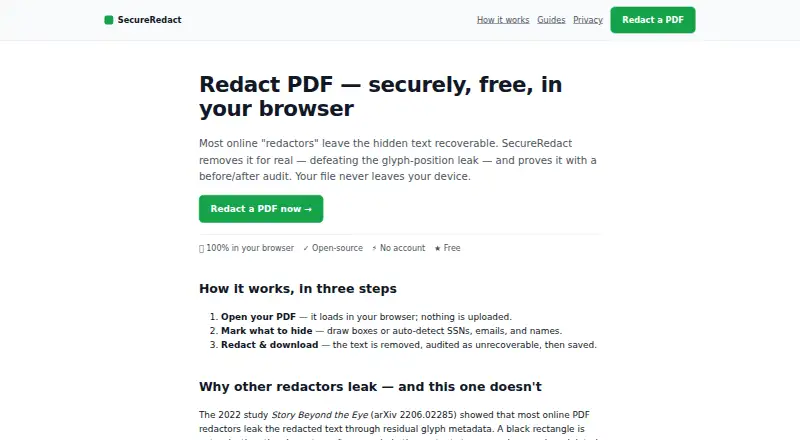
SecureRedact is a browser-based tool for removing sensitive content from standard PDFs with selectable text. Users can draw boxes over material to redact, or have the tool detect SSNs, email addresses, and names. In redacted areas, it removes text operators, changes or strips glyph positions, and rasterizes the region. A recovery audit checks for text, glyph-position data, metadata, and earlier revisions that could expose the redacted content; download is blocked if anything remains recoverable. The tool also strips document metadata, embedded JavaScript, and thumbnails, and collapses incremental-update history. PDFs are processed in the browser rather than uploaded to a server. Once the page has loaded, redaction runs there; the optional name-detection model downloads once and is cached. SecureRedact does not handle encrypted or scanned image-only PDFs in this version, and it does not provide OCR redaction. Its redaction engine and recovery audit are open source. The Free plan costs nothing, with no accounts, watermarks, or limits.
Who it suits
SecureRedact suits people who need to redact selectable-text PDFs in a browser, with manual boxes or automatic detection for names, SSNs, and email addresses. It is not suited to encrypted or scanned image-only PDFs.
What it does well
- Detects SSNs, email addresses, and names automatically
- Audits for recoverable text before download
- Processes PDFs in the browser, not on a server
- Free plan has no accounts, watermarks, or limits
What to know first
- Does not support encrypted PDFs in this version
- Does not support scanned image-only PDFs
- OCR redaction is unavailable
Limits
The free plan is listed as free, with no accounts, watermarks, or usage limits. This version excludes encrypted and scanned image-only PDFs, and it has no OCR redaction.
Plans
| Plan | Billed and limits | Price |
|---|---|---|
| Free | No accounts · no watermarks · no limits | Free |
As redactpdf.dev lists them, read 7 Oct 2026. The maker's own page has the final word.
Getting started
- Visit https://redactpdf.dev/ in a web browser.
- Load a standard PDF with selectable text.
- Draw boxes over content to redact or use automatic detection for SSNs, email addresses, and names.
- Review the recovery audit; download is blocked unless nothing is recoverable.
Verdict
SecureRedact combines manual and automatic redaction with a recovery audit that can block downloads when content remains recoverable. Its limits are clear: it handles standard PDFs with selectable text, not encrypted or scanned image-only files, and has no OCR redaction.
Questions
How much does SecureRedact cost?
Its Free plan costs nothing. The plan has no accounts, watermarks, or usage limits.
Is there a free trial?
No. SecureRedact has a free plan and no free trial.
Which files and platforms does it support?
It is a web tool that accepts PDF input. It supports standard PDFs with selectable text, but not encrypted or scanned image-only PDFs.
Does it detect sensitive information automatically?
Yes. It can detect SSNs, email addresses, and names. OCR redaction is unavailable.
Are redactions checked before download?
Yes. Its audit checks for recoverable text, glyph-position information, metadata, and prior revisions, and blocks download unless nothing is recoverable.
Is SecureRedact open source?
The redaction engine and recovery audit are open source and may be inspected.
Facts from SecureRedact (RedactPDF.dev)'s own pages
- Implementation
- The browser-based steps use pdf.js, pdf-lib, and a canvas renderer. · redactpdf.dev, 7 Oct 2026
- Manual redaction
- Users can draw boxes over content they want to hide. · redactpdf.dev, 7 Oct 2026
- Metadata handling
- Redaction strips XMP/Info metadata, embedded JavaScript, and thumbnails, and collapses incremental-update history. · redactpdf.dev, 7 Oct 2026
- Offline use
- After the page loads, redaction runs in the browser; the optional name-detection model downloads once and is cached. · redactpdf.dev, 7 Oct 2026
- Open source
- The redaction engine and recovery audit are open-source and may be inspected. · redactpdf.dev, 7 Oct 2026
- PII detection
- The tool can auto-detect SSNs, email addresses, and names. · redactpdf.dev, 7 Oct 2026
- Privacy
- PDFs are processed in the browser and are not uploaded to a server. · redactpdf.dev, 7 Oct 2026
- Purpose
- SecureRedact removes hidden text from PDFs so it cannot be recovered, and provides a built-in audit. · redactpdf.dev, 7 Oct 2026
- Recovery audit
- The tool checks for recoverable text, glyph-position information, metadata, and prior revisions, and blocks download unless nothing is recoverable. · redactpdf.dev, 7 Oct 2026
- Redaction method
- It removes text operators in redacted regions, reflows or strips glyph positions, and rasterizes those regions. · redactpdf.dev, 7 Oct 2026
- Support
- The About page directs questions and issues to the listed contact email. · redactpdf.dev, 7 Oct 2026
- Supported files
- It supports standard PDFs with selectable text; encrypted and scanned image-only PDFs are not supported in this version. · redactpdf.dev, 7 Oct 2026
Where SecureRedact (RedactPDF.dev) stands on Freedom251
- Document Redaction Software#18 of 27