Freedom251 › Document Redaction Software
pdf-redactor
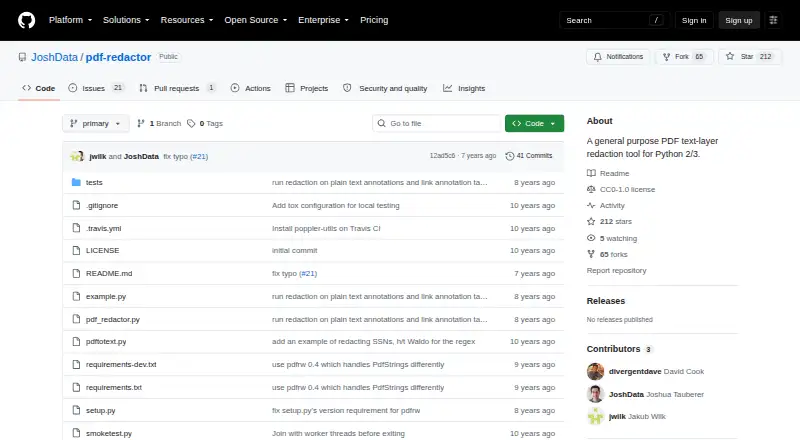
What pdf-redactor is
pdf-redactor is a free, open-source Python tool for processing text layers and metadata in PDF files. It can apply regular-expression substitutions to page text, plain-text annotations, and link target URLs—for example, replacing a Social Security number with a chosen string. Its metadata functions can rewrite, remove, or add fields in the Document Information Dictionary and embedded XMP metadata.
The project is designed for use as a Python library with text-filtering functions you write. It uses pdfrw to parse and write PDFs, and recommends qpdf to decompress files before processing and recompress or linearize them afterward when needed. Although a Python command-line invocation is documented, the command-line version does not modify PDFs by itself. The project is for Linux and self-hosted, on-premises use, accepts PDF input, and includes a CC0 1.0 Universal license. Joshua Tauberer and Antoine McGrath are credited as authors.
Its scope is limited to text and specified metadata. It leaves graphical elements, images, and other embedded resources untouched, and does not inspect several PDF components such as embedded files, forms, scripts, multimedia, or digital signatures. Unusual fonts can also affect text matching and replacement rendering.
Who it suits
It suits Python users who need to build text-filtering workflows for PDF files and want to process text or metadata locally. It is a poor fit when redaction must cover images, graphical content, or the other PDF components outside its inspection scope.
What it does well
- Regular expressions can replace matching text with a chosen string.
- Can process page text, annotations, and link target URLs.
- Can rewrite, remove, or add document and XMP metadata.
- Free, open source, and licensed under CC0 1.0 Universal.
- Supports self-hosted, on-premises use.
What to know first
- The command-line version does not modify PDFs by itself.
- Images, graphics, and embedded resources are untouched.
- Some PDF components, including forms and digital signatures, are not inspected.
- Unusual fonts can disrupt matching or replacement rendering.
Limits
It does not change graphical elements, images, or other embedded resources, and it does not inspect embedded files, multimedia, scripts, rich-text annotations, forms, internal object names, or digital signatures. Some PDFs may need qpdf decompression first, and unusual fonts may prevent patterns from matching or replacement text from rendering correctly.
Getting started
- Open the project website on GitHub.
- Use it on Linux in a self-hosted, on-premises environment.
- Install it for Python 3 and use the Python module as a library.
- Write text-filtering functions for the content you want to process.
- Use qpdf to decompress PDFs first when needed, then recompress or linearize afterward.
Verdict
Choose pdf-redactor if you can use its Python library and need text-layer or metadata changes in PDFs. Look elsewhere if the job requires visual redaction or coverage of PDF components it does not inspect.
Questions
How much does pdf-redactor cost?
It is free and open source.
Which input format does it accept?
It processes PDF files.
Does it redact images or graphics?
No. Graphical elements, images, and other embedded resources are not touched.
Can I use it from the command line?
A Python 3 command-line invocation is documented, but the command-line version does not modify the PDF by itself. The project recommends using the Python module as a library with user-written text filters.
What does it use to process PDFs?
It uses pdfrw to parse and write PDFs, and recommends qpdf to decompress and recompress PDFs when needed.
What license does it use, and who are its authors?
The repository includes a CC0 1.0 Universal license and credits Joshua Tauberer and Antoine McGrath as authors.
Facts from pdf-redactor's own pages
- Authors
- The README credits Joshua Tauberer and Antoine McGrath. · github.com, 9 Oct 2026
- Command-line status
- The README says the command-line version does not yet actually do anything to the PDF. · github.com, 9 Oct 2026
- Compression guidance
- The README recommends using qpdf to decompress PDFs before processing and to recompress and linearize them afterward because pdfrw does not support all content-stream compression methods. · github.com, 9 Oct 2026
- Compression limit
- Because pdfrw does not support all content-stream compression methods, the README recommends decompressing PDFs with qpdf before processing them. · github.com, 4 Oct 2026
- Content it handles
- It can process page text, plain-text annotations, link target URLs, document information metadata, and embedded XMP metadata. · github.com, 4 Oct 2026
- Content not touched
- Graphical elements, images, and other embedded resources are not touched. · github.com, 9 Oct 2026
- Coverage limits
- The README says it does not inspect some PDF components, including embedded files, multimedia, scripts, forms, internal object names, and digital signatures. · github.com, 4 Oct 2026
- Font limit
- Unusual fonts may not be processed correctly, which can prevent text patterns from matching or replacement text from rendering correctly. · github.com, 4 Oct 2026
- Font limitation
- Unusual fonts may not be processed correctly because the tool has limited understanding of glyph-to-Unicode mappings. · github.com, 9 Oct 2026
- Implementation dependency
- The project uses pdfrw to parse and write PDFs. · github.com, 9 Oct 2026
- Integration
- The project uses pdfrw to parse and write PDFs, and recommends qpdf to decompress and recompress PDFs when needed. · github.com, 4 Oct 2026
- License
- The repository displays a CC0-1.0 license. · github.com, 9 Oct 2026
- Maker
- The README credits Joshua Tauberer and Antoine McGrath as the authors. · github.com, 4 Oct 2026
- Metadata
- It can rewrite, remove, or add document metadata fields and XML metadata. · github.com, 4 Oct 2026
- Metadata editing
- It can rewrite, remove, or add metadata fields and XML metadata through functions operating on the parsed XMP DOM. · github.com, 9 Oct 2026
- Partial coverage
- The README lists embedded files, multimedia, scripts, rich-text annotations, forms, internal object names, and digital signatures among PDF content it does not scan. · github.com, 9 Oct 2026
- Purpose
- pdf-redactor is a general-purpose PDF text-layer redaction tool written in pure Python. · github.com, 9 Oct 2026
- Python library
- The README recommends using pdf_redactor as a library with Python text-filtering functions; it also documents Python 3 installation and a Python 3 command-line invocation. · github.com, 9 Oct 2026
- Redaction targets
- It can process page text, plain text annotations, link target URLs, the Document Information Dictionary, and embedded XMP metadata. · github.com, 9 Oct 2026
- Text redaction
- It supports regular-expression text substitution, such as replacing Social Security numbers with a mask. · github.com, 4 Oct 2026
- Text substitution
- It supports regular-expression text substitution, such as replacing Social Security numbers with a chosen string. · github.com, 9 Oct 2026
- Use
- The README recommends using the Python module as a library with user-written text filters; the command-line version does not yet do anything to the PDF by itself. · github.com, 4 Oct 2026
- Visual content
- Graphical elements, images, and other embedded resources are not touched. · github.com, 4 Oct 2026
Where pdf-redactor stands on Freedom251
- Document Redaction Software#14 of 27