Freedom251 › Screen Recording Software
ScreenToVideo
What ScreenToVideo is
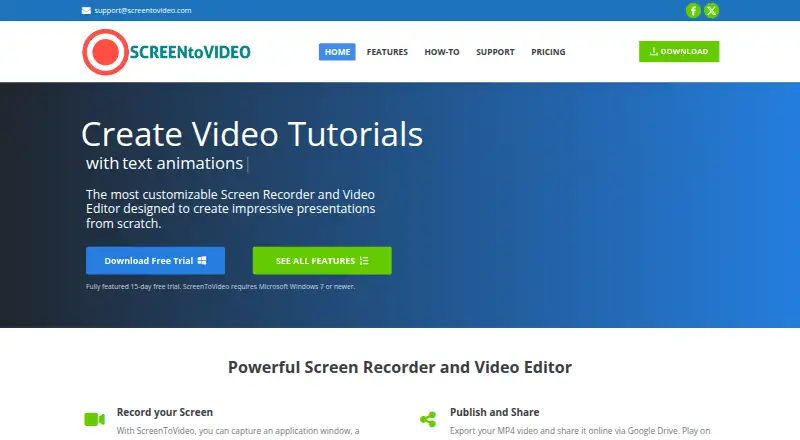
ScreenToVideo is a paid Windows recorder and editor that captures an application window, selected area, or entire screen, then turns recordings into videos. It can record webcam footage with a virtual background, microphone narration, system sound, on-screen drawing, and screenshots. Editing tools include annotations, blur and pixelation, cursor effects, zoom and pan, animations, transitions, and silence removal. Videos can be exported as MP4, WMV, or GIF, and an interactive HTML player is included. Uploads to Google Drive can create a shareable link. Text-to-speech supports Google Cloud Text-to-Speech and Microsoft SAPI. The 15-day trial includes all features but watermarks exported videos. Perpetual licenses are assigned per user and allow installation on multiple owned machines. The regular license is $119 a month, billed one time fee; the educational license is $79 a month, billed one time fee.
Who it suits
It suits businesses, students, teachers, and hobbyists using Windows 7 or newer. It is aimed at people who want screen capture, camera and audio recording, and editing in one application.
What it does well
- Captures screen, webcam, microphone, and system audio
- Includes annotations, effects, transitions, and silence removal
- Exports MP4, WMV, and GIF
- Installs on multiple machines owned by one user
- Educational license is available
What to know first
- Windows only
- No free plan
- Trial exports contain watermarks
- Listed prices use a one-time fee with monthly wording
Plans
| Plan | Billed and limits | Price |
|---|---|---|
| Regular license | one time fee · Full-featured recorder/editor · multiple-device installation · Windows · lifetime upgrades/support · 30-day money-back guarantee | $119, paid once |
| Lifetime license offer | one time payment · Lifetime license offer; coupon SV50OFF is advertised for 50% off | $59.50, paid once |
| Educational license | one time fee · For students and teachers · full-featured recorder/editor · multiple-device installation · Windows · lifetime upgrades/support · 30-day money-back guarantee | $79, paid once |
As screentovideo.com lists them, read 15 Oct 2026. The maker's own page has the final word.
Verdict
ScreenToVideo combines multi-source recording with a substantial editing toolkit and several export formats. Windows dependence, watermarked trial output, and the listed license terms should guide evaluation.
Facts from ScreenToVideo's own pages
- AI backgrounds
- AI virtual-background and background-blur tools can replace or obscure media backgrounds, and chroma key is also available. · screentovideo.com, 15 Oct 2026
- Annotations and effects
- The editor provides text annotations, sketches, blur and pixelation effects, geometric masks and cursor effects. · screentovideo.com, 15 Oct 2026
- Audio capture
- The recorder can capture microphone input and sounds played by the computer. · screentovideo.com, 15 Oct 2026
- Captions and interactivity
- Users can create, import and export closed captions and add buttons or video events for interactive output. · screentovideo.com, 15 Oct 2026
- Company
- The maker says it was founded in 2019 and renamed to Tatomir N. Alex PFA in 2025. · screentovideo.com, 12 Oct 2026
- Drawing and screenshots
- Users can draw or highlight while recording and take screenshots during capture. · screentovideo.com, 15 Oct 2026
- Editing
- The editor includes annotations, effects such as blur and pixelation, cursor effects, zoom and pan, animations, transitions, and silence removal. · screentovideo.com, 12 Oct 2026
- Export formats
- The help documentation lists MP4 with H.264 or H.265, WMV and animated GIF export. · screentovideo.com, 15 Oct 2026
- Exports
- Videos can be exported in MP4, WMV, or GIF formats, and the product provides an interactive HTML player. · screentovideo.com, 12 Oct 2026
- Free plan
- No · screentovideo.com, 22 Sept 2026
- Integration limitation
- Independent coverage characterizes export and integrations as less robust than premium video platforms. · affiliatalk.com, 15 Oct 2026
- Integrations
- ScreenToVideo can upload videos to Google Drive for a shareable link, and its text-to-speech feature supports Google Cloud Text-to-Speech or Microsoft SAPI. · screentovideo.com, 12 Oct 2026
- Intended users
- The maker identifies businesses, students and teachers, and hobbyists as audiences for ScreenToVideo. · screentovideo.com, 12 Oct 2026
- Latest changelog
- Version 2026.1 dated February 11, 2026 fixed dual-monitor UI scaling, improved AI background blur and included stability optimizations. · screentovideo.com, 15 Oct 2026
- Licence
- The EULA describes ScreenToVideo as copyrighted proprietary software and prohibits modification, decompilation, reverse engineering, leasing and sublicensing. · screentovideo.com, 15 Oct 2026
- Licence scope
- A registered copy is licensed either to one person on multiple computers or to multiple people on one computer, and network use requires licenses for each workstation. · screentovideo.com, 15 Oct 2026
- License
- The license is perpetual, is assigned per user, and allows that registered user to install the software on multiple machines they own. · screentovideo.com, 12 Oct 2026
- Limit: advanced editing depth
- Independent coverage says the editor may lack the advanced effects and multi-track depth of top professional suites. · affiliatalk.com, 15 Oct 2026
- Limit: editing workflow
- One AppSumo reviewer said cutting scenes left gaps requiring manual adjustment and chose CapCut for editing instead. · appsumo.com, 15 Oct 2026
- Limit: interface
- AppSumo reviewers report that navigation and editing controls can feel confusing or unintuitive. · appsumo.com, 15 Oct 2026
- Limit: long recordings
- AppSumo reviews report freezing, skipped frames or unusable output during some long recordings and exports. · appsumo.com, 15 Oct 2026
- Maker
- The company says it was founded in 2019 and renamed itself Tatomir N. Alex PFA in 2025. · screentovideo.com, 15 Oct 2026
- Media editing
- Images, videos and audio files can be imported directly into a project for editing. · screentovideo.com, 15 Oct 2026
- Microphone recording
- Yes · screentovideo.com, 22 Sept 2026
Where ScreenToVideo stands on Freedom251
- Screen Recording Software#107 of 131