Freedom251 › Screenshot Annotation Software
ScreenSnap Pro
What ScreenSnap Pro is
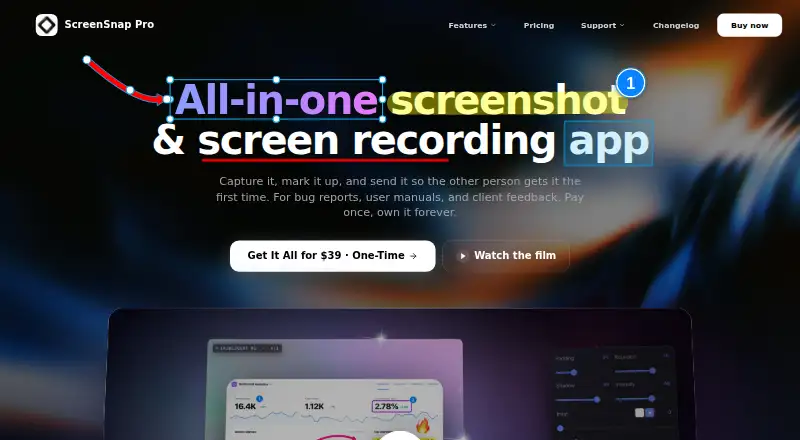
ScreenSnap Pro is a paid screenshot and screen-recording app for developers, designers, and creators. It runs on macOS and Windows and captures selected areas, windows, or full screens, with annotation and redaction tools. Screenshots export as PNG. The app includes more than 500 backgrounds in six collections. Recording can produce video or GIF files with webcam, microphone, and system audio. Website Capture makes full-page or first-screen captures with device presets while blocking cookie banners and ads. OCR extracts text from screenshots, and the maker says it works in any language. Core features work offline. Optional cloud sharing uploads captures and creates unlisted but public links that anyone with a link can open. Files remain on the computer unless uploaded. Each license allows up to 10,000 cloud uploads, with a 300 MB limit per file. There is no Linux version, browser extension, scrolling capture, video editing, trimming, or AI feature. Crash diagnostics are enabled by default without a settings switch.
Who it suits
It suits developers, designers, and creators needing desktop captures, recording, annotation, OCR, or redaction. It is for users who can work without Linux, scrolling capture, editing, or AI tools.
What it does well
- Captures areas, windows, or full screens
- Includes annotation and redaction tools
- Records video or GIF with audio
- OCR supports screenshots in any language
- Core features work offline
What to know first
- No free plan or free trial
- No Linux or browser extension
- Cloud links are unlisted but public
- Crash diagnostics cannot currently be disabled
Plans
| Plan | Billed and limits | Price |
|---|---|---|
| ScreenSnap Pro | $34 one-time payment · 1 license · 2 seats · Mac and Windows · lifetime updates · ScreenSnap Cloud up to 10,000 uploads | $34, paid once |
As screensnap.pro lists them, read 11 Oct 2026. The maker's own page has the final word.
Verdict
ScreenSnap Pro combines desktop screenshots, recording, website capture, OCR, and optional cloud sharing. Its listed one-time ScreenSnap Pro offer is $39 a month for two seats and two computers, with no subscription or recurring fees.
Facts from ScreenSnap Pro's own pages
- Backgrounds
- The app includes more than 500 backgrounds across six collections. · screensnap.pro, 11 Oct 2026
- Browser extension
- No · screensnap.pro, 20 Sept 2026
- Capture and annotate
- It captures selected areas, windows, or full screens and includes screenshot annotation tools. · screensnap.pro, 11 Oct 2026
- Cloud limit
- Each license can have up to 10,000 cloud uploads, and each uploaded file can be up to 300 MB. · screensnap.pro, 11 Oct 2026
- Cloud sharing
- Cloud sharing is optional and creates shareable links for uploaded captures. · screensnap.pro, 11 Oct 2026
- Diagnostics
- Crash diagnostics are on by default and the app currently has no settings switch for them. · screensnap.pro, 11 Oct 2026
- Export formats
- PNG · screensnap.pro, 20 Sept 2026
- Founded
- 2025 · screensnap.pro, 28 Sept 2026
- Free plan
- No · screensnap.pro, 20 Sept 2026
- Headquarters
- Porto, Portugal · screensnap.pro, 28 Sept 2026
- Not offered
- The maker says the product does not currently offer Linux, a browser extension, scrolling capture, video editing or trimming, or AI-powered features. · screensnap.pro, 11 Oct 2026
- OCR
- OCR can extract text from screenshots, and the maker says it works in any language. · screensnap.pro, 11 Oct 2026
- Offline use
- The maker says core features work offline, while cloud sharing is optional. · screensnap.pro, 11 Oct 2026
- Platforms
- The app supports macOS 15+ and Windows 10/11 (64-bit), with Apple Silicon and Intel Mac support. · screensnap.pro, 11 Oct 2026
- Privacy
- Screenshots and recordings stay on the user's computer unless uploaded to ScreenSnap Cloud. · screensnap.pro, 11 Oct 2026
- Purpose
- ScreenSnap Pro is a screenshot and screen recording app for developers, designers, and creators. · screensnap.pro, 11 Oct 2026
- Recording
- It records video or GIF with webcam, microphone, and system audio. · screensnap.pro, 11 Oct 2026
- Redaction tools
- Yes · screensnap.pro, 20 Sept 2026
- Share link access
- Cloud share links are unlisted but public, and anyone with a link can open the file. · screensnap.pro, 11 Oct 2026
- Support
- Support is available by email at [email protected], and the maker says replies typically arrive within a few hours. · screensnap.pro, 11 Oct 2026
- Website capture
- Website Capture can create full-page or first-screen captures using device presets and automatically blocks cookie banners and ads. · screensnap.pro, 11 Oct 2026
Where ScreenSnap Pro stands on Freedom251
- Screenshot Annotation Software#74 of 76