Freedom251 › Projection Mapping Software

Screenberry
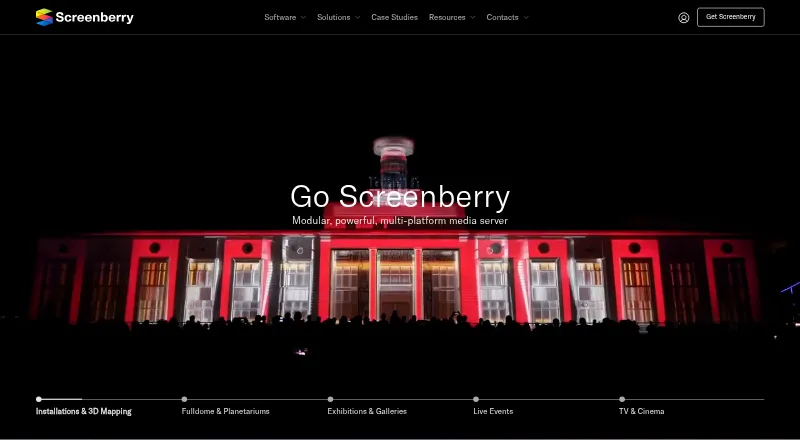
What Screenberry is
Screenberry is a media server for real-time multi-screen playback at venues and productions, including planetariums, galleries, virtual production studios, interactive installations, and live events. The product overview says one server can handle video content up to 16 × 4K and output canvases up to 32 × 32K. Its audio engine supports up to 256 simultaneous channels, VST plugins, and custom multichannel setups. Projection tools include warping and blending, camera-based automatic calibration, manual warping, and a 3D scene editor with projector pose estimation. Screenberry lists native TouchDesigner and Notch support, Unity and Unreal integration via Spout, and GLSL and ISF shaders. Control options include timecode, MIDI, DMX, and OCS, plus node-graph and JavaScript automation. Server and Panel are available for Windows, Linux, and macOS, though features vary by operating system. Minimum requirements include Windows 10 or Ubuntu 22.04 LTS and a graphics card supporting OpenGL 4.6. The free Non-Commercial license allows up to 2x 2K output for non-paying use, renews every 90 days, and requires internet.
Who it suits
Screenberry suits venues and production teams creating multi-screen playback, projection mapping, exhibitions, live events, or fulldome and planetarium presentations. Its free license is limited to non-paying use.
What it does well
- Supports up to 256 simultaneous audio channels.
- Includes projector warping and blending tools.
- Lists timecode, MIDI, DMX, and OCS control.
- Available for Windows, Linux, and macOS.
- Free non-commercial license supports up to 2x 2K output.
What to know first
- Free license excludes paid work.
- Free license renews every 90 days and requires internet.
- Content-protection DRM requires a USB dongle.
- Some features vary by operating system.
Limits
The free Non-Commercial license permits only non-paying use and up to 2x 2K video output. It renews every 90 days and requires internet. Screenberry Lite supports up to 1x 4K output, one media player and three layers; Pro output resolution is licensed in 4K pixel blocks.
Plans
| Plan | Billed and limits | Price |
|---|---|---|
| Non-Commercial | Personal, learning, evaluation, and non-paying use only · up to 2x 2K video output · license renews every 90 days and requires internet | Free |
| Screenberry Pro | Commercial use · output resolution licensed in 4K pixel blocks · permanent or time-based license · 1 year of updates | On request |
| Screenberry Lite | Commercial use · up to 1x 4K output · one media player · three layers · permanent license · 1 year of updates | On request |
As screenberry.com lists them, read 29 Sept 2026. The maker's own page has the final word.
Getting started
- Visit the Screenberry website.
- Choose a Non-Commercial license for personal, learning, evaluation or other non-paying use, or a Pro or Lite license for commercial work.
- Check the operating system and graphics card against the minimum requirements: Windows 10 or Ubuntu 22.04 LTS and OpenGL 4.6 support.
- Install Screenberry Server or Screenberry Panel for Windows, Linux or macOS.
- For activation issues, contact the support email; contact the team for product, service or sales inquiries.
Screenberry is a media server for complex multi-screen playback, projection and show control, aimed at production teams working in venues and live events. It suits projects that need synchronized video, audio and projector calibration in one system. Its breadth is compelling, but commercial use requires a paid license and the non-commercial license is tightly limited.
Overview
Screenberry brings playback, projection calibration, audio and show control together for planetariums, galleries, virtual production, interactive installations, live events, exhibitions, 3D mapping, TV and cinema. That range makes it a plausible fit for immersive or production-scale work; a simple presentation is unlikely to need its full scope.
A single server can handle video content up to 16 × 4K and output canvases up to 32 × 32K. Screenberry also supports two projection outputs, edge blending, live video input and 3D mapping. These headline capacities do not remove the need to check the output allowance attached to the chosen license.
Screenberry is made by Front Pictures, headquartered in Kyiv, Ukraine. The company provides email support for activation issues and handles product, service and sales inquiries through its team.
Key features
Playback and audio
The stated video capacity is paired with an audio engine capable of up to 256 simultaneous channels, VST plugins and custom multichannel setups. That combination is useful when a production needs layered media and complex audio routing; it is excessive for work with modest playback and audio needs.
Projection calibration
Projector warping and blending are joined by camera-based automatic calibration, manual warping and a 3D scene editor with projector pose estimation.
Integrations and show control
TouchDesigner and Notch have native support; Unity and Unreal integrate through Spout, and GLSL and ISF shaders are supported. Control options include timecode, MIDI, DMX and OCS, alongside node-graph and JavaScript automation. This breadth can suit creative and event workflows with varied control systems, though users should confirm operating-system support for the features they need.
Pricing
Screenberry has a free Non-Commercial license and paid commercial options. The paid entry point is $99/mo, while Pro and Lite have custom pricing.
- Non-Commercial — free: For personal, learning, evaluation and other non-paying use. It permits up to 2x 2K video output, renews every 90 days and requires internet. It cannot be used for paid work.
- Screenberry Lite — custom pricing: For commercial use with up to 1x 4K output, one media player and three layers. It is a permanent license with one year of updates, making it the more constrained commercial option.
- Screenberry Pro — custom pricing: For commercial use, with output resolution licensed in 4K pixel blocks. It can be permanent or time-based and includes one year of updates, offering a route beyond Lite's stated output and player limits.
Content protection DRM is available only with a USB dongle. Minimum requirements include Windows 10 or Ubuntu 22.04 LTS and a graphics card supporting OpenGL 4.6.
Platforms
Screenberry Server and Screenberry Panel are available for Windows, Linux and macOS, with some features varying by operating system. The product also lists web availability, but the server and panel are the named applications; verify the OS fit for the intended setup before committing.
Who it's for
Screenberry is best suited to teams producing fulldome and planetarium content, live events, media installations, 3D mapping, exhibitions and gallery presentations, or TV and cinema work. Its audio, calibration and control options matter most when several parts of a production need to work together. It is not the right license for paid work on the free Non-Commercial plan, nor an obvious choice for straightforward playback that does not need multi-screen production tools.
Pros and cons
- Pro: High stated video capacity and large output canvases support ambitious multi-screen designs.
- Pro: Up to 256 audio channels, VST support and custom routing extend the system beyond video playback.
- Pro: Automatic and manual calibration, blending and multiple control protocols suit varied projection and show workflows.
- Con: The free license is limited to non-paying use and up to 2x 2K output, so it cannot serve as a commercial entry tier.
- Con: Lite is capped at one 4K output, one player and three layers; larger commercial setups may need Pro.
- Con: Some features vary by operating system, and DRM requires a USB dongle.
Alternatives
For a broader set of projection-mapping options, browse Projection Mapping Software.
- Disguise Designer is worth considering if a free plan for pre-visualising and developing projects without connecting to Disguise servers fits the workflow.
- Ghost Arcade is a free desktop option with all features included and no tiers, trial, watermark or expiry.
- VIOSO may suit teams looking for a freemium option with a free tier capped at 10 saved projects and 250 MB storage, or a Pro plan at €49 a month.
- Christie Mystique offers a free Lite edition limited to one webcam, up to three Christie projectors and flat screens.
- Fluence offers a free download with the full feature set, with a periodic watermark until license activation.
- MadMapper has a free tryout with all features but watermarked video input and output, DMX channels that black out every 30 seconds and a space scanner limited to one-quarter resolution.
- SurfaBeam Pro is another freemium option.
- LightAct offers a free Creator plan with all features unlocked and unlimited outputs, but outputs are watermarked.
Verdict
Choose Screenberry when a venue or production needs one system for high-capacity multi-screen playback, projection calibration, complex audio and show control. Its strongest case is the breadth of those capabilities; look elsewhere if you need a commercially usable free tier, a simpler playback tool, or a defined price before evaluating a paid license.
Verdict
Screenberry combines playback, projection calibration, audio, and show-control options for multi-screen productions. Check the operating-system requirements and license terms, especially the non-commercial restriction and dongle requirement for DRM.
Questions
Is there a free plan?
Yes. The Non-Commercial license costs nothing and is limited to personal, learning, evaluation and other non-paying use, with up to 2x 2K video output.
What does the free license require?
It renews every 90 days and requires internet.
How much do paid plans cost?
The listed starting price is $99/mo. Individual prices for Screenberry Pro and Screenberry Lite are not provided here.
Which operating systems are supported?
Screenberry Server and Screenberry Panel are available for Windows, Linux and macOS. Some features vary by operating system.
What are the commercial license options?
Screenberry Pro is for commercial use, licenses output resolution in 4K pixel blocks and offers permanent or time-based licensing with one year of updates. Screenberry Lite is for commercial use and includes up to 1x 4K output, one media player, three layers, a permanent license and one year of updates.
When is DRM available?
Content protection DRM is available only when using a USB dongle.
Facts from Screenberry's own pages
- Audio
- Its audio engine can play up to 256 audio channels simultaneously and supports VST plugins and custom multichannel setups. · screenberry.com, 29 Sept 2026
- Calibration
- Screenberry supports projector warping and blending, camera-based automatic calibration, manual warping, and a 3D scene editor with projector pose estimation. · screenberry.com, 29 Sept 2026
- DRM limit
- The licensing FAQ states that content protection DRM is available only when using a USB dongle. · screenberry.com, 29 Sept 2026
- Headquarters
- Kyiv, Ukraine · screenberry.com, 28 Sept 2026
- Integrations
- The product overview lists native TouchDesigner and Notch support, Unity and Unreal integration via Spout, and GLSL and ISF shader support. · screenberry.com, 29 Sept 2026
- Minimum requirements
- The licensing page lists Windows 10 or Ubuntu 22.04 LTS and a graphics card supporting OpenGL 4.6 as minimum requirements. · screenberry.com, 29 Sept 2026
- Non-commercial limits
- The Non-Commercial license is restricted to non-paying use, and paid work requires a Pro or Lite license. · screenberry.com, 29 Sept 2026
- Playback
- The product overview says one server can handle video content up to 16 × 4K and output canvases up to 32 × 32K. · screenberry.com, 29 Sept 2026
- Product
- Screenberry is a media server for real-time multi-screen playback in venues and productions including planetariums, galleries, virtual production studios, interactive installations, and live events. · screenberry.com, 29 Sept 2026
- Security and privacy
- Front Pictures says it does not sell personal information, but may share it with distributors and partners, and users may request access, correction, or deletion. · screenberry.com, 29 Sept 2026
- Show control
- Screenberry supports timecode, MIDI, DMX, and OCS protocols, plus node-graph and JavaScript automation. · screenberry.com, 29 Sept 2026
- Support
- The company provides a support email for activation issues and directs users to contact its team for product, service, or sales inquiries. · screenberry.com, 29 Sept 2026
- Supported systems
- Screenberry Server and Screenberry Panel are available for Windows, Linux, and macOS, with some features varying by operating system. · help.screenberry.com, 29 Sept 2026
- Who it serves
- The site presents Screenberry for fulldome and planetariums, live events, media installations and 3D mapping, exhibitions and galleries, and TV and cinema. · screenberry.com, 29 Sept 2026
Where Screenberry stands on Freedom251
- Projection Mapping Software#10 of 24