Freedom251 › Projection Mapping Software

MadMapper
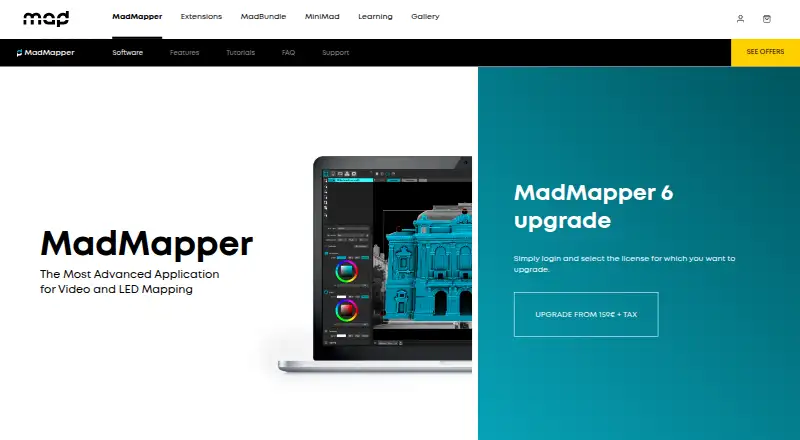
What MadMapper is
MadMapper is an application for video and LED mapping on macOS and Windows. It supports video up to 16K resolution and can connect as many projectors as the computer can handle; the maker says it tested 16 Full HD projectors on one PC. Mapping tools include Bezier masking, mesh warping, 3D calibration, space and LED scanning, live shader editing, cues, generative content, multichannel audio, and timelines. Live-control and networking integrations include MIDI, OSC with OSC Query, Art-Net, Ableton Link, Spout, Syphon, NDI, and the MiniMad remote controller. For DMX, it supports Art-Net 4 and sACN 3, universe synchronization, output up to 1000 fps, and up to 4096 universes. Media support includes video, image, OBJ 3D files, and many audio formats. The free demo watermarks output, disables project loading and saving and several exports, limits scanner resolution, and interrupts DMX devices every 30 seconds. Temporary installations cost €39 a month, excluding tax. The Artists license costs 399.00 EUR once, excluding tax, and covers the current 6.xx version with one extra seat for a spare computer.
Who it suits
MadMapper suits visual and digital artists, scenographers, stage designers, VJs, and other creative people working with mapped visuals. Its control integrations and DMX features may fit projects that use those systems.
What it does well
- Runs on macOS and Windows.
- Supports video up to 16K resolution.
- Includes masking, warping, scanning, and timeline tools.
- Supports up to 4096 DMX universes.
- Connects with MIDI, OSC, Art-Net, and NDI.
What to know first
- The free demo adds watermarks.
- The demo disables project loading and saving.
- Demo DMX devices black out every 30 seconds.
- Temporary installation licensing costs 39.00 EUR monthly, excluding tax.
Limits
The free Try MadMapper plan adds watermarks, disables project loading and saving and SVG, PNG, and PDF export, limits Space Scanner to one-quarter resolution, blacks out DMX devices every 30 seconds, and disables material installation and publishing. The €39 a month Temporary installations plan is a temporary license; the €399.00 EUR once Artists plan covers the current 6.xx version.
Plans
| Plan | Billed and limits | Price |
|---|---|---|
| Try MadMapper | All features · watermarked input/output · DMX blackout every 30 seconds · Space Scanner at quarter resolution | Free |
| Temporary installations | From 39€/month excl tax · All features · temporary license supports current and future versions | €39 a month |
| Artists | excl tax · All MadMapper features · perpetual license for current 6.xx version · one extra seat for a spare computer | €399, paid once |
| Artist | From 399€ excl tax · All features · perpetual for current 6.xx version · one spare-computer seat | €399, paid once |
As madmapper.com lists them, read 15 Oct 2026. The maker's own page has the final word.
Getting started
- Visit the MadMapper software website.
- Choose the free Try MadMapper demo or a paid license.
- Install MadMapper on macOS or Windows.
- Connect projectors and configure mapping, control, or DMX features for your project.
MadMapper is a professional application for video and LED mapping, combining surface-mapping tools with live control, audio, timelines and DMX output. It best fits visual artists, VJs, scenographers and stage designers building complex projection or LED installations. Its breadth and scale are compelling, but the free demo is for evaluation rather than production.
Overview
MadMapper supports hybrid workflows, live video input, edge blending and 3D mapping. It can process video up to 16K and connect as many projectors as the host computer can handle; the maker reports testing 16 Full HD projectors on one PC. That makes it suitable for multi-projector shows, while actual capacity remains dependent on the computer.
Founded in 2010, the company is headquartered in Paris and Geneva, with development in Brussels. Privacy commitments include compliance with Switzerland's Federal Act on Data Protection and the GDPR, plus access controls, encryption and contractual safeguards. Support is handled through a contact form on weekdays from 08:00 to 17:00 CET.
Key features
Mapping and media
Bezier masking, mesh warping and 3D calibration give precise control over irregular surfaces. Space Scanner and LED Scanner support measured installation workflows, while live shader editing and generative content let creators build or modify visuals inside the application. Cues and timelines provide structure for programmed playback, and multichannel audio supports synchronized audiovisual work.
Media support covers MP4, H.264, H.265/HEVC, ProRes, DNxHD and HAP video; JPEG, PNG, TIFF, EXR and PSD images; OBJ 3D files; and many audio formats. This broad format range reduces the need to convert material before a show.
Control and DMX
MadMapper connects to MIDI, OSC with OSC Query, Art-Net, Ableton Link, Spout, Syphon, NDI and the MiniMad remote controller. These integrations make it a strong choice for setups driven by music software, network cues or external video systems. DMX support is unusually extensive: Art-Net 4, sACN 3, universe synchronization, output up to 1000 fps and as many as 4096 DMX universes. That scale is aimed at demanding lighting and LED deployments rather than simple projection experiments.
Pricing
| Plan | Price | What you get |
|---|---|---|
| Try MadMapper | €0.00, free | All features, with watermarked video input and output, DMX channels blacking out every 30 seconds, and Space Scanner limited to one-quarter resolution. |
| Temporary installations | €39.00 per month, excluding tax | All features and a temporary license that works with any current or future MadMapper version. |
| Artists | €399.00 once, excluding tax | All features, a perpetual license for the current 6.xx version and one extra seat for a spare computer. |
The free plan is useful for learning interfaces and checking compatibility, but watermarks, the 30-second DMX blackout and restricted scanning prevent dependable show use; it also cannot load or save projects or export SVG, PNG or PDF, and disables material installation and publishing. The monthly license suits a temporary event or touring installation and avoids version lock-in. The one-time Artists license is better for recurring work when a perpetual current-version license and spare-computer seat matter, though upgrades beyond 6.xx are not included.
Platforms
MadMapper runs on macOS and Windows. Its workflow supports live input, edge blending and 3D mapping, with advanced control-protocol integration for networked productions.
Who it's for
Choose MadMapper for projection artists, VJs, scenographers and stage designers who need detailed geometric mapping alongside MIDI, OSC, video-network and DMX control. Its 16K capability, multi-projector scaling and large DMX ceiling also suit major installations. It is less appropriate if you need a genuinely unrestricted free tool or a perpetual license that automatically covers every future major version.
Pros and cons
Pros
- Comprehensive mapping, scanning, shader, generative, cue and timeline tools in one application.
- High-resolution and multi-projector support for large installations.
- Deep interoperability through MIDI, OSC, Art-Net, sACN, Ableton Link, Spout, Syphon, NDI and MiniMad.
- DMX output reaching 4096 universes and 1000 fps for complex lighting systems.
- Monthly and perpetual licensing options, including a spare-computer seat on Artists.
Cons
- The demo's watermarks, project restrictions and recurring DMX blackout make it unsuitable for production.
- The Artists license is perpetual only for the current 6.xx version.
- Projector capacity depends on the computer, so larger rigs require substantial host hardware.
Alternatives
SurfaBeam Pro is worth considering when you want Android and iOS support as well as desktop platforms, although its free plan blocks saving, loading and exporting and watermarks output.
Disguise Designer suits learning, training and pre-visualization without connecting to Disguise servers through its free Designer Starter plan.
Ghost Arcade is the simpler free choice when you want all features without tiers, trials, watermarks or expiry.
Map Club fits users seeking unlimited projects and surfaces with no watermarks or time limits at no cost.
Screenberry is an option for non-commercial use with up to two 2K outputs, subject to 90-day online license renewals.
Christie Mystique is aimed at Christie projector workflows, with its free Lite edition supporting one webcam and up to three Christie projectors.
MapMap is a free, open-source projection-mapping alternative.
VIOSO offers a free tier with up to 10 saved projects and 250 MB of storage, plus a paid Pro plan.
For a broader comparison, see Projection Mapping Software.
Verdict
MadMapper is a strong recommendation for professionals who need precise video and LED mapping joined to serious live-control and DMX infrastructure. Its main reason to choose it is the unusually complete combination of mapping tools, integrations and large-scale output. Look elsewhere if your priority is unrestricted free production, open-source software or a perpetual license covering future major releases.
Verdict
MadMapper brings video and LED mapping, extensive control integrations, and DMX features into one application. The free demo has meaningful restrictions; paid licenses are available for temporary installations or the current 6.xx version.
Questions
Is MadMapper free?
A free Try MadMapper plan is available. Its demo output is watermarked and several functions are restricted.
How much do the paid plans cost?
Temporary installations costs €39 a month, billed excluding tax. Artists costs €399.00 EUR once, billed excluding tax.
Which platforms does MadMapper support?
MadMapper is available for macOS and Windows.
What does the Artists license include?
It is a perpetual license for the current 6.xx version and includes one extra seat for a spare computer.
What integrations and control options does it support?
Options include MIDI, OSC with OSC Query, Art-Net, Ableton Link, Spout, Syphon, NDI, and the MiniMad remote controller.
Where is MadMapper based?
MadMapper lists Paris, France and Geneva, Switzerland as headquarters, with its development team in Brussels, Belgium.
Facts from MadMapper's own pages
- Audience
- The software is used by visual and digital artists, scenographers, stage designers, VJs, and other creative people. · madmapper.com, 30 Sept 2026
- Demo limitations
- The demo blocks project loading and saving, SVG/PNG/PDF export and material publishing, in addition to watermarking and DMX interruptions. · docs.madmapper.com, 15 Oct 2026
- Demo limits
- The free demo adds watermarks, disables project loading and saving and SVG/PNG/PDF export, limits the Space Scanner to one-quarter resolution, blacks out DMX devices every 30 seconds, and disables material installation and publishing. · madmapper.com, 30 Sept 2026
- Deployment automation
- Mass-deployment documentation provides command-line authorization, deauthorization, login and license-information commands for macOS and Windows. · docs.madmapper.com, 15 Oct 2026
- DMX
- The software supports Art-Net 4, sACN 3, universe synchronization, up to 1000 fps DMX output, and up to 4096 DMX universes. · madmapper.com, 30 Sept 2026
- Documentation depth
- The official manual covers interfaces, media, surfaces, DMX/LED, outputs, laser, modules, settings, timelines, live control, troubleshooting and technical references. · docs.madmapper.com, 15 Oct 2026
- Founded
- The MadMapper concept and development began in 2010. · madmapper.com, 15 Oct 2026
- Generative materials
- Built-in generators and a live GLSL editor allow users to create and publish shader-based materials. · madmapper.com, 15 Oct 2026
- Headquarters
- Paris, France and Geneva, Switzerland; development team in Brussels, Belgium · madmapper.com, 28 Sept 2026
- Integrations
- Networking and control options include MIDI, OSC, Art-Net, Spout, Syphon, NDI, Ableton Link, Blackmagic, USB cameras and MiniMad. · madmapper.com, 15 Oct 2026
- Laser control
- The MadLaser extension adds laser mapping and vectorization workflows to MadMapper. · madmapper.com, 15 Oct 2026
- LED and DMX
- LED scanning, fixture creation, Art-Net and sACN are supported, with up to 4096 DMX universes listed. · madmapper.com, 15 Oct 2026
- Licence model
- The legal page identifies MadMapper Sàrl copyright and reserves reproduction and modification rights, indicating proprietary software rather than open source. · madmapper.com, 15 Oct 2026
- License restrictions
- Perpetual licenses begin at two seats, seats cannot be added later, and license sharing is prohibited. · docs.madmapper.com, 15 Oct 2026
- Limit: blending effort
- A Reddit user reports that recovering from a projector going out of alignment can be finicky and time-consuming. · reddit.com, 15 Oct 2026
- Limit: content editing
- An independent review notes that MadMapper maps and plays prepared media but is not a non-linear video editor. · archivelabs.me, 15 Oct 2026
- Limit: learning curve
- Tiorai reports that beginners may face a steep learning curve. · tiorai.com, 15 Oct 2026
- Limit: price
- WindowsReport calls MadMapper somewhat expensive, while Tiorai characterizes the one-time purchase as relatively high. · windowsreport.com, 15 Oct 2026
- Limit: workflow scope
- TechJockey says MadMapper is not designed for live video mixing with an A/B crossfader and lacks a scripted-show timeline. · techjockey.com, 15 Oct 2026
- Maker collaboration
- The product was created by 1024 architecture and GarageCube, with development based in Brussels. · madmapper.com, 15 Oct 2026
- Mapping tools
- MadMapper includes Bezier masking, mesh warping, 3D calibration, space scanning, LED scanning, live shader editing, cues, generative content, multichannel audio, and timelines. · madmapper.com, 30 Sept 2026
- Media formats
- Supported media includes video formats such as MP4, H.264, H.265/HEVC, ProRes, DNxHD, and HAP; image formats such as JPEG, PNG, TIFF, EXR, and PSD; OBJ 3D files; and many audio formats. · madmapper.com, 30 Sept 2026
- Media support
- Supported media includes common H.264/H.265, ProRes, HAP, image, OBJ 3D and many audio formats, plus live camera input. · madmapper.com, 15 Oct 2026
- Minimum hardware
- MadMapper 6 requires at least 300 MB disk space, 2 GB RAM and an OpenGL 3.3-capable GPU; advanced work benefits from 2–4 CPU cores and 8 GB RAM. · docs.madmapper.com, 15 Oct 2026
Where MadMapper stands on Freedom251
- Projection Mapping Software#8 of 24