Freedom251 › PlayStation Emulators
ScePSX
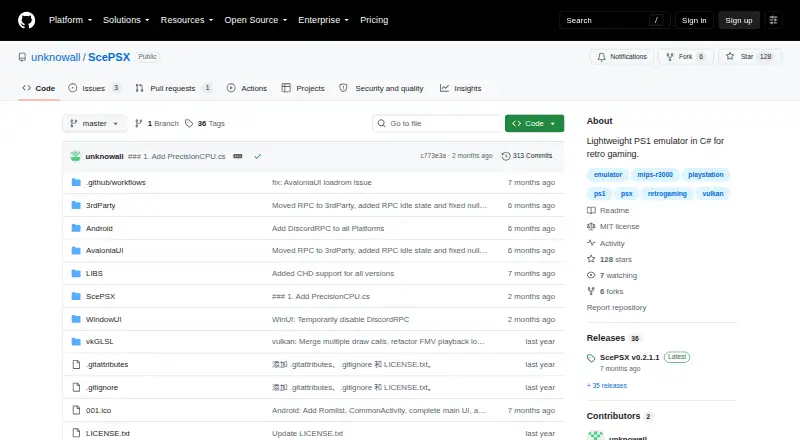
What ScePSX is
ScePSX is a free, open-source PlayStation 1 emulator written in C# for Windows, Linux, macOS and Android. It supports saving and loading game progress at any time, multiple save files, cheat codes, memory editing and search, and online multiplayer. Supported disc images include .bin/.cue, .img/.cue, .iso and .chd. Users can switch among D2D, D3D, OpenGL and Vulkan renderers. Hardware backends support output up to 4K; the software backend offers xBR and JINC upscaling. PGXP geometry enhancement works across software and hardware backends, with adjustments taking effect without restarting. ReShade effects are supported on D3D, OpenGL and Vulkan. Controllers are described as plug and play, while keyboard bindings can be customized. The emulator does not include BIOS files, so users must provide one. Android requires version 5.0 or later, with 9.0 or later recommended. Optional GameDB and ControllerDB downloads are listed, and the project welcomes bug reports, suggestions and contributions through GitHub.
Who it suits
ScePSX may suit players looking for a configurable PS1 emulator on desktop or Android, including those who want renderer options, cheats or online multiplayer. Android users need version 5.0 or later, and all users must supply a BIOS file.
What it does well
- Available for Windows, Linux, macOS and Android.
- Supports four listed disc-image formats.
- Renderer options include D2D, D3D, OpenGL and Vulkan.
- Includes online multiplayer, cheats and memory tools.
- Hardware backends support output up to 4K.
What to know first
- Does not include BIOS files.
- Android requires version 5.0 or later.
- Android 9.0 or later is recommended.
- Version 0.2.0.1 save states are incompatible with older versions.
Limits
Users must provide a BIOS file. Android requires version 5.0 or later, with 9.0 or later recommended; save states created by v0.2.0.1 cannot be used with older versions.
Getting started
- Open the ScePSX GitHub project page.
- Choose a listed download variant for Windows, Linux, macOS, or Android.
- On Android, use version 5.0 or later; version 9.0 or later is recommended.
- Provide a BIOS file.
- Load a supported game image: .bin/.cue, .img/.cue, .iso, or .chd.
- Use a controller without extra setup, or customize keyboard bindings in the File menu.
ScePSX is a lightweight PlayStation 1 emulator for people who want unusually broad graphics controls, enhancement tools, and flexible save management on desktop or Android. It is a strong fit for technically minded players with their own BIOS and a library of disc images. The trade-off is a setup step that proprietary-style packages often avoid, plus care when moving save states between versions.
Overview
ScePSX supports NTSC-J, NTSC-U, and PAL software and accepts .bin/.cue, .img/.cue, .iso, and .chd images. The project says the vast majority of mainstream PS1 games are playable, making it a sensible general-purpose choice for a PS1 collection, although individual titles can still vary in behavior. It does not ship with BIOS files, so you must provide a compatible BIOS separately before using it.
Save and load states work at any point, which helps with games that have infrequent checkpoints or lengthy sessions. Version changes require caution: save states made with release 0.2.0.1 cannot be used with older releases. Keep normal in-game saves when upgrading if you need a rollback path.
Key features
Rendering and enhancements
D2D, D3D, OpenGL, and Vulkan renderers can be switched dynamically. That gives users on different operating systems and graphics stacks more ways to resolve backend-specific issues than a single-renderer emulator. Hardware backends support output up to 4K, while the software backend provides xBR and JINC upscaling algorithms for users who prefer software rendering.
PGXP geometry enhancement works on both software and hardware backends, and changes apply without restarting the emulator. ReShade post-processing is available on D3D, OpenGL, and Vulkan, but not D2D, so users building a ReShade setup should choose one of the supported backends. Together, these options suit players who want to tune image quality rather than accept a fixed presentation.
Game management and play
Memory editing and searching, cheat codes, online multiplayer, and multiple save-file management extend ScePSX beyond basic playback. Controllers are described as plug and play, while keyboard bindings can be changed from the File menu. Optional GameDB files can automate game configuration, and optional ControllerDB files add support for more controllers; those downloads are useful when manual setup or device coverage becomes an issue.
The README reports stable 60 FPS on an Intel Celeron 3215U under conditions without GameDB, ReShade, or PGXP. That is an encouraging reference for modest hardware, but the excluded enhancements mean heavier configurations may have different performance. The project is MIT-licensed and accepts bug reports, suggestions, and pull requests through GitHub.
Pricing
ScePSX is free and open source, with no paid plan and no trial period. That removes licensing cost for a single user or a development contributor, while the BIOS requirement remains a separate responsibility. Optional GameDB and ControllerDB downloads are part of the project’s distribution choices rather than paid tiers.
Platforms
Builds are provided for Windows, Linux, macOS, and Android. Android requires version 5.0 or later, with 9.0 or later recommended, so older devices fall outside the stated baseline. Windows downloads include WinUI Lite, WinUI Full, and AvaloniaUI variants; an Android download is also listed.
Who it's for
Choose ScePSX if you want a free PS1 emulator with four switchable renderers, 4K hardware output, PGXP, optional ReShade, cheats, netplay, and detailed save management. It is particularly suited to users comfortable supplying a BIOS and adjusting graphics or database files. It is less suitable if you need an all-in-one package with no BIOS sourcing step, or if you depend on carrying save states backward across releases.
Pros and cons
- Pros: D2D, D3D, OpenGL, and Vulkan backends can be changed dynamically; hardware rendering reaches 4K and software rendering offers xBR and JINC; PGXP works across backend types without a restart; save states, cheats, memory tools, netplay, and multiple save files cover advanced use cases; Windows, Linux, macOS, and Android support broadens device choice.
- Cons: You must supply a BIOS; ReShade excludes the D2D backend; the reported 60 FPS reference excludes several optional enhancements; v0.2.0.1 save states are incompatible with older versions.
Alternatives
For a broader PSP-focused catalog across Android, iOS, Linux, macOS, and Windows, consider PPSSPP. Its free plan is available on those platforms, while PPSSPP Gold for Windows/macOS has custom pricing.
JPCSP is another free PSP emulator for Linux, macOS, and Windows, with no paid plans listed.
Android and iOS users wanting a free, ad-free tier can look at N-EMU; its open-source code is offered under GPL version 3 or later.
GamePod Emu offers a free Android and iOS tier covering 12 consoles, with ads and in-app purchases on Google Play and a requirement for your own ROM backups.
Manic EMU is a free PSP emulator spanning Android, iOS, Linux, macOS, web, and Windows.
PSP Emulator Web is a free self-hosted or web option.
PSP.js is a free web-based alternative.
PSPE4ALL is a free Windows alternative.
Verdict
ScePSX is a compelling choice for PS1 players who value renderer flexibility, image enhancements, advanced game tools, and broad desktop-plus-Android coverage without a license fee. Choose it when you can provide a BIOS and want control over presentation and saves; look elsewhere if that prerequisite or the save-state version limitation conflicts with your setup.
Verdict
ScePSX offers a wide range of rendering and gameplay options in a free, open-source package. Its main prerequisite is a user-provided BIOS, and Android compatibility has a stated minimum version.
Questions
Is ScePSX free?
Yes. It is free and identifies itself as MIT-licensed open-source software.
Which platforms does it support?
Windows, Linux, macOS, and Android. Android requires version 5.0 or later, with 9.0 or later recommended.
Which game image formats can it use?
The listed formats are .bin/.cue, .img/.cue, .iso, and .chd.
Does ScePSX include a BIOS?
No. Users must provide a BIOS file.
Does it support online multiplayer and cheats?
Yes. ScePSX includes online multiplayer and cheat codes.
Who makes ScePSX?
The project is hosted on GitHub at github.com/unknowall/ScePSX.
Facts from ScePSX's own pages
- BIOS requirement
- The emulator does not include BIOS files; users must provide one. · github.com, 3 Oct 2026
- Compatibility
- The README says the vast majority of mainstream PS1 games are playable and lists NTSC-J, NTSC-U, and PAL support. · github.com, 4 Oct 2026
- Controller support
- The README describes controllers as plug-and-play and says no additional setup is required. · github.com, 4 Oct 2026
- Controls
- Keyboard bindings can be customized in the File menu, and controllers are described as plug and play without extra setup. · github.com, 3 Oct 2026
- Download variants
- The README lists WinUI Lite, WinUI Full, AvaloniaUI, and Android downloads, plus optional GameDB and ControllerDB files. · github.com, 3 Oct 2026
- Game formats
- Listed supported disc image formats are .bin/.cue, .img/.cue, .iso, and .chd. · github.com, 4 Oct 2026
- Graphics
- It supports PGXP geometry enhancement and D2D, D3D, OpenGL, and Vulkan rendering backends. · github.com, 4 Oct 2026
- License
- The project identifies itself as MIT open source. · github.com, 4 Oct 2026
- Limits
- The emulator does not include BIOS files, which users must provide separately. · github.com, 4 Oct 2026
- Optional downloads
- GameDB is listed as an optional download for automatic game configuration, and ControllerDB as optional support for more controllers. · github.com, 4 Oct 2026
- Other features
- The emulator includes memory editing and search, cheat codes, online multiplayer, and multiple save-file management. · github.com, 4 Oct 2026
- Performance reference
- The README reports stable 60 FPS on an Intel Celeron 3215U under test conditions without GameDB, ReShade, or PGXP. · github.com, 3 Oct 2026
- PGXP
- PGXP geometry enhancement works on software and hardware backends, and adjustments take effect without restarting. · github.com, 3 Oct 2026
- Platform details
- The project lists Windows, Linux, macOS, and Android support; Android requires version 5.0 or later, with 9.0 or later recommended. · github.com, 3 Oct 2026
- Purpose
- ScePSX is a lightweight PlayStation 1 emulator written entirely in C#. · github.com, 3 Oct 2026
- Release compatibility
- The v0.2.0.1 release notes say that save states in that version are completely incompatible with older versions. · github.com, 3 Oct 2026
- ReShade
- ReShade post-processing is supported on D3D, OpenGL, and Vulkan; D3D requires manual ReShade installation. · github.com, 4 Oct 2026
- Resolution
- Hardware backends support up to 4K output; the software backend supports xBR and JINC upscaling. · github.com, 4 Oct 2026
- Save states
- It supports saving and loading game progress at any time. · github.com, 4 Oct 2026
- Support
- The project invites users to report bugs or suggest features through GitHub Issues and to contribute through pull requests. · github.com, 4 Oct 2026
- Support and contributions
- The project invites users to submit bug reports or suggestions through GitHub Issues and contribute through pull requests. · github.com, 3 Oct 2026
- What it does
- ScePSX is a lightweight PlayStation 1 emulator written in C#. · github.com, 4 Oct 2026
Where ScePSX stands on Freedom251
- PlayStation Emulators#13 of 25