Freedom251 › Mobile Scanning Apps
ScanMind
What ScanMind is
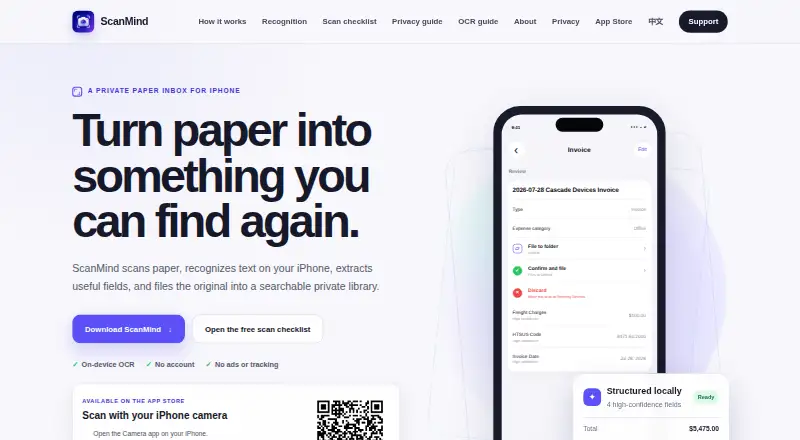
ScanMind is an iPhone document scanner and organizer with on-device OCR. It captures multiple pages, selected photos, imported PDFs, or documents shared from another app, then recognizes English and Simplified Chinese text and extracts fields. Supported patterns include receipts, invoices, business cards, shipping records, food and nutrition labels, product specifications, regulated labels, and commercial records. Originals, recognized text, and extracted fields are stored in the app’s private container by default, while core scanning and recognition do not upload document content. Confirmed documents can be located by title, text, type, amount, project, tag, or smart view; full-text search and structured filters require Pro. The app supports multipage PDFs and watermark-free PDF export. Its free plan includes five automatic organization runs per calendar month. Pro features add unlimited organization, advanced search and filters, smart views, reports, projects, tags, batch import, and optional iCloud Drive sync. ScanMind is freemium on iOS, with a free plan and a listed paid option of $12.99, paid once.
Who it suits
It suits iPhone users who want local document scanning, OCR, field extraction, and searchable organization. It is also relevant to people handling receipts, invoices, labels, or other supported records.
What it does well
- On-device OCR for English and Simplified Chinese
- Handles multipage scans and PDF imports
- Private storage by default
- Exports originals, OCR text, and metadata
- Deleted documents restorable for 30 days
What to know first
- No Android app
- Free plan limits organization runs monthly
- Full-text search requires Pro
- Recognition can change or miss values
Plans
| Plan | Billed and limits | Price |
|---|---|---|
| Free | Free download · Core capture and OCR · original access · title search · watermark-free PDF export · five automatic organization runs per calendar month | Free |
| Pro Lifetime | One-time in-app purchase · Unlimited automatic organization · Full-text search and filters · Smart views · Reports · Projects and tags · Batch import | $12.99, paid once |
| ScanMind Pro Lifetime | One-time in-app purchase · Unlimited automatic organization · full-text search and filters · smart views · reports · projects · tags · batch import · optional iCloud Drive sync | $12.99, paid once |
As scanmind.mossuu.com lists them, read 9 Oct 2026. The maker's own page has the final word.
Verdict
ScanMind combines iPhone scanning, OCR, structured extraction, and private organization. The free tier covers core capture and OCR, while Pro removes the organization limit and adds advanced search and management tools.
Facts from ScanMind's own pages
- Android app
- No · scanmind.mossuu.com, 22 Sept 2026
- Availability
- ScanMind 1.0 has been publicly available on the App Store since August 3, 2026. · scanmind.mossuu.com, 9 Oct 2026
- Capture and import
- Users can scan multiple pages, choose photos, import PDFs, or send documents to ScanMind from another app. · scanmind.mossuu.com, 9 Oct 2026
- Data practices
- The app does not create user accounts, use advertising SDKs, track users across apps, or sell personal data. · scanmind.mossuu.com, 9 Oct 2026
- Exports and recovery
- Users can export all data as a ZIP containing originals, OCR text, fields, metadata, and SHA-256 checksums; deleted documents can be restored for 30 days unless permanently deleted sooner. · scanmind.mossuu.com, 9 Oct 2026
- Free plan
- Yes · scanmind.mossuu.com, 22 Sept 2026
- Intended users
- The maker describes ScanMind as an independently developed local-first iPhone document scanner and organizer. · scanmind.mossuu.com, 9 Oct 2026
- iOS app
- Yes · scanmind.mossuu.com, 22 Sept 2026
- Multipage PDF
- Yes · scanmind.mossuu.com, 22 Sept 2026
- OCR included
- Yes · scanmind.mossuu.com, 22 Sept 2026
- OCR languages
- On-device OCR reads English and Simplified Chinese. · scanmind.mossuu.com, 9 Oct 2026
- Optional sync
- Optional iCloud Drive sync is off by default and stores a copy in the user’s own iCloud Drive when enabled. · scanmind.mossuu.com, 9 Oct 2026
- Organization and search
- Confirmed documents can be found by title, recognized text, type, amount, project, tag, or smart view; full-text search and structured filters are Pro features. · scanmind.mossuu.com, 9 Oct 2026
- Privacy
- Scans, imported files, recognized text, and extracted fields are stored in the app’s private container by default, and core scanning and recognition do not upload document content. · scanmind.mossuu.com, 9 Oct 2026
- Purpose
- ScanMind scans paper, recognizes text on the iPhone, extracts useful fields, and files originals in a searchable private library. · scanmind.mossuu.com, 9 Oct 2026
- Recognition
- Supported document patterns include receipts, invoices, business cards, shipping records, food and nutrition labels, product specifications, regulated labels, and commercial records. · scanmind.mossuu.com, 9 Oct 2026
- Recognition limitations
- Recognition may miss or change values due to image quality or layout, so the maker advises checking important suggestions against the saved original. · scanmind.mossuu.com, 9 Oct 2026
- Support
- Technical support is available by email in English or Simplified Chinese. · scanmind.mossuu.com, 9 Oct 2026
Where ScanMind stands on Freedom251
- Mobile Scanning Apps#38 of 76
- Scanner apps#40 of 76