Freedom251 › Ai Dictation Apps
SabreVoice
by SabreVoice
What SabreVoice is
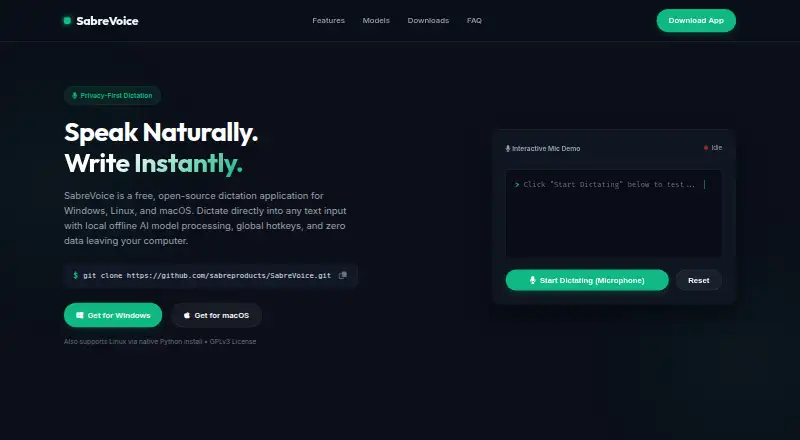
SabreVoice is a free, open-source dictation app that types speech into text inputs. Local speech-to-text models process audio on the device, so offline dictation is available. Silence and pause detection divides continuous speech into chunks for transcription and typing. AI prompt formatting can reshape text as an email, correct spelling and grammar, or summarize it as bullet points using local or cloud language models. The app includes a draggable Tkinter HUD overlay with active-application detection, equalizer bars, and layout controls. Listed speech engines include Moonshine Tiny, Moonshine Streaming Medium, Nemotron Speech 3.5, and OpenAI or Groq Whisper. Moonshine models are English-only; the page lists Nemotron Speech 3.5 for 40+ languages and cloud Whisper for 99+ languages. Whisper requires an internet connection and an API key. SabreVoice supports Windows, macOS, and Linux, with distinct system requirements and text-entry methods for each. It is licensed under GPLv3, which allows users to use, inspect, and modify its code.
Who it suits
SabreVoice suits people who want speech-to-text entry across Windows, macOS, or Linux, including offline dictation with local models. It may also suit users who want to reformat dictated text with local or cloud language models.
What it does well
- Local models support offline dictation
- Pause detection transcribes speech in chunks
- Text formatting can rewrite, correct, or summarize
- Free and open source under GPLv3
What to know first
- Moonshine models support English only
- Cloud Whisper requires internet access and an API key
- macOS client requires macOS 15.0 or later and Apple Silicon
- Linux setup is Python-based for Ubuntu, Debian, and Mint
Limits
The app is free under the listed Free plan. Platform requirements apply: the macOS client requires macOS 15.0 or later and Apple Silicon, and Windows is for 64-bit Windows 10/11; Moonshine models are English-only.
Plans
| Plan | Billed and limits | Price |
|---|---|---|
| Free | 100% free · open source · GPLv3 | Free |
As sabreproducts.com lists them, read 9 Oct 2026. The maker's own page has the final word.
Getting started
- Open the SabreVoice website.
- Choose the client or setup route for Linux, macOS, or Windows.
- Check that your device meets the platform requirements.
- Select a listed speech engine; cloud Whisper requires internet access and an API key.
- Use dictation in an active text input.
Verdict
SabreVoice combines offline dictation with optional prompt-based text formatting across three operating systems. Check the specific platform requirements and language limits before choosing a speech engine.
Questions
How much does SabreVoice cost?
The Free plan costs nothing. The app is described as 100% free and open source under GPLv3.
Can SabreVoice dictate offline?
Yes. Local speech-to-text models process audio on-device without an internet connection.
Which platforms does it support?
SabreVoice supports Linux, macOS, and Windows. The macOS client requires macOS 15.0 or later and Apple Silicon, while the Windows app is for 64-bit Windows 10/11.
Is SabreVoice open source?
Yes. It is licensed under GPLv3, which allows users to use, inspect, and modify its code.
Which languages are supported?
Moonshine models are English-only. Nemotron Speech 3.5 is listed for 40+ languages, and cloud Whisper for 99+ languages.
Does Whisper work offline?
No. OpenAI or Groq Whisper requires an active internet connection and an API key.
Facts from SabreVoice's own pages
- Cloud requirement
- OpenAI or Groq Whisper requires an active internet connection and an API key. · sabreproducts.com, 9 Oct 2026
- Company
- Sabre Products says it is a family-owned and run business registered in 2006. · sabreproducts.com, 9 Oct 2026
- Continuous dictation
- Silence and pause detection transcribes and types speech in chunks. · sabreproducts.com, 9 Oct 2026
- Founded
- 2006 · sabreproducts.com, 28 Sept 2026
- Free plan
- Yes · sabreproducts.com, 20 Sept 2026
- Headquarters
- Pinetown, KwaZulu-Natal, South Africa · sabreproducts.com, 28 Sept 2026
- HUD overlay
- The app includes a draggable Tkinter HUD overlay with active target application detection, equalizer bars, and layout controls. · sabreproducts.com, 9 Oct 2026
- Language limits
- Moonshine models are English-only; the page lists Nemotron Speech 3.5 for 40+ languages and cloud Whisper for 99+ languages. · sabreproducts.com, 9 Oct 2026
- License
- The app is licensed under GPLv3, allowing users to use, inspect, and modify its code. · sabreproducts.com, 9 Oct 2026
- Linux support
- Linux setup is Python-based for Ubuntu, Debian, and Mint; the page says it was tested on Ubuntu 22.04 and 24.04. · sabreproducts.com, 9 Oct 2026
- macOS support
- The native SwiftUI macOS client supports macOS 15.0 or later and Apple Silicon. · sabreproducts.com, 9 Oct 2026
- Offline dictation
- Yes · sabreproducts.com, 20 Sept 2026
- Offline processing
- Local speech-to-text models process audio on-device without an internet connection. · sabreproducts.com, 9 Oct 2026
- Privacy model
- hybrid · sabreproducts.com, 20 Sept 2026
- Purpose
- SabreVoice is a free, open-source dictation app that types speech into text inputs. · sabreproducts.com, 9 Oct 2026
- Speech engines
- Listed engines include Moonshine Tiny, Moonshine Streaming Medium, Nemotron Speech 3.5, and OpenAI or Groq Whisper. · sabreproducts.com, 9 Oct 2026
- Supported platforms
- Windows,macOS,Linux · sabreproducts.com, 20 Sept 2026
- Text entry method
- On macOS it uses accessibility controls; on Windows and Linux it uses the clipboard and simulated paste keystrokes to enter text in the active window. · sabreproducts.com, 9 Oct 2026
- Text formatting
- AI prompt formatting can rewrite text as emails, correct spelling and grammar, or summarize it into bullet points using local or cloud LLMs. · sabreproducts.com, 9 Oct 2026
- Windows support
- The Windows app is a standalone background tray app for 64-bit Windows 10/11. · sabreproducts.com, 9 Oct 2026
Where SabreVoice stands on Freedom251
- Ai Dictation Apps#7 of 23
- Dictation software#19 of 27