Freedom251 › ROM Patching Software

rom-weaver
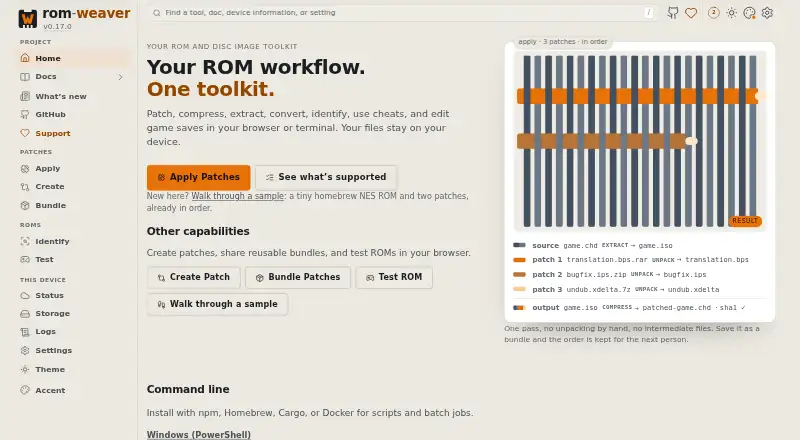
What rom-weaver is
rom-weaver is a free, open-source tool for patching, converting, and bundling ROMs and disc images. Its browser and command-line versions share an engine. It can apply patches, create them from ROMs, and assemble ordered patch workflows into reusable bundles; supported formats include IPS, IPS32, BPS, UPS, xdelta, PPF, and others, with some format-specific limits. It can probe and extract many archive and compressed image formats, including ZIP, 7z, RAR, CHD, RVZ, and Z3DS, though creation support varies. Supported cheat codes can be added to ROMs, or selected database cheats saved as patch files; runtime-memory cheats are unsupported. Save editing covers specified Pokémon save layouts and The Legend of Zelda: A Link to the Past SRAM, subject to game recognition limits. The browser uses on-device WebAssembly processing, and the CLI reads and writes local paths. The maker says files and results are not uploaded. The browser app can work offline after caching. It is available for Linux, macOS, Windows, web, and self-hosting, with no account required.
Who it suits
rom-weaver suits people working with ROMs or disc images who need patching, conversion, or reusable patch workflows. It is available through a browser or CLI, including self-hosted deployment.
What it does well
- Browser and CLI share the same engine.
- Supports batch patching and checksum verification.
- Keeps an original backup.
- No account is required.
- Browser can work offline after caching.
What to know first
- Some patch formats have specific limits.
- Archive creation support varies by format.
- Runtime-memory cheats are unsupported.
- Save editing has game recognition limits.
Limits
The free plan costs nothing and requires no account. Support varies by patch and conversion format; runtime-memory cheats are unsupported, and save editing covers only specified layouts with game recognition limits.
Plans
| Plan | Billed and limits | Price |
|---|---|---|
| Free and open-source | No account required · browser and command-line versions | Free |
As rom-weaver.com lists them, read 29 Sept 2026. The maker's own page has the final word.
Getting started
- Open https://rom-weaver.com/ in a browser.
- Use the browser app after it has cached if you need offline access.
- Download a CLI release binary for macOS, Linux, or Windows.
- Self-host the static web app from a Docker image or static files, and use HTTPS outside localhost.
Overview
rom-weaver is a free toolkit for patching, converting and bundling ROMs and disc images, available in a browser and as a command-line tool. It suits people who need repeatable file workflows or want to keep processing on their own device. Its range is impressive, though format and game-specific limits mean it is not a guarantee of compatibility with every file.
Key features
Patching and reusable workflows
rom-weaver can apply patches, create them from ROMs and package ordered patch sequences into reusable bundles. Support spans formats such as IPS, IPS32, BPS, UPS, xdelta and PPF, alongside many others. Batch patching, checksum verification and original-file backups make it a stronger fit for repeated or multi-file jobs: bundles preserve the sequence, while verification and backups help protect against mistakes. Check that the specific format and operation you need are supported before building a workflow around it.
Conversion, cheats and saves
It can probe and extract many archive and compressed image formats, including ZIP, 7z, RAR, CHD, RVZ and Z3DS. Creation support varies, so it is more dependable as a broad inspection and extraction tool than as a promise of two-way conversion for every format.
Supported cheat codes can be baked into ROMs, and selected database cheats can be saved as patch files. Runtime-memory cheats are unsupported, so rom-weaver is not a live cheat system. Its Save Editor supports specified Pokémon save layouts and The Legend of Zelda: A Link to the Past SRAM; recognition limits by game narrow its usefulness for anyone working with other saves or unrecognized layouts.
Local processing and integration
The browser version processes files on-device with WebAssembly, while the CLI reads and writes local paths. The maker says ROMs, patches and results are not uploaded to its server. The webapp also has no analytics, advertising or tracking scripts, sets no advertising or tracking cookies, and stores app data in browser storage. It can work offline after caching the app, a useful option when connectivity is unreliable.
For hosted workflows, an app can be preloaded with bundle, ROM and patch URLs or ingest files from same-origin OPFS storage. Remote sources must permit the app origin through CORS, which makes integration dependent on how those files are served. The static webapp can be self-hosted from Docker or static files; HTTPS is required except on localhost.
Pricing
Free and open-source: free. No account is required, and the plan includes browser and command-line versions. There is no free trial because the software is free. GNU AGPL v3.0 or later licensing and the absence of an account make it accessible across individual and self-hosted use, though users should account for the license when distributing modified versions.
Platforms
rom-weaver supports Linux, macOS, Windows, web use and self-hosting. The CLI has release binaries for macOS, Linux and Windows, with architecture variants; the browser app can be hosted as a static site and needs HTTPS outside localhost. Its cross-platform reach is useful if a workflow spans machines, though the available CLI binary depends on the user's architecture.
Who it's for
Choose rom-weaver if you want one no-cost toolkit for patch creation and application, repeatable bundles, batch work and local file handling across browser and CLI workflows. It is also a sensible option for privacy-conscious users who prefer on-device browser processing or self-hosting. Look elsewhere if you need runtime-memory cheats, broad save recognition, or a conversion workflow whose output format has not been confirmed as supported.
Pros and cons
- Pros: Browser and CLI share an engine, so workflows can span local command-line use and browser processing.
- Pros: Batch patching, checksum verification, backups and reusable bundles support safer, repeatable jobs.
- Pros: On-device browser processing, offline use after caching and self-hosting give users several ways to keep files local.
- Cons: Format support has operation-specific limits, and creation support for archives and compressed images varies.
- Cons: Runtime-memory cheats are unsupported, and save editing is limited to specified layouts with game recognition constraints.
Alternatives
ROM Patching Software is the broader category directory for comparing patching options.
EZ ROM Patcher is another free browser-based option, and may suit someone who wants a browser tool without an account or installation; rom-weaver is the stronger fit when CLI, bundles or its wider file workflows matter.
IUBPatchLib is a free MIT-licensed choice for Linux, macOS and Windows; choose it if those desktop platforms and its license are the relevant criteria.
Floating IPS (Flips) is a free option focused on IPS and BPS patching for Linux, macOS and Windows. It suits a narrower patch-format need; its community-provided Flathub package is not verified, affiliated with or supported by Alcaro.
Patcher64+ Tool targets N64, NES and SNES and requires 64-bit Windows 7 or newer with PowerShell 5.1+. Pick it when that console focus and Windows requirement match your setup.
Gaming Optimizer is a free Windows option with a public MIT-licensed repository; consider it if those platform and license details fit your needs.
MultiPatch is free for macOS 10.9 or newer, making it an alternative for users on that platform.
ROM Bin Patcher (rombp) is a free Linux and self-hosted option, suitable for readers who want those deployment choices.
Rompatcher is a free option for Linux and Windows if those platforms fit your requirements.
Verdict
rom-weaver is an easy recommendation for people who want a free, local-first toolkit with both browser and CLI workflows, broad patch support and reusable batch processes. Its main advantage is combining those jobs without requiring an account; its main reason to look elsewhere is that format operations, cheat support and save recognition have meaningful boundaries. Confirm your target formats and game layout first, then choose rom-weaver if they fit.
Verdict
rom-weaver offers a broad set of patching and file-handling workflows with local browser and CLI processing. Check format-specific limits and save-game recognition before relying on a particular workflow.
Questions
How much does rom-weaver cost?
The Free and open-source plan is free.
Is there a free plan or trial?
There is a free plan and no free trial.
Which platforms does it support?
It lists Linux, macOS, self-hosted, web, and Windows. CLI release binaries are available for macOS, Linux, and Windows.
Is rom-weaver open source?
Yes. It is licensed under GNU AGPL v3.0 or later.
Does it process files locally?
The browser app processes files on the device with WebAssembly, while the CLI reads and writes local paths. The maker says ROMs, patches, and results are not uploaded to its server.
Who makes rom-weaver?
The project is written by Brandon Casey and contributors.
Facts from rom-weaver's own pages
- Cheats
- Users can bake supported ROM cheat codes into ROMs or save selected database cheats as patch files; runtime-memory cheats are marked unsupported. · rom-weaver.com, 29 Sept 2026
- CLI platforms
- The CLI provides release binaries for macOS, Linux, and Windows, with architecture variants listed on its install page. · rom-weaver.com, 29 Sept 2026
- File conversion
- It supports probing and extracting many archive and compressed image formats, including ZIP, 7z, RAR, CHD, RVZ, and Z3DS; creation support varies by format. · rom-weaver.com, 29 Sept 2026
- Integration
- Hosts can preload browser workflows with bundle, ROM, and patch URLs or ingest files from same-origin OPFS storage; remote sources must allow the app origin through CORS. · rom-weaver.com, 29 Sept 2026
- License and maker
- The project is written by Brandon Casey and contributors and is licensed under GNU AGPL v3.0 or later. · rom-weaver.com, 29 Sept 2026
- Local processing
- The browser processes files with WebAssembly on the device, and the CLI reads and writes local paths; the maker says ROMs, patches, and results are not uploaded to its server. · rom-weaver.com, 29 Sept 2026
- Offline use
- The maker says the browser app works offline after it has cached the app. · rom-weaver.com, 29 Sept 2026
- Patch workflows
- It can apply patches, create patches from ROMs, and package ordered patch workflows as reusable bundles. · rom-weaver.com, 29 Sept 2026
- Privacy details
- The webapp says it has no analytics, advertising, or tracking scripts and sets no advertising or tracking cookies; it stores app data in browser storage. · rom-weaver.com, 29 Sept 2026
- Purpose
- rom-weaver patches, converts, and bundles ROMs and disc images using the same engine in its browser and command-line versions. · rom-weaver.com, 29 Sept 2026
- Save editing
- The Save Editor supports specified Pokémon save layouts and The Legend of Zelda: A Link to the Past SRAM, with recognition limits listed by game. · rom-weaver.com, 29 Sept 2026
- Self-hosting
- The webapp is a static app that can be self-hosted from a Docker image or static files, and requires HTTPS outside localhost. · rom-weaver.com, 29 Sept 2026
- Support
- The maker directs bugs, format requests, and questions to the GitHub issue tracker and says security reports have a separate process. · rom-weaver.com, 29 Sept 2026
- Supported patch formats
- The support matrix lists formats including IPS, IPS32, BPS, UPS, xdelta, PPF, and others for applying or creating patches, with some format-specific limits. · rom-weaver.com, 29 Sept 2026
Where rom-weaver stands on Freedom251
- ROM Patching Software#10 of 20