Freedom251 › ROM Patching Software
MultiPatch
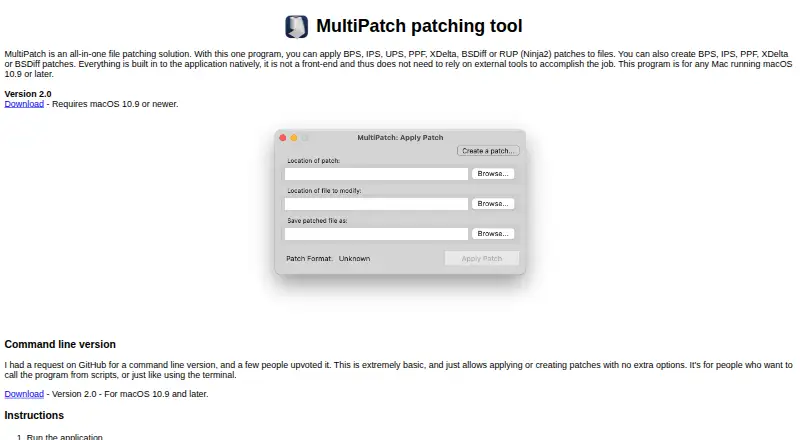
What MultiPatch is
MultiPatch is a free macOS application for applying and creating file patches. It can apply BPS, IPS, UPS, PPF, XDelta, BSDiff and RUP (Ninja2) patches, and create BPS, IPS, PPF, XDelta and BSDiff patches. To apply one, select a patch file or drag it onto the application window, then choose the file to patch and where to save the result. MultiPatch identifies formats from the patch file extension, so the extension must be correct. BPS creation offers Linear and Delta modes: Delta patches are usually smaller, but take longer and require more memory. The application cannot create UPS or Ninja2 patches. The maker says patching is built into the application and does not rely on external tools. Version 2.0 requires macOS 10.9 or later; older releases are listed for Mac OS X 10.4 through 10.8. A separate basic command-line version can apply or create patches for scripts or terminal use. Version history notes native Apple Silicon support from version 1.7.1. The application is GPL-licensed, while bundled patching libraries have their own licenses.
Who it suits
MultiPatch suits macOS users who need to apply or create supported patch formats through an app. Its separate command-line version is intended for people using scripts or a terminal.
What it does well
- Applies seven listed patch formats
- Creates five listed patch formats
- Patching is built into the application
- Separate command-line version is available
- Older releases cover Mac OS X 10.4 through 10.8
What to know first
- Version 2.0 requires macOS 10.9 or later
- Cannot create UPS or Ninja2 patches
- Patch format detection depends on the file extension
- Delta creation takes longer and requires more memory
Limits
The free application can create BPS, IPS, PPF, XDelta, and BSDiff patches, but not UPS or Ninja2 patches. BPS Delta mode usually creates smaller patches, but takes longer and requires more memory.
Plans
| Plan | Billed and limits | Price |
|---|---|---|
| MultiPatch | macOS 10.9 or newer | Free |
As projects.sappharad.com lists them, read 5 Oct 2026. The maker's own page has the final word.
Getting started
- Open the MultiPatch project website.
- Download the version for your macOS release.
- Select a patch file or drag it onto the application window.
- Choose the file to patch and where to save the result.
- For patch creation, choose a supported output format; for BPS, select Linear or Delta mode.
MultiPatch is a free macOS patching utility for users who need one application to apply or build files in several established patch formats. It suits ROM-hacking and software-preservation workflows that move between graphical and scripted work, while users who need every readable format to be creatable will encounter a clear boundary.
Overview
MultiPatch performs patch processing within the application instead of calling separate tools. In the graphical workflow, select a patch file or drag it onto the window, choose the file to modify, and select an output location. Format recognition is automatic from the patch filename extension, so an incorrectly named patch can prevent the expected format from being identified even when the underlying format is supported.
The project is released under the GPL, while its bundled patching libraries carry their own licenses. Version 2.0 adds an update checker that you can turn on or off in Preferences. Bug reports are directed to the project's GitHub Issues tab.
Key features
Broad application support
The app applies BPS, IPS, UPS, PPF, XDelta, BSDiff, and RUP (Ninja2) patches. That range is its strongest practical advantage: a Mac user handling files from different patching communities can use one native tool rather than collecting format-specific utilities. Check extensions before starting, because automatic detection depends on the suffix being correct.
Creation with a narrower format set
MultiPatch creates BPS, IPS, PPF, XDelta, and BSDiff patches. It cannot create UPS or Ninja2 patches, despite being able to apply them. Choose it when applying varied incoming patches is the priority; choose another utility when your authoring workflow specifically requires UPS or Ninja2 output.
BPS modes
BPS creation offers Linear and Delta modes. Delta output is usually smaller, but takes longer and uses more memory. It is appropriate for distributing compact patches when processing time and memory are available; Linear is the more sensible choice on constrained hardware or when faster creation matters more than file size.
Command-line option
A separate basic command-line version can apply or create patches. It gives script authors and terminal users a way to incorporate patching into repeatable jobs without using the graphical interface. Its basic positioning makes the desktop application the better fit for occasional interactive work.
Pricing
| Plan | Price | Includes |
|---|---|---|
| MultiPatch | free | Free macOS plan for macOS 10.9 or newer, with graphical patching and a basic command-line version |
There is no paid tier, seat charge, trial period, renewal, or usage quota attached to the free plan. The trade-off is platform scope rather than price: this is a Mac-only option, and creation support excludes UPS and Ninja2.
Platforms
Version 2.0 requires macOS 10.9 or later. Native Apple Silicon support arrived in version 1.7.1, making current Mac hardware a supported target. Older releases cover Mac OS X 10.4 through 10.8, with format support varying by version; users on those systems should match an older release to the formats they need rather than assume current capabilities.
Who it's for
MultiPatch is a strong fit for Mac users applying patches in BPS, IPS, UPS, PPF, XDelta, BSDiff, or Ninja2 form and wanting the processing built into a single application. It also suits developers and hobbyists who need a simple terminal or scripting entry point. It is less suitable for Windows or Linux users, for anyone requiring UPS or Ninja2 creation, or for workflows where patch files commonly arrive with unreliable extensions.
Pros and cons
Pros
- Applies seven patch families, including RUP (Ninja2), so one tool covers a wide range of existing files.
- Creates five formats and offers BPS Linear and Delta modes, balancing speed, memory use, and output size.
- Built-in processing avoids dependence on external patch executables.
- Graphical and basic command-line versions support both one-off jobs and scripts.
- Free licensing for the application removes purchase and renewal costs.
Cons
- UPS and Ninja2 patches can be applied but not created, limiting format coverage for authors.
- Automatic format selection relies on a correct patch extension.
- Current support starts at macOS 10.9; older systems require version-specific releases with differing format support.
- Delta BPS creation trades smaller files for longer processing and higher memory use.
Alternatives
For a browser-based option that runs across Android, iOS, Linux, macOS, Windows, and the web, consider EZ ROM Patcher; it is also free and requires no stated account or installation. If you want MIT-licensed software for Linux, macOS, and Windows, IUBPatchLib is the alternative. rom-weaver suits users seeking free open-source browser and command-line versions without an account. For a narrower IPS/BPS tool on Linux, macOS, or Windows, choose Floating IPS (Flips).
Patcher64+ Tool is the better match for N64, NES, and SNES work on 64-bit Windows 7 or newer with PowerShell 5.1+. Gaming Optimizer is a free Windows project with a public MIT-licensed repository. Linux and self-hosted users can consider ROM Bin Patcher (rombp), while Rompatcher is a free Linux/Windows alternative without stated usage limits. Browse the broader ROM Patching Software list when you want to compare more tools.
Verdict
Choose MultiPatch if you use a Mac and want free, built-in handling for many patch formats, with a basic command-line path for scripts. Its main reason to leave is equally clear: creators needing UPS or Ninja2 output, or users outside macOS, need a different tool.
Verdict
MultiPatch handles several patch formats without relying on external tools, with both graphical and basic command-line options. Check the supported creation formats and macOS requirement before choosing a version.
Questions
How much does MultiPatch cost?
The MultiPatch plan costs nothing.
Which macOS versions are supported?
Version 2.0 requires macOS 10.9 or later. Older releases are provided for Mac OS X 10.4 through 10.8, with format support varying by version.
Which patch formats can it apply?
It applies BPS, IPS, UPS, PPF, XDelta, BSDiff, and RUP (Ninja2) patches.
Which patch formats can it create?
It creates BPS, IPS, PPF, XDelta, and BSDiff patches. UPS and Ninja2 patch creation is not supported.
Is MultiPatch open source?
The application is released under the GPL. The bundled patching libraries have their own licenses.
Is there a command-line version?
Yes. A separate basic command-line version can apply or create patches and is intended for scripts or terminal use.
Facts from MultiPatch's own pages
- Apple Silicon
- The version history says native Apple Silicon support was added in version 1.7.1. · projects.sappharad.com, 4 Oct 2026
- Apply formats
- It can apply BPS, IPS, UPS, PPF, XDelta, BSDiff, and RUP (Ninja2) patches. · projects.sappharad.com, 5 Oct 2026
- Apply patches
- It applies BPS, IPS, UPS, PPF, XDelta, BSDiff, and RUP (Ninja2) patches to files. · projects.sappharad.com, 4 Oct 2026
- BPS creation
- BPS creation offers Linear and Delta modes; Delta patches are usually smaller but take longer and require more memory. · projects.sappharad.com, 4 Oct 2026
- BPS options
- BPS patch creation supports Linear and Delta modes; Delta patches are usually smaller but take longer and require more memory. · projects.sappharad.com, 5 Oct 2026
- Built-in processing
- The maker says the patching functionality is built into the application and does not rely on external tools. · projects.sappharad.com, 5 Oct 2026
- Command line
- A separate basic command-line version can apply or create patches without extra options and is intended for scripts or terminal use. · projects.sappharad.com, 5 Oct 2026
- Compatibility
- The current version requires macOS 10.9 or later, and older releases are listed for Mac OS X 10.4 through 10.8. · projects.sappharad.com, 5 Oct 2026
- Create formats
- It can create BPS, IPS, PPF, XDelta, and BSDiff patches. · projects.sappharad.com, 5 Oct 2026
- Create patches
- It creates BPS, IPS, PPF, XDelta, and BSDiff patches. · projects.sappharad.com, 4 Oct 2026
- Creation limits
- Patch creation for UPS and Ninja2 formats is not supported. · projects.sappharad.com, 5 Oct 2026
- Format detection
- Supported patch formats are detected automatically from the patch file extension. · projects.sappharad.com, 5 Oct 2026
- Input handling
- Users can select a patch file or drag it onto the application window, then choose the file to patch and where to save the result. · projects.sappharad.com, 5 Oct 2026
- Intended users
- The maker describes the command-line version as useful for people who want to call patching from scripts or use the terminal. · projects.sappharad.com, 5 Oct 2026
- License
- The application itself is released under the GPL, while included patching libraries have their own licenses. · projects.sappharad.com, 5 Oct 2026
- Native operation
- The maker says patching is built into the application, which does not rely on external tools. · projects.sappharad.com, 4 Oct 2026
- Older systems
- The maker provides older versions for Mac OS X 10.4 through 10.8, with different version-specific format support. · projects.sappharad.com, 4 Oct 2026
- Patch selection
- Supported formats are detected from the patch file extension, which must be correct. · projects.sappharad.com, 4 Oct 2026
- Purpose
- MultiPatch applies and creates file patches in one native application. · projects.sappharad.com, 5 Oct 2026
- Support
- The maker directs users to report bugs through the project's GitHub Issues tab. · projects.sappharad.com, 5 Oct 2026
- Supported macOS
- Version 2.0 requires macOS 10.9 or later. · projects.sappharad.com, 4 Oct 2026
- Update feature
- Version 2.0 added a feature to check for updates, which can be enabled or disabled in Preferences. · projects.sappharad.com, 5 Oct 2026
- Updates
- Version 2.0 added a feature to check for updates, which can be enabled or disabled in Preferences. · projects.sappharad.com, 4 Oct 2026
Where MultiPatch stands on Freedom251
- ROM Patching Software#11 of 20